We have all the plugins, but we can upload anything. There is no other button which you can do with it.
Can someone explain me how I can get it working in the forum?
Thank you for help
Peter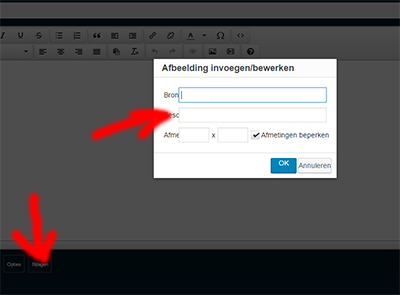


We have all the plugins, but we can upload anything. There is no other button which you can do with it.
Can someone explain me how I can get it working in the forum?
Thank you for help
Peter


that is not an upload action you have going there… its the tinymce/wp way of inserting a link to an image on the web…
to upload images, media or files, you need to be using our file uploader plugin for simple press… Are you using that?? If so, when creating a post, you will see an attachments button that will allow you to upload a file (such as image)…
Thanks for the quick reply. I think the plugin. See image attached. Start upload does not work.
Hope you can help me further.
Sincerely,
Peter
Van: Simple:Press Support [mailto:support@simple-press.com]
Verzonden: zaterdag 13 augustus 2016 19:05
Aan: info@petermarcus.nl
Onderwerp: New Forum Post – Simple:Press: [Image uploading problem]


lets start with some basic info…
which version of wp and sp?
what device are you using? is it desktop or mobile? if latter device and browser would be helpful…
do you have link to your site? might be simple js error from other components…
any caching plugin disabled on forum pages?
Hello,
is it still succeeded with the login information in a previously sent mail?
Otherwise, please look for me in the WordPress for info?
I really hope for a solution
Thanks,
Peter
Van: Simple:Press Support [mailto:support@simple-press
.com] Verzonden: zaterdag 13 augustus 2016 21:58 Aan: info@petermarcus.nl Onderwerp: New Forum Post – Simple:Press: [Image uploading problem]
Sorry, what email? What address did you send it to?
Any chance to answer some of the questions?
If we need credentials to view your site please send PM to both yellowswordfish and Mr Papa and link to this message. If you sent previously, we don’t keep those around.

Sorry, URL is
www.exclusiveracingseries.nl
Thanks,
Peter
Van: Simple:Press Support [mailto:support@simple-press.com] Verzonden: maandag 15 augustus 2016 21:41 Aan: info@petermarcus.nl Onderwerp: New Forum Post – Simple:Press: [Image uploading problem]
There are two potential problems so let us deal with them one at a time.
The first is that there is a script error being triggered. It is possible – although by no means certain – that this is being triggered by the ‘modernizr’ script that is supplied and run by your WP theme. Often an actual script error will stop other jQuery operations from happening so this is a possibility. If the error is not coming from the modernizr plugin then I am afraid I do not know what is causing it. As always, script errors should be eradicated for the sake and health of the website,.
The second possibility is the loading and use of the ‘Bootstrap’ script library. This is an unsupported script and can cause problems for the jQuery UI which IS the WordPress supported library. To make matters worse, your website is loading two copies that may well be fighting with one another. One is being loaded by your WordPress theme and the other by a plugin called ‘wp-custom-register-login’.
Sometimes it is possible to work around the conflict by ensuring that the SP scripts are loaded in the footer (option on the page and permalink admin panel) but this is rare. SP does try and combat the conflict with Bootstrap but with two copies being loaded AND the original script error as well – that may just be too much.
Thank you for the assistance (pm). The problem is the theme in WordPress. On a normal wordpress theme it works fine.
Hope that the creator of theme can solve this.
Thanks and this topic can be closed
the key to this is making sure that the Bootstrap script is loaded BEFORE the jQuery UI script.
The theme maker says it is an issue of Simple Press. Now we are left with a problem. I am a noob and do not know how to do it with that Bootstrap script is loaded BEFORE the jQuery UI script.
Possibly I will have to switch to phpbb what I hate,
Pay for something we can not work with $ 80 gold is also a waste of money.
Can anyone help us out here?
I hope for a solution.
Peter Marcus said
The theme maker says it is an issue of Simple Press. Now we are left with a problem. I am a noob and do not know how to do it with that Bootstrap script is loaded BEFORE the jQuery UI script.
This really is a matter of just passing the buck. As I said before, the WordPress supported AND supplied equivalent library is the jQuery UI. Bootstrap is NOT supported and NOT supplied by WordPress. We make sure that Simple:Press only uses supported libraries for these standard operations. Bootstrap negatively effects the jQuery UI. Your theme is responsible for this. How can this be a Simple:Press issue?
Possibly I will have to switch to phpbb what I hate,
This has to be your call of course but personally getting things fixed is better all around – and particularly better for the health of your website. Simple:Press us not the only plugin to use the jQuery UI.
Pay for something we can not work with $ 80 gold is also a waste of money.
Simply to keep the record straight, you paid nothing for Simple:Press – it is free to try and to use. You paid an optional amount for support and some free plugins etc. We have been giving you that support. And it is not over yet of course.
Can anyone help us out here?
I hope for a solution.
Probably yes – although to be fair we work in Simple:Press support not WordPress theme corrections. But we can try. So – first question if we have not already got the answer. Are ALL of your Simple:Press items – core plugin, additional plugins and theme – fully up to date with the latest versions? Visit the WordPress ‘Updates’ page to check this please.
And next – did you try the option to load our scripts in the footer as suggested earlier?
Logging on to your site is not really that useful. What is needed is a copy of your WP theme.
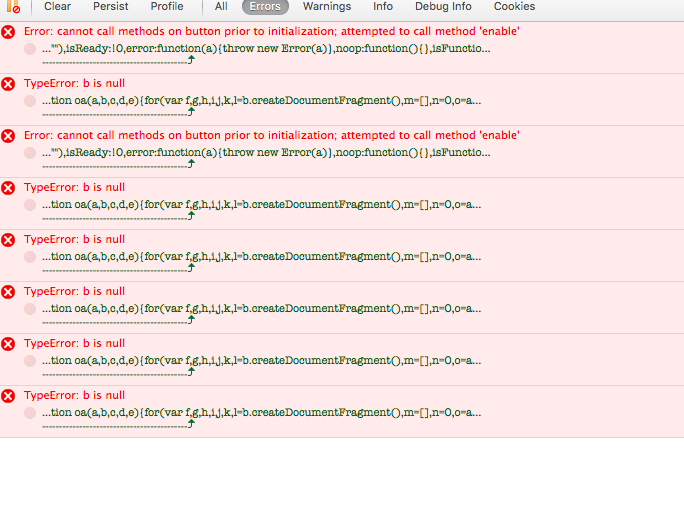
But – your page is throwing a heap of errors and there is little point in trying to change the js load order without addressing all the errors. NONE of these are caused by Simple:Press although I have no idea where they do stem from. See attached image. These are all fatal to running script.
if this were me I would swap my WP theme for a standard WP one just to see if all thee errors go away. Then out ot back. But if there errors go away you know exactly where the problem lies. If they don’t then it is going to be a plugin.

I am unfortunately a noob in this regard, and hope you can do something with the attached.
Simple:Press Support schreef op 2016-08-17 15:47: >