
Support Forum

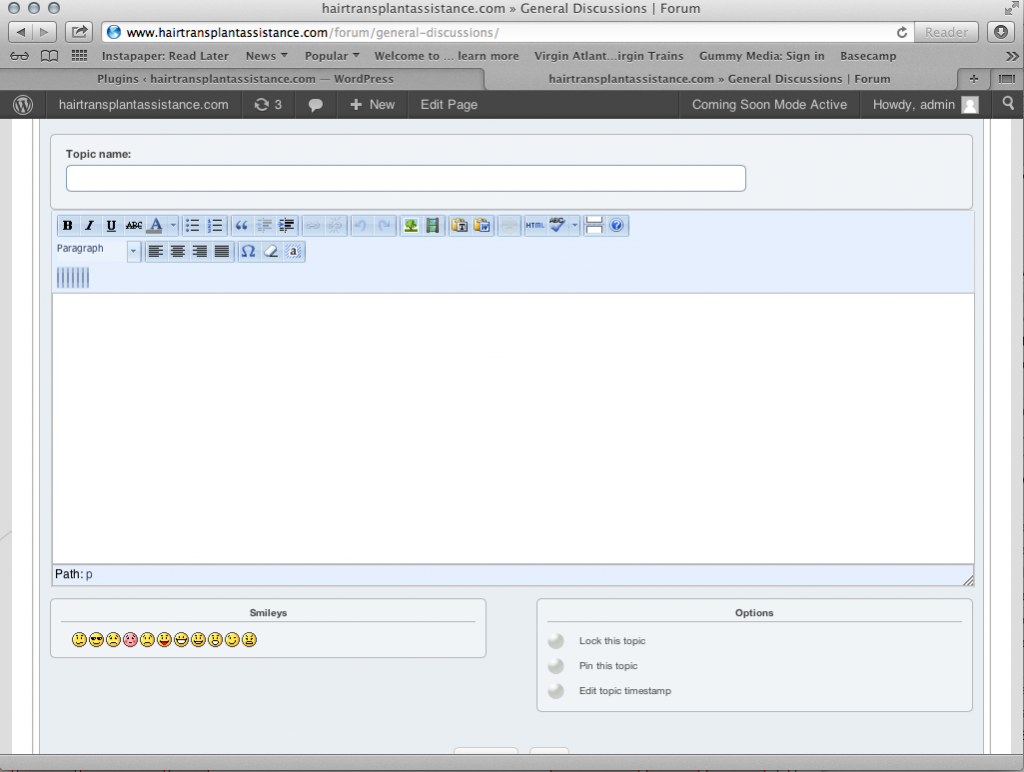
just installed tinyMCE editor and the layout of the top bar is messed up

JM Jan Goergen-makinson
Jan Goergen-makinson
Member

Hi Guys, 

just installed the plugin and had a look but it looks somehow strange. 
I took a screenshot to show you what I mean. 

I’m running WP3.5.1, the newest version of SP and using the good space responsive template.
I have changed to twenty twelve and it looks ok, so I assume it has to do something with the template. 

I just don’t know what so I ask you guys.
i am going to post on the good space forum too. 

Hope you can help me out. 

Cheers, 

Jan Screen-Shot-2013-01-25-at-12.01.57.png


23 Answers

New Answer

YS Yellow Swordfish
Yellow Swordfish
Member

Do you ave any other WP plugins that add components to the tinyMCE toolbar? Or sometimes a theme will do so….

JM Jan Goergen-makinson
Jan Goergen-makinson
Member

Hi Yellow Swordfish. 

Is there an easy way to find out if a theme or plugin uses the tinyMC editor??
I had a look but couldn’t find anything :(


Thanks in advance, 


jan

MP Mr Papa
Mr Papa
Member

didnt you say this was resolved in your other topic???  if so, best to keep it in one topic

JS js
js
Member

I was getting something similar to the picture above, buttons seemed blurry, I switched to ‘cirkuit’ and it looks okay now but i’m getting a 404 not found –
http://abc.com/wp-includes/js/tinymce/themes/advanced/skins/cirkuit/content.css

MP Mr Papa
Mr Papa
Member

where are you seeing that??? in the console? if so, yes… still trying to think of a way around that… its not hurting anything, just wp is trying to load a second copy of the css which is already loaded… has to do with us creating our own themes…

JS js
js
Member

yeah in the console, everything is working fine though, the css of a few of the editor skins isn’t real pretty but that isn’t sp’s fault, shouldn’t have to do tinymce’s work :)

MP Mr Papa
Mr Papa
Member

lol… cool, thanks for the update…  trying to resolve why wp is trying to load the wrong css file when it already loaded the right one…  think it has to do with wp expecting a plugin to not add new themes… but it works…

SI sintmacro
sintmacro
Member

Hi, I’ve the same issue as Jan  G. I use the plugin TinyMCE Advanced version 3.5.8. If I deactivate this plugin it works how it should work. But then I don’t have editor for my standard posts. 

SI sintmacro
sintmacro
Member

sintmacro said
Hi, I’ve the same issue as Jan  G. I use the plugin TinyMCE Advanced version 3.5.8. If I deactivate this plugin it works how it should work. But then I don’t have editor for my standard posts. 

I replaced the plugin by Ultimate TinyMCE and this one is working fine. Seems TinyMCE is conflicting with the forum.

MP Mr Papa
Mr Papa
Member

its probably because that plugin is adding stuff to the wp tinymce editor incorrectly… too many plugins and themes make the false assumption that the wp tinymce editor is only loaded in the wp admin… a very bad assumption given that the wp editor can be used anywhere…

so you can see where they hook in for adding their stuff, they incorrectly tend to use ‘init’ and change it to ‘admin_init’ so they only do load it in the admin where they can make that assumption…

SI sintmacro
sintmacro
Member

sintmacro said

sintmacro said
Hi, I’ve the same issue as Jan  G. I use the plugin TinyMCE Advanced version 3.5.8. If I deactivate this plugin it works how it should work. But then I don’t have editor for my standard posts. 

I replaced the plugin by Ultimate TinyMCE and this one is working fine. Seems TinyMCE is conflicting with the forum.

Hmm, unfortunatelly this isn’t work eather. My editor stacks when using this plugin. What kind of editor are you using for this site?

MP Mr Papa
Mr Papa
Member

stacks? what does that mean? what kind of editor here? our sp tinymce plugin…

SI sintmacro
sintmacro
Member

Mr Papa said
stacks? what does that mean? what kind of editor here? our sp tinymce plugin…

It jams I mean. So no editing was possible anymore. 

Oh oke, I use that to of course for the forum but to edit my WP Posts I use also a TinyMCE plugin. If I have activated that one it conflicted with the TinyMCE of the forum whereby the TinyMCE toolbar setting doesn’t work anymore. The setting of the TinyMCE plugin overrules the setting of the TinyMCE forum plugin.

YS Yellow Swordfish
Yellow Swordfish
Member

This is likely because authors who write extensions for the WP tinymce editor assume it is ONLY going to be used on the admin side of things. But this is erronious as WP have made it possible to use on the front end as well – like we do with SP.

The chances are that the plugin uses what is called the ‘init’ hook to activate it’s stuff on each page load when it should, in fact, use the ‘admin_init’ hook. If you can find this and change it then it will probably correct the issue.