Support Forum

"Mark al topics as read" button not working

CA Carlos
Carlos
Member

Hi folks! 

I have an issue… i think is a problem of mine ´cause i had to restore my site… but if you can help me it would be very apreciated…


When my users push the “Mark All Topics As Read” button it doesnt´work, it redirects the user to the main page… in example… it goes to www.mysite.com/?mark-read instead of www.mysite.com/forum/?mark-read or something else… 


any help would be very apreciated

47 Answers

New Answer

MP Mr Papa
Mr Papa
Member

is that the only thing??  try going to forum – integration – page and permalink and giving the forum permalink a update…

CA Carlos
Carlos
Member

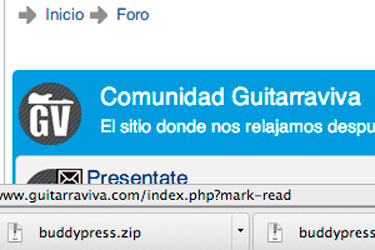
  Hi MrPapa, I tried several times, updating the forum permalink as well as the WP permalinks too… and no luck… it still goes to the main page… you can see it on this capture… it goes to www.guitarraviva.com/index.php?mark-read

mark.jpg
CA Carlos
Carlos
Member

My forum permalink is www.guitarraviva.com/foro 

MP Mr Papa
Mr Papa
Member

do you have that set up as a popup window or its own page?

MP Mr Papa
Mr Papa
Member

strange it is…  let me go over to one of my test sites and switch it to own page and make sure something didnt get stomped on…

MP Mr Papa
Mr Papa
Member

oh wait… we are talking two completely different things here…  not the unread list… but the mark all read…

but still the url is totally butchered…  should be:

http://www.guitarraviva.com/foro/newposts/?mark-read

since you have newposts on their own page…

what does the link for the newposts look like??  its the button to the left of this one…


CA Carlos
Carlos
Member

Mr Papa said
oh wait… we are talking two completely different things here…  not the unread list… but the mark all read…

but still the url is totally butchered…  should be:

http://www.guitarraviva.com/foro/newposts/?mark-read

since you have newposts on their own page…

what does the link for the newposts look like??  its the button to the left of this one…


The button on the left says “javascript:void(null)” or something simillar and opens a popup with all the most recent topics with new posts 

CA Carlos
Carlos
Member

Mr Papa said
but still the url is totally butchered…  should be:
http://www.guitarraviva.com/foro/newposts/?mark-read

yep, that link works fine…. maybe I should over ride the button?

MP Mr Papa
Mr Papa
Member

the button has the javascript(void)?? really, then you are NOT showing new posts on their own page, but instead using the popup…

in which case the proper url would be: http://www.guitarraviva.com/foro/?mark-read

I would imagine it works fine too…

so why is the forum name dropped from that link and why is the index.php in there? any security plugins or mod_security on site?

CA Carlos
Carlos
Member

Mr Papa said

so why is the forum name dropped from that link and why is the index.php in there? any security plugins or mod_security on site?

is a total mistery for me… :(

MP Mr Papa
Mr Papa
Member

you dont know what wp security plugins you might be running?

did you update anything else (like theme or plugins) when wp and sp were updated?

CA Carlos
Carlos
Member

nope… i dont have any security plugin…. just updated the forum and the wp to 3.6

I think that is a problem of my WP ´cause my server frezzed and i restored the site from a backup…