
Support Forum

New Install: Plugin Folder Corrupted

DP Dennis Pitocco
Dennis Pitocco
Member

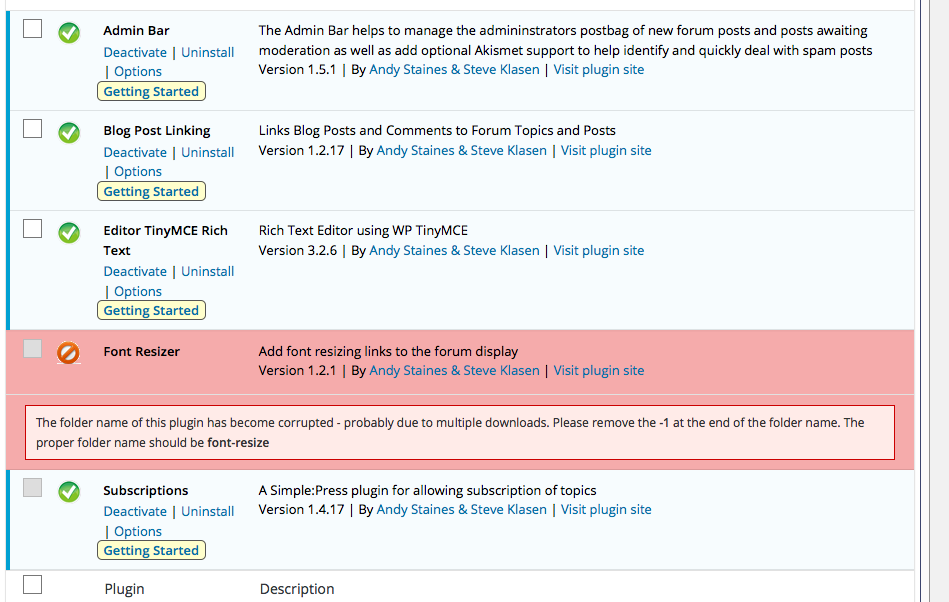
Installed five (5) Plugins today and received a Warning regarding Font Resize:

The folder name of this plugin has become corrupted – probably due to multiple downloads. Please remove the -1 at the end of the folder name. The proper folder name should be font-resize

Plugins Folder: /home/bizcatal/public_html/wp-content/sp-resources/forum-plugin

See Screenshot.

Unable to delete this Upload and we have no idea how to access the Folder mentioned above. Screen-Shot-2016-04-19-at-1.23.14-PM.png
6 Answers

New Answer

IK Ike
Ike
Member

This is due to WordPress adding a number on the end when uploading a duplicate file / folder.

You should be able to access your WP plugins folder via FTP. If you don’t already use FTP it’s worth setting up as it’s a really useful method of accessing your site files in an explorer fashion.

All you need is an FTP client (such as Cyberduck) and the login credentials. If you have access to your cPanel, you can obtain all you need but the password from the Files > FTP Accounts.

Once you’re logged in, you can find your plugins folder by navigating to:

wp-content > sp-resources > forum-plugins

From here you can rename the folder.

Hope that helps!

YS Yellow Swordfish
Yellow Swordfish
Member

In fact if you have chanel you can even use the file manager that comes with it to do this

DP Dennis Pitocco
Dennis Pitocco
Member

Thank you both! Our Site crashed after uploading a number of the Simple Press Plugins – we’ll come back to this discussion once everything has been restored.

DP Dennis Pitocco
Dennis Pitocco
Member

After restoring Site and reinstalling each Plug-in, this problem has been solved.smile

IK Ike
Ike
Member

Good news, shame you had to go to all that effort, just remember ftp for next time if you need to do the same or something similar.