Hi – just deployed the tinyMCE plugin on our new SImplePress 5.1.4 Build 9150 release running on Wordpres Multisite 3.4 on Linux. The editor displays correctly on new posts but does not allow the user to type anything in the window. Tested this on multiple browsers with the same issue. Need help to resolve. Thanks
Support Forum
Both this and the other issue you have raised separately are almost certainly caused by the same thing – which will be a javascript conflict with either your WP theme or another plugin.
This codex article explains what this means and what to look for:
http://codex.simple-press.com/codex/faq/troubleshooting/what-is-this-jquery-conflict/
Once located, these things are usually pretty easy to fix up.
if you want to give us a link to your site, we can potentially help identify the conflict…
I have the same issue, im pretty sure that is because of the theme that im using.
Could you lend me a hand and tell me what changes on the theme i should do? i really want to use tinymce on the forum.
http://airdasherchile.com/
The theme name is raindrops
can you give us more info? as a guest, we cannot post on your site…
if you want to see if theme issue, do a temp quick switch to the default wp theme and see if it starts working… if not, then disable your other plugins and see if working… if so, re-enable one by one until breaks… then we know the conflict and can work it…
Mr Papa said
can you give us more info? as a guest, we cannot post on your site…if you want to see if theme issue, do a temp quick switch to the default wp theme and see if it starts working… if not, then disable your other plugins and see if working… if so, re-enable one by one until breaks… then we know the conflict and can work it…
ii know that the conflic is with the theme, because i tested this plugin with the default theme and work well.
I dont know what more info i can give you.
you just did…
next step would be to create us a temp user account so we can actually try posting and see if we can see what the problem is and if any errors…
If that works, send a pm with the credentials to mr papa, yellow swordfish and BrandonC… be sure to include a link to this topic so we know what its about…
i
Mr Papa said
you just did…
next step would be to create us a temp user account so we can actually try posting and see if we can see what the problem is and if any errors…
If that works, send a pm with the credentials to mr papa, yellow swordfish and BrandonC… be sure to include a link to this topic so we know what its about…
i send you the pm
Somehow i can only edit my post, but not reply or create a new post, thank to this i notice something with the option ´´inspect element“ on google chrome.
When i want to create a topic dont load this code, in comparison when i want to edit the topic.
<html><head xmlns=”http://www.w3.org/1999/xhtml”><style id=”mceDefaultStyles” type=”text/css”>.mceResizeHandle {position: absolute;border: 1px solid black;background: #FFF;width: 5px;height: 5px;z-index: 10000}.mceResizeHandle:hover {background: #000}img[data-mce-selected] {outline: 1px solid black}img.mceClonedResizable, table.mceClonedResizable {position: absolute;outline: 1px dashed black;opacity: .5;z-index: 10000}
</style><meta http-equiv=”X-UA-Compatible” content=”IE=7″><meta http-equiv=”Content-Type” content=”text/problem-with-post-edit-buttontml; charset=UTF-8″><link type=”text/css” rel=”stylesheet” href=”http://airdasherchile.com/wp-content/sp-resources/forum-plugins/tinymce-richtext/tinymce/themes/advanced/skins/o2k7/content.css”><link type=”text/css” rel=”stylesheet” href=”http://airdasherchile.com/wp-content/sp-resources/forum-plugins/tinymce-richtext/tinymce/plugins/spellchecker/css/content.css”><link type=”text/css” rel=”stylesheet” href=”http://airdasherchile.com/wp-content/sp-resources/forum-plugins/tinymce-richtext/tinymce/themes/advanced/skins/o2k7/content.css”></problem-with-post-edit-buttonead><body id=”tinymce” class=”mceContentBody ” onload=”window.parent.tinyMCE.get(‘postitem’).onLoad.dispatch();” contenteditable=”true” dir=”ltr”><p><br data-mce-bogus=”1″></p></body></problem-with-post-edit-buttontml>
Is there a way to force loading that? editing some file in my worpdres theme or simplepress?
There are, I believe, two main problems although until they are dealt with it is hard to go any further.
The first is something that seems to be called ‘arrowchat’. It is loading it’s own jQuery and jQuery.ui libraries which is very bad practice. This means they are probably outdated libraries, not WP standard versions and they are being loaded on top of the WP libraries so the WP API and rules are being ignored.
The other issue – which may be having an effect is some sort of call to something called ‘widgetapi’ that is causing a script error on every page load.
The best thing to do – to test this – is to briefly deactivate the ‘arrowchat’ code and then re-test the forum to see if this alone resolves it. We may know where the problem actually is after that.
Yellow Swordfish said
There are, I believe, two main problems although until they are dealt with it is hard to go any further.The first is something that seems to be called ‘arrowchat’. It is loading it’s own jQuery and jQuery.ui libraries which is very bad practice. This means they are probably outdated libraries, not WP standard versions and they are being loaded on top of the WP libraries so the WP API and rules are being ignored.
The other issue – which may be having an effect is some sort of call to something called ‘widgetapi’ that is causing a script error on every page load.
The best thing to do – to test this – is to briefly deactivate the ‘arrowchat’ code and then re-test the forum to see if this alone resolves it. We may know where the problem actually is after that.
Like i said before, i tested the website with the default themes ´´twenty eleven and twenty ten“ and the tinyMCE plugin work well.
I doubt that this problems is because arrowchat, for two reason:
1st) I tested this plugin in my own server ´´localhost“ via apache, etc. In that i don’t have arrowchat installed, and still dost work the tinyMCE. Also, in this server i test it with the default themes and the tinyMCE plugin did work.
2nd) Arrowchat work as a standalone module, is like when you install Wikipedia or another type of forum in a website with no integration/bridge to wordpress. You don’t install Arrochat via the plugin folder, the only thing that thing do is connect to the database and synchronize with the ´´user account“ in the website, that way you can enable arrowchat only to be used by the people who register ^^
In conclusion, im pretty sure that is the theme raindrops. Maybe you could check it, its on the word press official page.
I’m really thankfully for your time and patience in trying to help me.

Well the first screenshot above shows that indeed ‘arrowchat’ IS loading second, non-WP supported copies of both jQuery and the jQuery UI libraries. Correct, u to date and properly supported versions of these libraries have already been correctly loaded by WP…
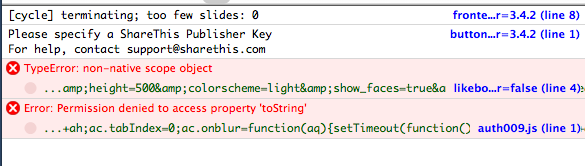
The second screenshot above shows the errors being thrown by your page loads (Not just SP page by the way). The ‘TypeError’ will often stop subsequent scripts from running. This one appears to be coming from Facebook.
Yellow Swordfish said
Well the first screenshot above shows that indeed ‘arrowchat’ IS loading second, non-WP supported copies of both jQuery and the jQuery UI libraries. Correct, u to date and properly supported versions of these libraries have already been correctly loaded by WP…
The second screenshot above shows the errors being thrown by your page loads (Not just SP page by the way). The ‘TypeError’ will often stop subsequent scripts from running. This one appears to be coming from Facebook.
Tell me something, why even with this error that you show me, the plugin work in another theme? if i fix the problems that you show me, it will fix the tinymce issue?
What I actually said in post 9 of this thread is that with these two issues in place it is impossible to perform any further investigation because either or both of them are possibly the cause of the problem. That is why I suggested a brief deactivation of the components in question so that a test could be conducted.
wanted to take a look myself because of a post in first page… is this with specific browser only? IE? I left a new topic for you just fine with that account you sent us…
and asking about IE because some message you posted shows the site trying to force IE 7 on you… ugh, poor choice…
but curious about if for all browsers…
that chatroom makes it hard to debug anything querying the site every couple secs and throwing some errors…
interesting on the default wp theme working… the only js loaded by the theme is:
http://airdasherchile.com/wp-content/themes/raindrops/raindrops.js
and when I look at the file, I see some potentially corrupted characters… could the file be corrupted?
does the chatroom work with the wp default theme?
can you at least temporarily remove that chatroom so we can actually look at the site without getting bombarded by updates and errors?
As Andy says, hard to debug with it doing that…
Yeah, the chatroom work in any theme, even the default ones.Okey then, i disable arrowchat so both of you can debug the site without problems.
Is kinda sad that this tinymce plugin is giving me a really hardtime U_U. Funy thing that i actully buy the membership for that plugin… Im stating to think that is more viable to use another theme, i wonder where i can found one similar to the one in the site.
if you could tell me how i can disable the force messages on IE7 that would be fantastic. I actually dont use that navigator, i use google chrome.