Support Forum

Number of Topics Paging Links to show

DO Dosenben
Dosenben
Member

Dear simple:press team,


just a quick question – in the “topic view formatting” help, there is still an option mentioned to set the number of thread pages to show – yet i don’t see the option itself anymore. Is there a way to modify the setting?


thanks in advance!

5 Answers

New Answer

MP Mr Papa
Mr Papa
Member

Its still there… forum – options- general display settings…

by threads, I assume you mean topics… so the option is ‘topics per page to display’…  there is a corresponding option for number of posts per page…

DO Dosenben
Dosenben
Member

For the life of me, i can’t find the number of Topics Paging Links option. I can set the number of “topics per page”, yes, but i see no option to set – quote helpfile:

Number of Topics Paging Links to show

The page links are shown in bars at the top and bottom of the topic index. Set the number to show. The first and last are always shown.

end quote.


set those. Since the number of topics in our subforums will be finite, i’d love to set limit those pagelinks to 20 or so, we’d have room enough.


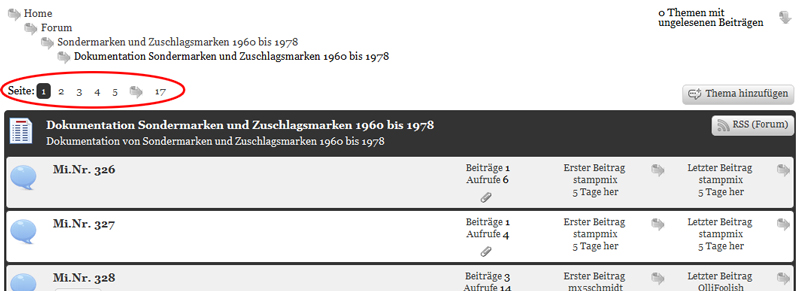
To specifiy; i mean those here:

page_links.jpg
MP Mr Papa
Mr Papa
Member

oh, sorry, was just responding to your post number 1 where it appears you were looking for number of topics…  missed the paging links in the topic title…

They are not an option any more but part of your theme display…  the vast majority of display elements have moved to the sp theme itself…   so you change that option in the theme… as always, we highly recommend you create your own theme and not edit one of ours…  see:  http://codex.simple-press.com/codex/themes/theme-basics/creating-a-theme/

since your are talking number of topics, that means forum view… so you would want to edit the spForumView.php template file in your sp theme…  this is how WP works too with themes and template tags…

so find the tag that outputs the page links, in this case:

                    sp_TopicIndexPageLinks(”, __sp(‘Page: ‘), __sp(‘Jump to page %PAGE% of topics’));

there will be two – top and bottom – by default…  and update the number of links that you want… by default its 4… so

                    sp_TopicIndexPageLinks(‘showLinks=8’, __sp(‘Page: ‘), __sp(‘Jump to page %PAGE% of topics’));

if you wanted 8 instead…

and btw, in SP 5.1 due to be released today, we went through and cleaned up all those old admin helps that we had missed when 5.0 was released…

MP Mr Papa
Mr Papa
Member

okay, let us know if you have any more questions…