Support Forum

Plugins "File Uploader with Plupload" and "Editor TinyMCE Rich Text" not working on my forum

DR didier Roudaut
didier Roudaut
Member

Hello Simple:press team !

I have installed and activated both plugins “File Uploader with Plupload” and “Editor TinyMCE Rich Text”, but they don’t work properly.

– when “Editor TinyMCE Rich Text” is activated, it is not showing up ! The editor remains with no buttons at all.
– When “File Uploader with Plupload” is activbated, it is no more possible to add a new post (the button has no effect).

I have read some posts where quite same issues were discribed and issues were related to Jquery badly used by theme or others plugins. So I guess my problem is also related to that but I have no idea how to find a workaround !

Could you help me ?

I have created a user admin that I will send you in PM, if you agree.
My forum is here : http://funlab.fr/test/forum/

Thanks in advance for any help!

Didero

28 Answers

New Answer

MP Mr Papa
Mr Papa
Member

are you sure you have activated the plugins??  I see no evidence of the SP tinymce plugin (looking at js loaded)…

no caching plugins, right?

when tinymce does not show, its usually a theme or plugin that has added some tinymce buttons but done it incorrectly assuming the wp editor is only used in the admin…  the wp api allows for the editor (tinymce) to be used on the front end too…

a quick test would be to do a temp switch to the default wp theme and see if that clears things up…

If not, try disabling all other plugins, then seeing if it works… if so, re-enable one by one until it breaks again…

that will give us more info to go on…

DR didier Roudaut
didier Roudaut
Member

Hello Mr Papa !

Thanks for your reply!

I have deactivated most of my plugins (just remains some batch plugin like backup plugin) ,I switched to the twenty twelve theme, but still, the issues exist !

I don’t think I have a caching plugin !

Any other suggestion ?

Didero

DR didier Roudaut
didier Roudaut
Member

I forgot ! Yes I have activated the plugins (both of them), but with Plupload, you won’t be able to create a new topic, because if it is activated, the “add new topic” button has no effect !

Didero

MP Mr Papa
Mr Papa
Member

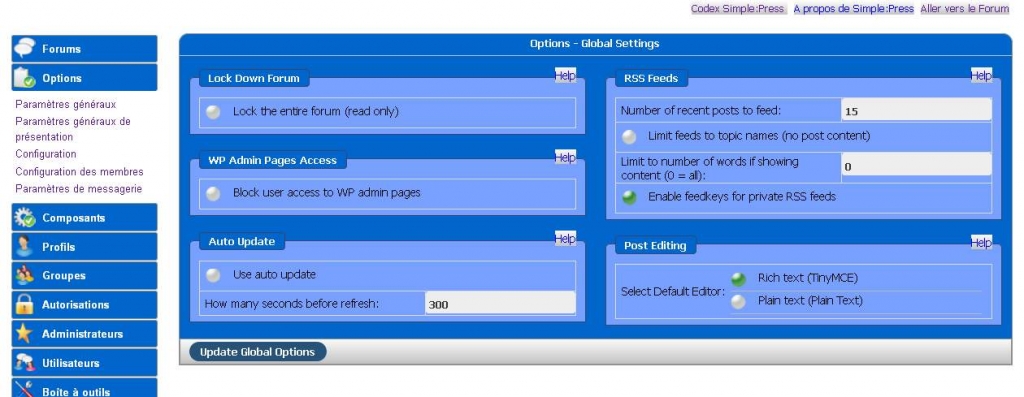
can you check forum – options – global settings and try turning off the combined css and js caches?

DR didier Roudaut
didier Roudaut
Member

I’m sorry but I can’t find such an option in “forum – options – global settings”option.jpg

MP Mr Papa
Mr Papa
Member

that of course then begs the question, what version of SP are you using???  sounds out of date…

and what versions of tinymce and file uploader plugins??  you might be using incompatible versions if you sp core is that out of date…  the plugin header always listed the required SP core version to use that plugin…

DR didier Roudaut
didier Roudaut
Member

My version is

Version: 5.1.0
Build: 8615
Release: Release

And as you said it’s out of date ! The site is quite new and I was sure the version intalled was the most recent, but, obviously it’s not ! The forum was installed by someone else, and the sp plugin was installed by me ! (bad team workconfused)

If I upgrade the plugin, is there a risk to loose data ?

MP Mr Papa
Mr Papa
Member

No, you wont lose any data… of course, like with wp or any plugin, just good practice to make a db backup before upgrading just to be safe…

yes, that version is quite old…  you didnt say what the plugin versions were…   you should be able to upgrade core and plugins from the wp updater in your admin…

DR didier Roudaut
didier Roudaut
Member

The SP plugins were downloaded yesterday, so I guess they are up to date !!

Editor TinyMCE Rich Text (2.0.6)
File Uploader with Plupload (2.0.2)

I’m currently upgrading simple:press and I’ll come back to you once I’m done.l

DR didier Roudaut
didier Roudaut
Member

Ok, so now, every thing is up to date !

The good news is that the file uploader works great ! But the editor still not shows up !


MP Mr Papa
Mr Papa
Member

so now, lets go to forum – options – global settings and make sure the combined css and js is off..   I am still not seeing tinymce being loaded…  does your theme include a proper wp_footer.php in the footer?  seeing some js loaded in footer, but not tinymce..

DR didier Roudaut
didier Roudaut
Member

Following your instructions I disabled the combined CSS and js, but this has had no effect !

My theme (Options) is deactivated for test purpose, the one currently active is a basic wordpress theme (Twenty twelve). But I don’t know if it has a proper wp_footer.php in the footer. How can I get this information ?

Maybe you can suggest me a theme that you know well so I can temporarily switched to it and see what’s happens…

Thanks for your time,

Didero  


MP Mr Papa
Mr Papa
Member

Twenty twelve is fine for this test…  if its still occurring with WP Twenty Twelve, its not a theme issue…

But I am still not seeing tinymce geting loaded properly… other stuff in the footer is though…

lets try two more things…

one, deactivate and uninstall the sp tinymce plugin…  then reactivate it… since it was running with very old SP version its possible there was  problem with its initialization…  see if that helps…

In an earlier screenshot you posted, it looked correct, but double check forum – options – global settings and make sure tinymce is the default editor…  then as an extra check, go to your profile in the forum, the posting options and make sure tinymce is your editor…

Perhaps I am not seeing the tinymce because we cannot actually post as guests… so perhaps you can send to both myself and yellow swordfish a temp user account that can reply to posts so we can try…  If that works, please PM the credentials to both of us and link to this topic so we know what it is concerning…

YS Yellow Swordfish
Yellow Swordfish
Member

Do you have any plugins active (WordPress plugins that is) that add components to TinyMCE – ie., new toolbox buttons, TinyMCE plugon or other functionality?