Support Forum

Post by email settings

WA Wardee
Wardee
Member

I just installed the plugin Post by Email. I only want to use the reply by email feature.

I updated the member permissions to allow this feature with pretty much all my members.

The settings page doesn’t offer me any options for configuring this feature (I see the settings to configure post by email).

How do you get the following on your emails?

* To post a reply by email * – please remove all old text from ABOVE the insert line at the top and enter your plain text reply above it. Do not remove ANY of this email text. Please remember that your reply may not appear immediately in the forum

My tests are not working thus far, and I don’t know what else to configure or check.

Thank you for your help.

Also, I’m sorry if my question isn’t clear. I don’t know what to ask really. However, I know I need help with #1) the feature working and #2) that the emails give instructions for how to use the feature.

Thanks!

13 Answers

New Answer

MP Mr Papa
Mr Papa
Member

what do you mean the settings page doesnt give you any options? 

have you seen this codex page:

http://codex.simple-press.com/codex/plugins/our-plugins/available-plugins/plugin-post-by-email/

you also have to configure some email addresses at your host since it requires a unique email address per forum…   please read the codex and try to configure… come on back if you are still having problems..

that message will automatically show up in any emails where you can reply via emial… you get the emails for admin notifications or subscription emails…

WA Wardee
Wardee
Member

No, I hadn’t seen that codex. And the settings under Post by Email I thought didn’t apply since I wasn’t using that feature of the plugin. I’ll set that up now.

YS Yellow Swordfish
Yellow Swordfish
Member

Not sure I understand what you mean by ‘I wasn’t using that feature of the plugin’. That is what the post by email plugin is all about. Allows your users to reply to topics using email instead of logging in to the forum. The settings on the admin page are absolutely required. Port – incoming.

WA Wardee
Wardee
Member

I mean that there’s two components to this plugin: Post by Email and Reply by Email. I thought the settings box for Post by Email applied only to the former because it has the same name (so I thought).

It makes sense to me now that it applies to both, but I was confused at first.

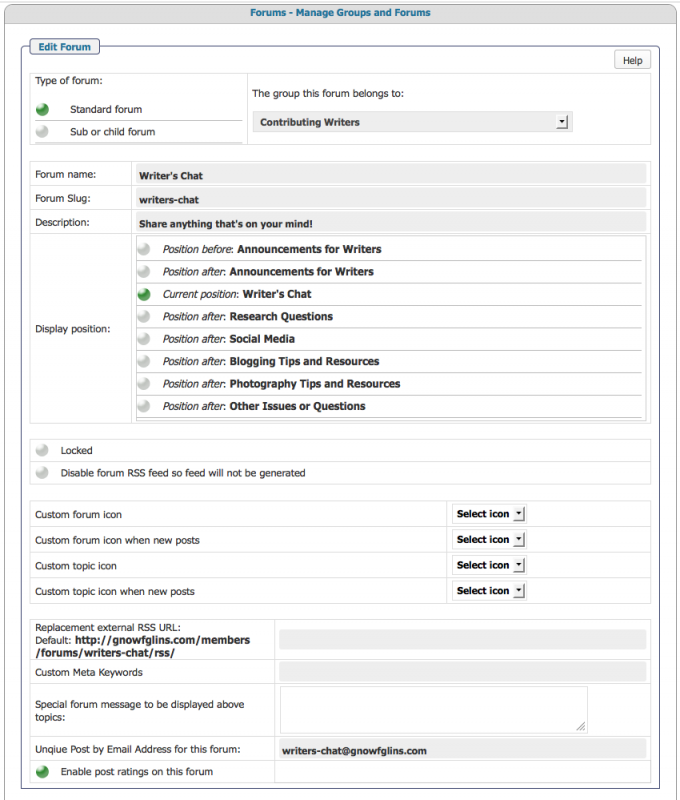
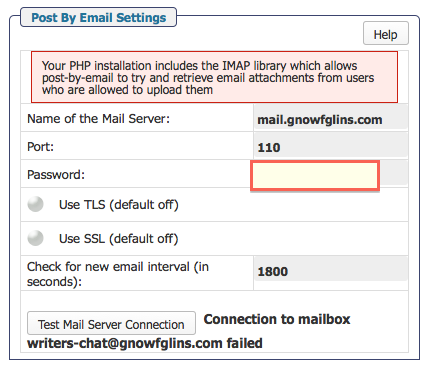
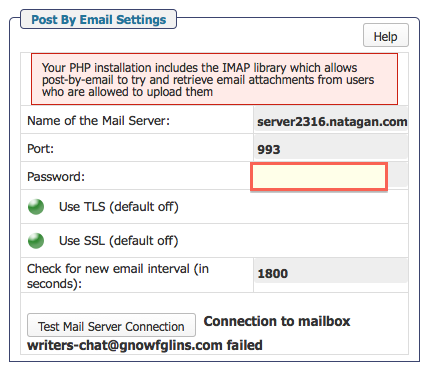
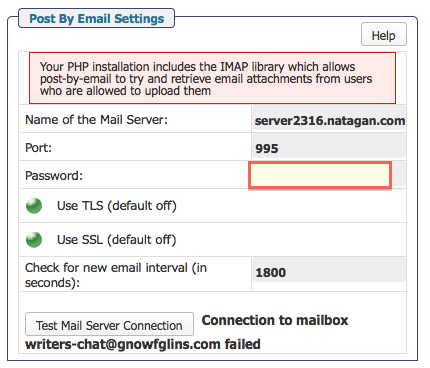
I get it now, and I’m setting it up, but I’m having trouble. I’ve put in everything, trying both the SSL and non-SSL options. No matter what I put, it is telling me connection failed. And yes, I created the emails and entered them in “Edit Forums”. I’ve checked and they match exactly (using the forum slug as the email as you suggest). They all have the same password. I’m using the incoming POP3 port.

My PHP installation has the IMAP library (so says the red notice box).

Is there anything else I can check?

MP Mr Papa
Mr Papa
Member

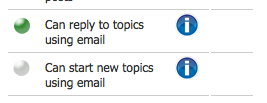
technically, there is one component, sending a post to the forum via email…  there are two different permissions, one for creating and one for replying… so think you can do what you want…

can you post a screenshot of your settings?  BE SURE to block out any password info….

talking about forum – options – email settings…  and perhaps one example forum…

WA Wardee
Wardee
Member

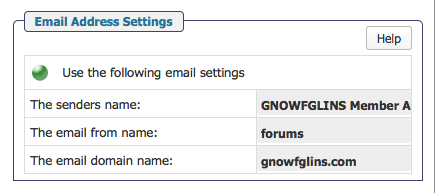
Here you go. If I take out the reply by email from forum options for writers-chat, I get the same error for the next forum in the list. And so on.

Thanks! :)

forum-options.pngnon-ssl.pngpermissions.pngssl.pngemail-settings.pngssl2.png

email-address.png


YS Yellow Swordfish
Yellow Swordfish
Member

That is simply because it cycles through all of your forum email addresses and will report on the first one it fails to open.

So – what are the POP settings you would need to use to access this email address via an ordinary desktop email client? Because they are the ones you should need to use.

WA Wardee
Wardee
Member

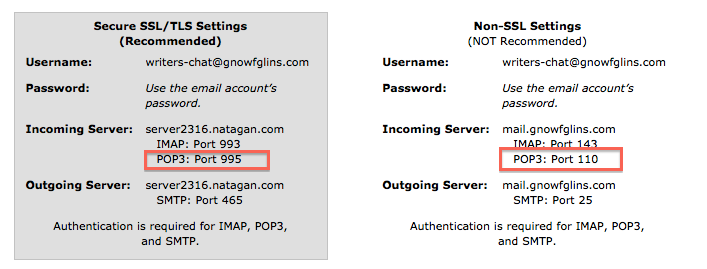
I went into my cpanel and got the info from there. I’m attaching a screenshot of the port #s I used. Is this correct?

Screen-Shot-2013-06-07-at-11.43.41-AM.png
MP Mr Papa
Mr Papa
Member

its rare to have both tls and ssl on…

did you try both tls and ssl off with a port of 110?  understand it says not required… just gathering info…

WA Wardee
Wardee
Member

Yes, I tried port 110 with both TLS and SSL off (see picture above called non-ssl.png).

I will check with my host to see if there’s any kind of security setting blocking this.

WA Wardee
Wardee
Member

I check with them, and they checked everything over and said my server is functioning as it should with regard to email.

We have checked this in detail and all looking correct in the server side. We have tried accessing the webmail with the same logins you are using and it’s connecting without any issues. Also upon checking, we could see that the plugin is using imap_open function and it’s already compiled in the server. IMAP/POP ports are already opened in the server firewall and connecting.

Is there anything else we can check? Email notifications are going out with the “reply by email” instructions but it isn’t working. I tested several hours ago and a reply was not added to my forum.

MP Mr Papa
Mr Papa
Member

need to see if Andy has any more ideas as he wrote the plugin… but I can say we have quite a few users using it… some take some figuring on the settings but they have all gotten there…

out of curiosity, have you set up your email client to use one of those forum addresses?  set it up and try sending and receiving email from it…  another test anyways…