Support Forum

Ranks/Badges for Admins

JC Jason Carr
Jason Carr
Member

Hello, I’m using the Ranks Information plugin. I’ve noticed that they work great for my users, but they don’t show up for me because I’m an admin. Is there any way for me, as an admin, to participate in the ranking system?

Also, I’ve noticed that with the latest versions I’m seeing some users in the wrong rank on the rank information page, when clicking the View Members links. Some members show up as a different rank on the page than they do in the member information popup.

Thanks!

Jason

8 Answers

New Answer

YS Yellow Swordfish
Yellow Swordfish
Member

If you mean just the standard rankings based on post count then I am afraid no – that isn’t going to work for admins as they do not belong to a user group – nor would their status, as such, ever change… The Special Ranks are available of course but I do appreciate that this is not quite the same thing.

I am somewhat puzzled by why there should be any differences. They use the same php routines to populate the user data. Unless perhaps you are using a WP caching plugin? Is that the case? If so then you do need to exclude the forum page from the cache…

JC Jason Carr
Jason Carr
Member

Okay, thanks for the reply. I’ll see if Special Ranks will help me there.

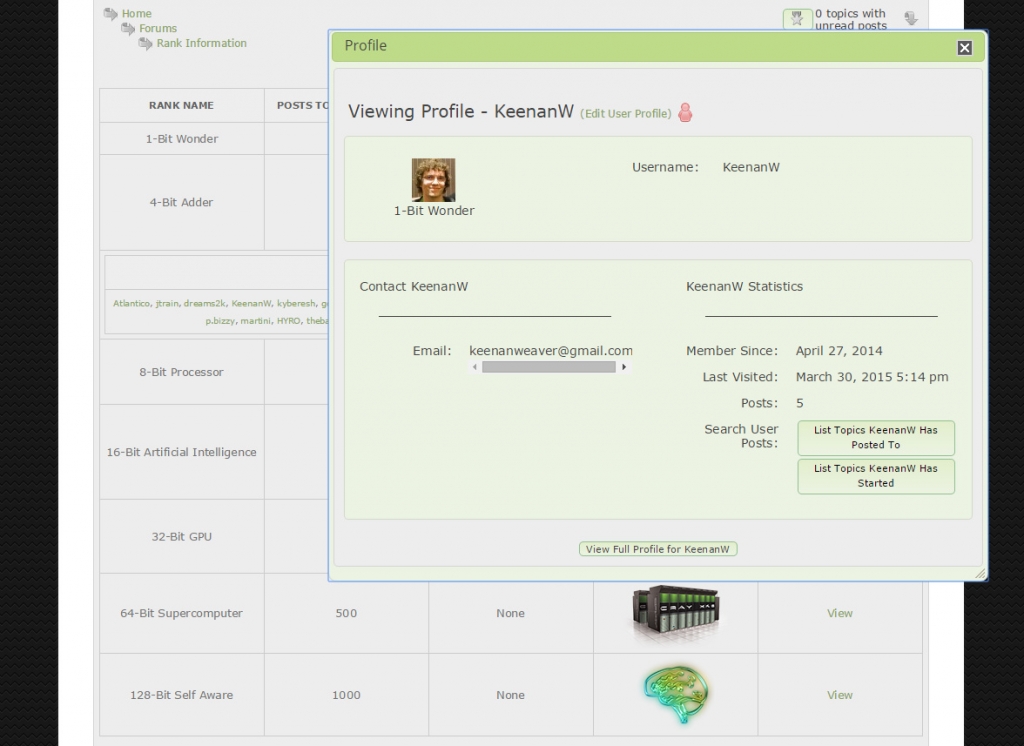
I’m not using a caching plugin for the forums. I’ve attached a screenshot of the Rank Information page that shows KeenanW listed under “4-Bit Adder” but showing up as “1-Bit Wonder”. No idea why this would be the case; the rest of the forums are working well (have been for months).

Thanks!

forums.jpg
YS Yellow Swordfish
Yellow Swordfish
Member

Most curious. Can you just confirm which one is actually correct? The users profile or the rank info listing? 

MP Mr Papa
Mr Papa
Member

and a link to both examples would help too… t

JC Jason Carr
Jason Carr
Member

Alright, Special Ranks does seem to do the trick for me, well enough. I can at least now have a badge like everyone else. 😉

Here’s the link to the Rank Information page:

http://www.launchbox-app.com/forum/rankinfo

And KeenanW’s profile:

http://www.launchbox-app.com/forum/profile/25

KeenanW has 5 posts, which is telling, because that is one of my limits, so it sounds likely that it could be a >= vs. > issue.

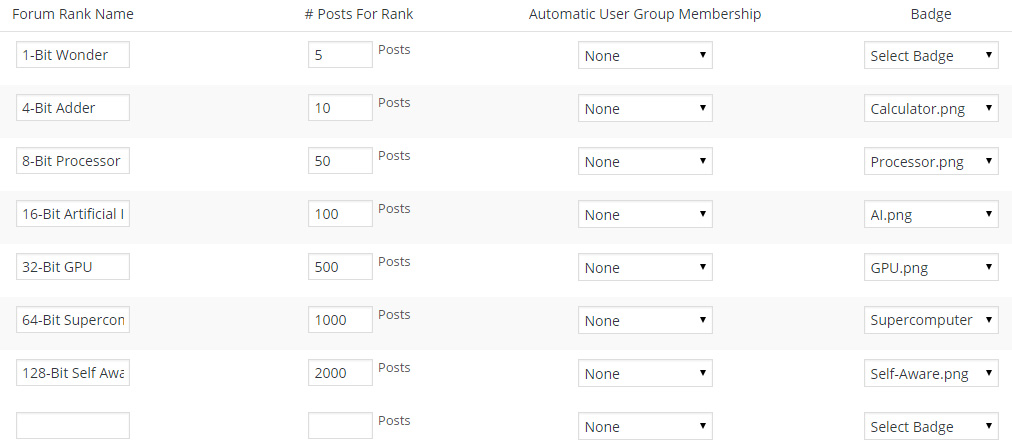
Also, attached is a screenshot of my Ranks settings. The settings are confusing because they seem to be one off from what they turn out to be. If you compare the settings to the Rank Information page, they go 0, 5, 10, 50, 100, 500, 1000 on the Rank Information page, but 5, 10, 50, 100, 500, 1000, 2000 on the settings page. So that is another issue.

Thanks again,

Jason

RanksSettings.jpg
MP Mr Papa
Mr Papa
Member

think we cant win to lose on the the ranks… 😉  we have changed it multiple times because it confuses folks…

in your case, users will have the rank 1 bit wonder up through 5 posts… then the get the next rank…  so in effect, it takes 6 to obtain 4 bit adder…

your second link does not work for us – no permission so cannot compare it…  what rank does Keenan have now with 5 posts?  should be 1 bit wonder…

does appear that the rank info plugin might be doing that part wrong – will check into it…  but seems like all the operations are correct, no?  just visual representation…

JC Jason Carr
Jason Carr
Member

Okay, yes, Keenan has 5 posts and shows up as 1-Bit Wonder in his profile. So using that logic, the only glitch would be that the Rank Information page puts him under 4-Bit Adder instead of 1-Bit Wonder.

Now that I understand the logic with the settings page, that’s no big deal. I understand the difficulty with making everyone happy…these are my forums for my own software product called LaunchBox.

In any case, perhaps the best thing to do would be to put a little explanation blurb on the settings page to explain the technicalities. Thanks. 🙂

MP Mr Papa
Mr Papa
Member

a ticket was opened on the rank info plugin to get it synced up…

we keep tweaking the popup help and the column heading, but seem to still be missing… will do some more thinking on it…