Support Forum

Read more link in linked post

RS Roman Steinbacher
Roman Steinbacher
Member

hi is there a possibility to integrate automatically a read more link in linked blog posts? I use the blog link plugin. But there es only a button under the headline. I would like to have a link in the text read more ore something like this!

Thanks! Roman

11 Answers

New Answer

YS Yellow Swordfish
Yellow Swordfish
Member

If you mean a traditional WordPress style ‘read more’ that then moves the page from the index/home page to what is called the ‘single’ page with a single blog post – then that is something that has to be done by your WordPress theme…

RS Roman Steinbacher
Roman Steinbacher
Member

I mean the plugin puts a link to the topic headline and cuts the content as defined in the SP Backend after 50 letters. But it should put a read more link after cutting the letters, not?

YS Yellow Swordfish
Yellow Swordfish
Member

The plugin places a link to the forum topic itself – (topic headline?) – which is the whole idea of the link – convey your readers to the forum topic where they can join in a discussion. 

If you want to display that link at the bottom and change the text then you can do both of those on the blog linking admin panel (components section).

If not the above then I am afraid I am unsure what you are asking for…

RS Roman Steinbacher
Roman Steinbacher
Member

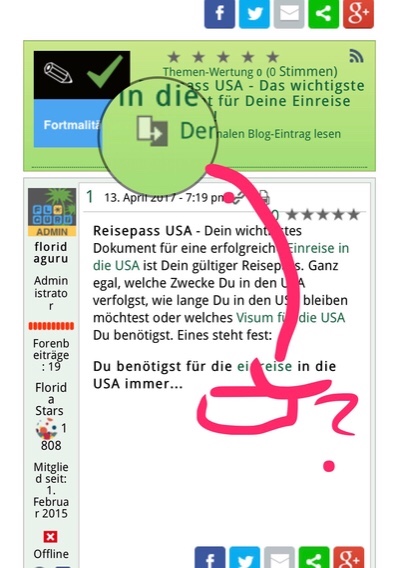
IMG_0862.JPG I mean this is confusing if someone don’t recognize the read blog post under the headline. 

MP Mr Papa
Mr Papa
Member

are you just wanting to change the text?  if so, you can change it to what you want…

take a look at your sp theme you are using… in the topic view template file, you will see the template tag for outputting the link… something like this:

                                if (function_exists(‘sp_TopicHeaderShowBlogLink’)) sp_TopicHeaderShowBlogLink(‘icon=’, __sp(‘Read the original blog post’), __sp(‘Click to go to original blog post’));

you can change the two strings to whatever you like…  as always, we strongly encourage you to create your own theme or make a child theme before editing the template file…

if something different, sorry, but please explain further…

YS Yellow Swordfish
Yellow Swordfish
Member

I think Mr Papa missed the image which explains it all. There is no simple or easy way to move that link to below the post. It would need some coding up and proper support.

Tell you what though – I can see the sense in it and will put it on the list  for a future addition. Won’t be quick I am afraid but we will try and get there.

YS Yellow Swordfish
Yellow Swordfish
Member

Rewind that….

I can give you some simple code that would do what you want. It would mean an edit to a template or two. If you want to try it I would advise switching to the SP child theme version of whatever SP theme you are currently using so that changes will be preserved from future updates.

Let me know if you want to do that…

RS Roman Steinbacher
Roman Steinbacher
Member

Oh yes, that would be great. I’m going to launch tonight. Could you give me the code quickly? Many thanks for the great support!!!

YS Yellow Swordfish
Yellow Swordfish
Member

Not sure what theme you are using there (very squashed up in a small column width judging by the image) but – you need to copy the spTopicView.php template from the parent theme (/templates folder) into the equivalent location within the child theme. Note – if Reboot or BareBones then there is a desktop version and a separate mobile version both of which will need to be copied across with each having the device type appended to the name.

Then open the spTopicView file in the child theme for editing. MUST be a plain text editor!

Locate the line of code that is:

sp_PostIndexContent('', __sp('Awaiting Moderation'));

And add the following block of code immediately after it. Use the ‘raw code’ button below and copy it from the subsequent popup.

if ($spThisPost->post_index == 1) {
    if (function_exists('sp_TopicHeaderShowBlogLink')) {
        sp_TopicHeaderShowBlogLink('icon=sp_BlogLinkWhite.png', __sp('Read the original blog post'), __sp('Click to go to original blog post'));
    }
}

That should do the trick.

RS Roman Steinbacher
Roman Steinbacher
Member

You are the best – this runs perfect!!!! Thanks a lot, great service!!