
Support Forum

Removing the Forum Button from WP Pages

JJ Justin Jones
Justin Jones
Member

Hey, I recently signed up and configured my forum and plugins for my new website, but at some point a blue forum button showed up on the bottom of every one of my pages, which all send to a 404 not found page. I thought it was either the post linking or template tags plugin, but disabling them has done nothing. I tried searching through the forum for a similar issue, but to no avail. Any idea how to remove these?
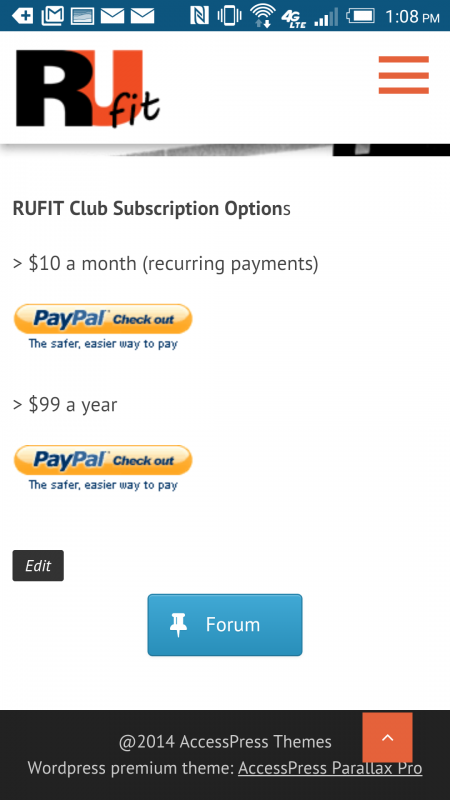
 

Screenshot_2015-05-12-13-08-09-1.png

5 Answers

New Answer

IK Ike
Ike
Member

Hey Justin,

It’s definitely something that’s coming from your WP theme. The forum is used on a page, so it might be worth firstly checking what page the forum is used on (see Forum > Integration > Page and Permalink) and then checking to see if you have any stray or draft pages called ‘Forum’. I’m only guessing there as obviously your forum is working, there’s no reason why a link to ‘Forum’ should take you to a 404 unless it’s not the right page.

Other than that, are you running any other WP plugins that manage pages, categories, menus or something similar?

JJ Justin Jones
Justin Jones
Member

Thanks for the quick response. I checked for any extraneous forum posts/pages, but it’s just the one. That big blue button links to a page called services-section, which isn’t even part of my site. I’m just not sure where that button even came from in the first place. Don’t have any other real plugins in use. I wonder if it’s being caused by my theme somehow.

IK Ike
Ike
Member

In that case it’s definitely worth disabling any other plugins you have, leave SP running and revert to one of the stock WP themes. Then when you enable things one by one you should be able to spot where it’s coming from.

JJ Justin Jones
Justin Jones
Member

Got it! Turns out the siteorigin plugin added in a button to my side bars when it saw a forum plugin had been installed. Found, and fixed. Thanks for the assistance, I appreciate it.