Support Forum

Some other issues on my forums

XD xDave
xDave
Member

Besides the “buddypress issue” I have some other questions to SP:

– the “Unread and recently updated topics” is missing for some reason, how can i bring it to my forum?

– is there a way to “style” the “recent post” widget and/or the “template tags”? I use them in my website footer, and they look kind of messed up there

41 Answers

New Answer

YS Yellow Swordfish
Yellow Swordfish
Member

For the first question probably just easiest to point to another thread where this is discussed: https://simple-press.com/support-forum/sp5-general-topics/displaying-unread-and-recently-updated-topics-on-main-forum-page-for-adminsmods/

On the second question of course it is possible. But this would need to happen in your WordPress theme stylesheet as these components are used outside of the forum page. So they will be currently utilising default WP theme rules.

The Options section of the recent posts tag codex article (http://codex.simple-press.com/codex/plugins/our-plugins/the-template-tags-plugin/template-tag-recent-posts/) show the main class names that are applied depending on the settings being used – this is the tag that the widget uses by the way. But as always, using the developer tools built in to your browser like the console makes it a lot easier to determine CSS required and changes that style things as you want.

XD xDave
xDave
Member

Okay the first worked. Thank you once more. The second one I will investigate, when I decided wheather to keep Sp or to change back to bbp.

XD xDave
xDave
Member

The Forum Thanks…Where do they hide? Do I have to activate them somewhere else but in plugins? 

YS Yellow Swordfish
Yellow Swordfish
Member

Setup options will be in the Components section of the forum admin (the link for this is shown beside the plugin in the plugin listing).

You will also need to turn on the permission ‘Can thank a user for a post’ in the permission sets you wish to enable this feature in.

If in doubt the codex should give you the information you need for individual plugins.

XD xDave
xDave
Member

Okay. The “thanks” thingy would need some coding right?

I saw that the file uploader is not even necessary if I want images to be uploaded right? Images can also be dragged into the tinyMCE Editor.

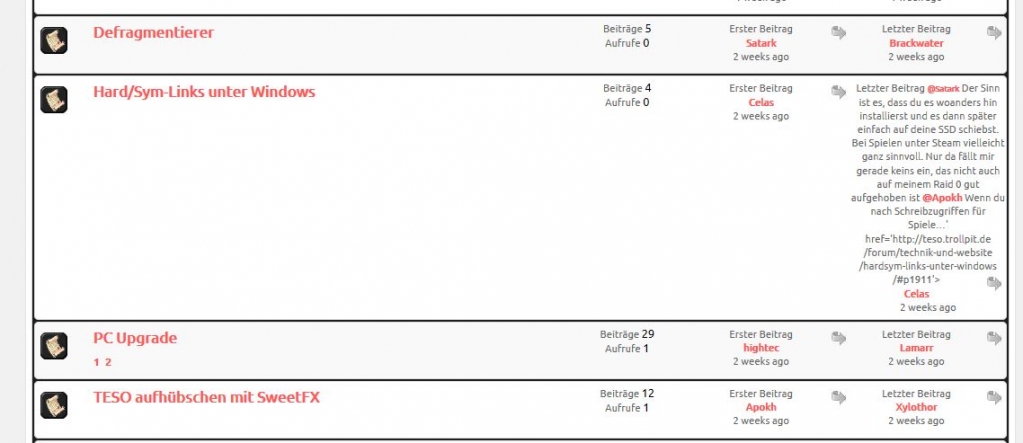
One thing about @mentions . It seems to distort the forum list somehow

ScreenShot086.jpg
YS Yellow Swordfish
Yellow Swordfish
Member

What SP theme are you using? I rather thought that support for ‘thanks’ is already built in but it might depend on which one you have…

The File Uploader is required for uploading images, media, files to your server for use in forum posts. You can drag them into TinyMCE? I have not tried but if you can then it probably saves it as a ‘blob’ which will sort of work but will bypass any other filter settings you may have like popup enlargement, max size etc. I will have to try it later today.

@mentions should give no problem. Sometimes you may see an issue like that because of pasted text with bad heml embedded or other controls embedded. Is that a possibility here? I would have to see it to be able to judge.

XD xDave
xDave
Member

Im using a premium theme which is called “Oblivion”. But I think yopu mean the Forum Template, which is “CSS-Only” from here.


My page is teso.trollpit.de if you like to have a look. The strange thing is, that the Uploader worked on my “old page” (that one where i hat that memory issue) and now it doesn´t.

YS Yellow Swordfish
Yellow Swordfish
Member

Oh goodness me. That WordPress theme breaks just about every rule in the book. It is NOT WordPress standards/API compliant.

It loads it’s own jQuery UI library instead of the proper WordPress API version. And it uses Bootstrap which is not supported by WordPress.

On the jQuery issue reading this will explain the situation: http://codex.simple-press.com/codex/faq/troubleshooting/what-is-this-jquery-conflict/

On the Bootstrap issue then this can be resolved by ensuring that Bootstrap loads before the jQuery UI library which sometimes means some fiddling with the theme code.

XD xDave
xDave
Member

Humm, this is pretty hard to hear for a Theme which I paid about 50€ for :/

XD xDave
xDave
Member

Did you take a look? I didn´t find any bootstrap.js or bootstrap.min.js to be  loaded in the source code. But to be honest I dont even have a clue what exactly I´m looking for as well as I don´t always know, if I really understood anything on your Codex page (according to the fact, that I´m not native speaker).

YS Yellow Swordfish
Yellow Swordfish
Member

Sadly and for reasons I can not fathom, those that charge for their themes seem to be the worse at stomping all over the WordPress API.

Yes, of course I looked. Open a source view on a forum page and search for ‘bootstrap’ and search for ‘jquery’. My own personal view is that you should consult with the theme author to eradicate the issues but whether that will bear any fruit I do not know.

The WP team have talked about putting checks in place to stop the use of thirds-party jquery and jquery.ui scripts but as yet have failed to come up with anything.

XD xDave
xDave
Member

Hmm I see. The guys in the support forum of the theme told me the same you did :/

Does EVERYTHING which has bootstrap in its name have to be loaded before jQuery stuff?

YS Yellow Swordfish
Yellow Swordfish
Member

xDave said
Hmm I see. The guys in the support forum of the theme told me the same you did :/

What did they say? Would be interested to know exactly…

Does EVERYTHING which has bootstrap in its name have to be loaded before jQuery stuff?

To be honest I have no idea. I have not seen it broken up like that before. I do not use Bootstrap and never have. Whatever your theme authors say – Bootstrap JS overrides jQuery UI JS when it comes to control manipulation. I do not know which components. And whatever the theme guys said – the jQuer UI IS supported by WordPress. BootStrap is not.

XD xDave
xDave
Member

Nevertheless bootstrap seems to be a major framwork actually to build templates. The guys told me their theme pass a “very tough TF standards” verification whatever that means.

See: http://support.skywarriorthemes.com/discussion/1345/oblivion-jquerybootstrap#Item_9

I found some bootstrap loads but all are BEFORE the jQuery stuff.

I also deactivated anything else on my page including the uploader but I wont get it working. That pretty much sucks because my members now have to take the way over the WP-Media Upload and not everyone wants/is able to do that.

As you perhaps saw, I´m doing a MMO Guild Page with WP. I always did that with joomla before but now I thought a more slim WP would be an advantage. But obviously I´m havin much more technical problems than I ever had before.