
Support Forum

Start upload button and remove file button not working

AN Angus
Angus
Member

Good morning, in trying to attach a file to a post we can open the ‘File Uploader’ plugin box and add files by pressing the Add Files button or by drag and dropping. What isn’t working however is the ‘start upload’ button or indeed the – button allowing you to remove a file from the upload list.

Both WP, SP and the plugin are all at the most update versions. Many thanks for any help.

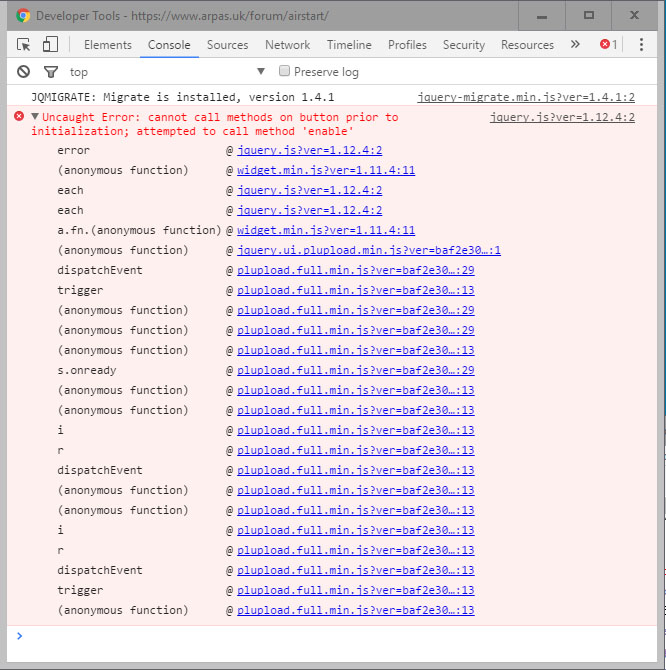
Edit: this console log shows the js error (“cannot call methods on button prior to initialization; attempted to call method ‘enable'”) that occurs from file plugload.full.min when any forum topic page is loaded. The same error is logged when the ‘minus’ button is clicked. We see no activity (and no error logged) when the Start Upload button is pressed. 
uploaderror.jpg

5 Answers

New Answer

YS Yellow Swordfish
Yellow Swordfish
Member

If we can leave aside the console log for a moment and just look at the most common problem we have with this it would help at least potentially discount one factor,. And that is BootStrap. So – does your website load the bootstrap.js library – most often used, if at al, by themes it seems.

And also are you loading the SP javascript in the footer of your site (forum admin > Integration > Page and Permalink admin panel)?

AN Angus
Angus
Member

Thanks Yellow, answers are i) yes, we are loading bootstrap.min.js in the head, and ii) no, we are not loading the SP js in the footer

IK Ike
Ike
Member

Could you try enabling the option to load SP Javascript in the footer? Also please note you should always clear your browser cache after making changes like this.

YS Yellow Swordfish
Yellow Swordfish
Member

There are several threads on this subject but in case you have missed them the problem is that Bootstrap is NOT a supported WordPress library. The jQuery UI library IS supported. But Bootstrap messes with the jQuery UI and causes changes to some display components – notably buttons.

Many theme authors (in particular) do not use Bootstrap responsibly. The key – if a site may also be using the jQuery UI (which is ANY WP site of course) is to load Bootstrap BEFORE the jQuery UI library.

As this so rarely happens we do have a small line of code that corrects the damage but that does have to be run in the footer. So glad it sorted the problem for you.