
Support Forum
 Support Forum


 Offline

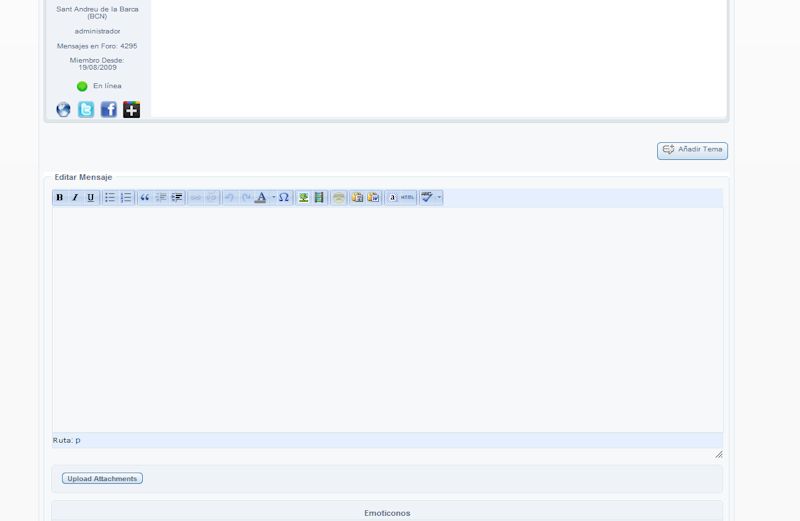
When I activate TinyMCE plugin I can't write in the text box... Just cant get the cursor on it. I've tried to do a search on the forum but I've been out of luck. Any advice??
My site's forum is http://www.fasebeta.net/forum
Please, excuse my english
Edit: I just discovered that, if I activate the Plugin I can write on new topics without a problem, but when I try to edit a topic... is when the text box doesn't show the cursor... so I can't write.
Offline
Ratgax said
When I activate TinyMCE plugin I can't write in the text box... Just cant get the cursor on it. I've tried to do a search on the forum but I've been out of luck. Any advice??
My site's forum is http://www.fasebeta.net/forum
Please, excuse my english
Edit: I just discovered that, if I activate the Plugin I can write on new topics without a problem, but when I try to edit or add a reply on
a topic... is when the text box doesn't show the cursor... so I can't write.
 Offline
This is almost certainly due to the fact that something on your site is loading the jQuery UI from the Google CDN and not the WordPress repository. Possibly your theme and if so, usually correctable
This codex article explains the actual problem: http://codex.simple-press.com/.....-conflict/
.
 |
YELLOW
SWORDFISH
|
 Offline
Hi! I have exactly the same problem, I can not put the cursor in the text box editor. It seems the reason is not theme that I use, because if set Twenty Elven, the editor does not work anyway. How can you fix this editor?
Another found that does not work File Uploader
Offline
You have EXACTLY that problem as described in the codex article in the link above. Worse in some respects as you are getting 2 copies of both the jQuery and jQuery UI libraries loaded - one good one from WP and one older one from the google CDN. Also some plugin to do with links is throwing a script error.
So - if it is not the theme then you have a plugin active that is very badly coded.
|
YELLOW
SWORDFISH
|
Offline
The PM plugin does not work either. Before I started to install sp-plugins everything worked perfectly.And now what do I do? It turns out that all plugins purchased by subscription will not work for me? I'm not a programmer and not be able to resolve the jQuery conflict.
I like my WP theme and I use I needed and tested plugins for WP:
Akismet (2.5.6)
All in One SEO Pack (1.6.15.2)
BackWPup (2.1.15)
Breadcrumb NavXT (4.2.0)
CodeStyling Localization (1.99.25)
Contact Form 7 (3.3.1)
Google XML Sitemaps (3.2.8)
Jigoshop (1.4.5)
Jigoshop - All in One SEO Pack (1.0)
Jigoshop Admin Bar Addition (1.8)
JigoShop Statistics (1.0.1)
RusToLat (0.3)
Simple:Press (5.1.4)
WordPress Importer (0.6)
Can you help me fix the problem with SP-plugins?
Offline
It is not a problem with SP plugins, It is a problem with either the WP theme or another WP plugin.
If you are indeed using the WP Twenty Eleven theme then the simpltest thing to do is to briefly deactivate the WP plugins one at a time until things start to work. Then - when we know the culprit - we can help you fix it.
I can say that as far as we know there is no problem with Akismet, AIOSEO Pack and Contact Form 7 but I am unfamiliar with the others you have installed.
|
YELLOW
SWORDFISH
|
Offline
So, I did everything as you said. And found two causes of the conflict:
1.Plagin Jigoshop, If if enabled, the SP-plugins do not work on my theme, or to the default "Twenty Eleven" too. If off, the SP-plugins work at default.
2.This means that my theme is also a source of conflict. When it enabled SP-plugins will not work even if you disable all WP-plugins.
I can not stop using Jigoshop, because I do shop, and the forum is the only optional on the site.Can you solve the problem of compatibility plugins and my theme+Jigoshop?
Offline
Well you could start by asking them to clean up their code and come into line with WP standards and the WP API. At least that is what I would start by doing. Failing their help then you need to identify the part of the code that is mis-loading the libraries. If they are unwilling to correct the code then at least they should be wiliing to tell you that.
|
YELLOW
SWORDFISH
|
Offline
I do not think that the developers of themes and Jigoshop will want to change of their code. They work well on WP and do not cause problems with WP standards and the WP API. I am afraid that if the correct code, and the theme and the store will stop working.
Can I make the forum to work independently from everything else? Somehow isolate the forum from the main template and Plagin Jigoshop?
 All RSS
1 Guest(s)