Support Forum

TinyMCE editor, Syntax Highlgihting problem

AG Adrian Gould
Adrian Gould
Member

Hi guys

I’ve just installed and activated SP, paid for the plugin subscription and grabbed the plugins ready to add, step by step.

My first steps were to add TinyMCe and the Syntax highlighter plugins.

That’s where it went all to crap…

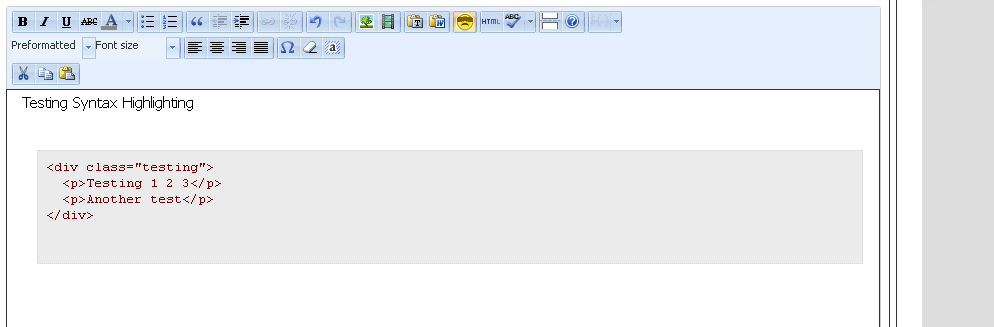
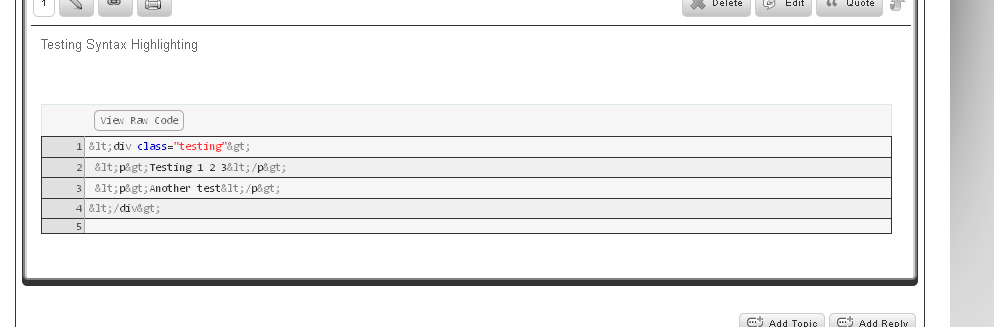
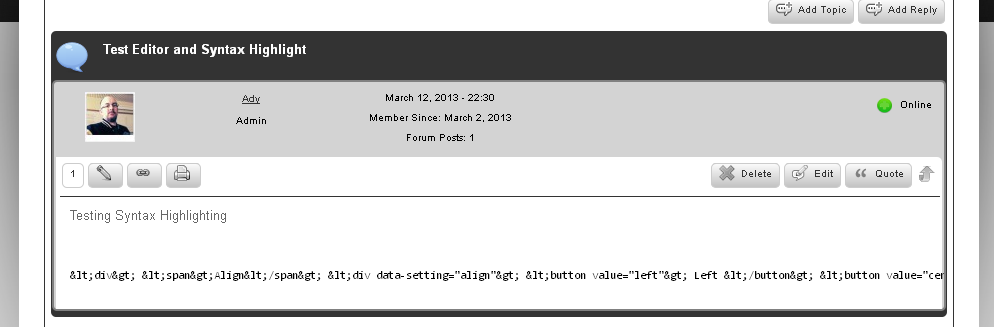
The Syntax highlighter does not function correctly:
sp-syntaxhighlightissues.png

sp-syntaxhighlightissues-1.pngsp-syntaxhighlightissues2.png

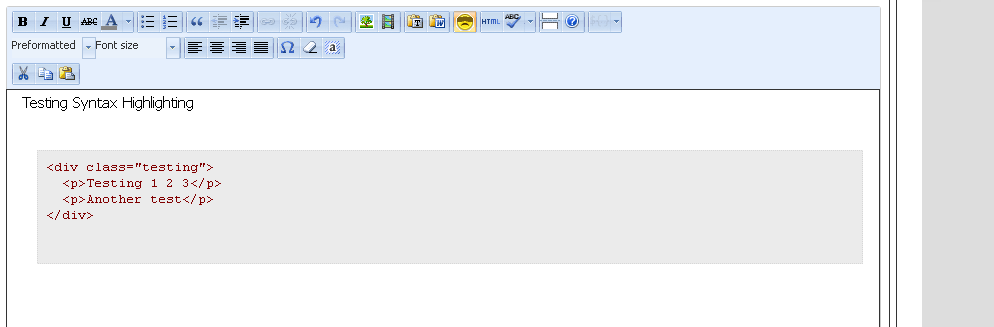
sp-syntaxhighlightissues-2.png

As you can see the plugin shows the code in a few incorrect manners:

  1. converts < and > etc to html entities
  2. puts all code onto one line -or-
  3. incorrectly displays

Getting code for syntax highlighting should not be as cumbersome as it is – possible option to select syntax highlighting system to make simpler (eg. Use of [shortcode][/shortcode] with pasted code between).


Cheers


10 Answers

New Answer

YS Yellow Swordfish
Yellow Swordfish
Member

That’s the way most syntax highlughting plugins work and this is, actually, one of the better WP plugins that we utilise.

let’s start with the tinyMCE editor. You seem to have an extra toolbar than we install as standard. Are you using a WP plugin that adds extra features to TinyMCE? If so what is it and what is it used for primarily? And if so, could you briefly deactivate it to see what effect it has on the SH plugin? Which, by the way, nobody else has reported any issues with.

AG Adrian Gould
Adrian Gould
Member

Hi YS

during my testing and debugging, I’d done the following:

  • Deactivated the Ultimate TinyMCE plugin
  • Deactivated the Crayon Syntax Highlighter plugin

After each deactivation, I tested the results and got the same thing.

I have had problems in the with syntax highlighting within WP itself… the only one I’ve managed to get working without a hitch has been Crayon…


AG Adrian Gould
Adrian Gould
Member

quick test of it on your forum…

<p>Fully featured but simple page-based forum</p> <div class="active second plugin-version-author-uri">
 Version 5.2.6 | By <a href="https://simple-press.com" title="Visit author homepage">
 Andy Staines & Steve Klasen
 </a> | <a href="https://simple-press.com" title="Visit plugin site">Visit plugin site</a>
</div>
This definitely has not screwed up the formatting of the code, so it is working for your forum...
I'll keep investigating.


AG Adrian Gould
Adrian Gould
Member

OK – it’s finally working…

I’ve been through and killed some unwanted plugins, deleted their code as well, plus left crayon and ultimate tinymce disabled.

My only problem now is that getting the code to insert correctly can be a little dodgy… highlight text and convert to code, results in missing PRE tags at times…

I’ll keep hunting ;)


Ady

AG Adrian Gould
Adrian Gould
Member

I still note that the HTML code when converted results in < and > (and other common entities) being displayed, rather than the correct < and > etc…

 There could still be a little bug…

In fact when I enter some code such as

<div>

   <p>Details</p>

</div>

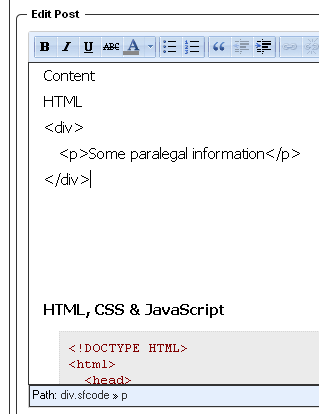
then syntax highlight… I get:

sp-code-prob-1.png

and not:

<div>

   <p>Details</p>

</div>


MP Mr Papa
Mr Papa
Member

sounds like you are on top of it…   holler if you need some help – we can try to help look at it…  do you have a link so we can look for obvious issues?

this instance of tinymce, btw, is simply the wp tinymce editor from the back end used n the front end…  the wp api provides for such usage…  Unfortunately, many wp plugins and themes that add stuff to tinymce do it incorrectly and simply assume it is only used when creating a post/page..  they often hook into the wrong action for their stuff, ie init…  when at worst, they would want to hook into admin_init… so things they expect, may not be loaded…

in your last, you allude to conversion to html entities… but its not clear from the text or image if you mean in tinymce itself or when syntax highlighted…

AG Adrian Gould
Adrian Gould
Member

I’m replying to you by PM, Mr P.

but I have noted that re-editing a post/reply causes the problem most commonly.

Ady

AG Adrian Gould
Adrian Gould
Member

in your last, you allude to conversion to html entities… but its not clear from the text or image if you mean in tinymce itself or when syntax highlighted…

I think it’s a combination of the two…

I create a post with code in it [especially HTML]

Submit the post,

Review the post and note an error

Edit the post, making changes to the content

Save the post, and when syntax is highlighted the > and < are replaced by their HTML entities.

It seems like a double whammy problem, TinyMCE tries to protect the content by using Entities, but on syntax highlight, the content is not re-interpreted as html symbols…

Even if we had an &amp; in the code, the & would be converted to the & and then added to the amp; which would display correctly as the entity/text &

<div>
<p>This & that</p>
</div>

 ahha – that did not <pre> tags added with the brush information…

try another:

<div>
   <p>Test & that</p>
</div>

 I had to manually edit the brush into that code…

Strange that the entities are not being double converted.

Wonder if it a TinyMCE version issue.


YS Yellow Swordfish
Yellow Swordfish
Member

1 – Let me have a try of this same snippet here:

<div>
    <p>Testing & that</p>
</div>

and see what happens when I save it…

2 – Good so far. Now editing it. Not sure what you changed but I am changing a word within the p tags…

3 – Seconf edit of post… Looks fine to me. So what did I miss?

MP Mr Papa
Mr Papa
Member

Andy, I think his point is if you look at the raw source for the code in the syntax highlighted code, its actually the encoded entity and not the less than sign, for example…

but not sure why it matters… they display the same… and if you copy or user the raw copy button, you will get the proper symbols and not the encoded entity…

or have I missed something?