Support Forum

Upload Attachments

EP Edu GONZALEZ PALOMINO
Edu GONZALEZ PALOMINO
Member

Hi. I’m having a problem with the FileUploader plugin.

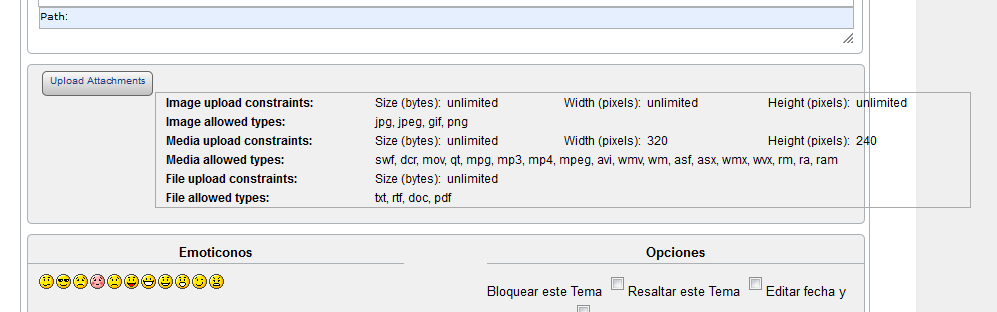
I see the “Upload Attachment” button, but when I push on it I see this:

plupload1.png

The SELECT FILES box isn’t displayed. I can see the upload info box only.

Is this a jquery.ui problem?

(Sorry for my poor English)

8 Answers

New Answer

MP Mr Papa
Mr Papa
Member

could be… have you seen this codex article:  http://codex.simple-press.com/codex/faq/troubleshooting/what-is-this-jquery-conflict/

If you give us a link to your site, we can look for any obvious issues…  that is some odd styling on the limits text too…  are you running latest sp and file uploader plugin?  and core sp theme or custom?

EP Edu GONZALEZ PALOMINO
Edu GONZALEZ PALOMINO
Member

Thanks Mr. Papa. I readed that article, but it seems not to be the case.

The styling on the limits is horrible, but i ‘ve been testing the FileUploader with other themes and the problem remains there.

I installed latest SimplePress and File Uploader versions. I re-installed the File Uploader plugin too.

I will give you a link and access to the site forum very soon. Let me ask the admin if i can send you the access credentials.

Thanks a lot.

YS Yellow Swordfish
Yellow Swordfish
Member

We can make a start with just a link and ask for credentials if needed.

The only reason the limits box text is offset to the right is because of the float on the button above it. When the proper selection area is created that will correct itself.

If you have discounted WP themes then it is probably in conflict with another plugin’s scripting that you have active..

MP Mr Papa
Mr Papa
Member

The issue is exactly like I said in post #2…

you optimizepress theme is not following the wp standards and loading its own version of jquery:

<script src=”http://ajax.googleapis.com/ajax/libs/jquery/1.3.2/jquery.min.js” type=”text/javascript”>

and its a very, very, very old version at that…  wp loads its version of jquery (which is 1.7.2)… so having two incompatible versions of jquery is a recipe for problems…

you need to correct the theme…  I seem to remember other threads on this theme – does it have an option for turning off the loading of its own jquery??  if not, find where its loaded in the theme and we can help correct it…

EP Edu GONZALEZ PALOMINO
Edu GONZALEZ PALOMINO
Member

Thank you very much Mr. Papa.

I missed that line you said. When I checked the jquery version, I only saw this line:

<script type=’text/javascript’ src=’http://xxxxxx/wp-includes/js/jquery/jquery.js?ver=1.7.2‘></script>

That’s why I thought It was OK. I will try to fix it and come back with good news!!!

Thanks again.

YS Yellow Swordfish
Yellow Swordfish
Member

We will await your post! Hope you figure it out.

EP Edu GONZALEZ PALOMINO
Edu GONZALEZ PALOMINO
Member

SOLVED!

You were right!!! Now it works fine!!!

The theme with this problem is OptimizePress, version 1.5

I didn’t find any configuration option to disable jquery loading from Google, so I opened the theme editor and searched for that “google jquery” line.

I found the line in a file called “header-myheader.php“, and replaced it with the one recommended by you (referencing the local file in the wp-include directory).

Now it looks like:

<script type=’text/javascript’ src=’http://mysite/wp-includes/js/jquery/jquery.js?ver=1.7.2′></script>
 

…and works fine!!!!

Thanks to both of you. Great support team! cool

MP Mr Papa
Mr Papa
Member

good news! glad its solved – thanks for the update!