Support Forum

Uploading an attachment that isn't embedded so it can be downloaded by user

TS Terri Stratton
Terri Stratton
Member

I’m pretty sure I’ve missed this, but I’ve been hunting and coming up empty.

We would like to know how we can upload files so that it’s not embedded, but showing as an attachment so that users can download it.  We do have Tiny MCE installed.  Our clients need to upload files for use by the members within the forum.  I know it should be possible as it works on this forum.  :)

Along with this is a question as how we add .zip as an allowable file type.

As always, thanks!
17 Answers

New Answer

TS Terri Stratton
Terri Stratton
Member

It was working correctly – just our oversight as it looked as though they were embedding until I looked at the preview and actually posted it.  Same with the zip.  Added it easily.

Sorry for the intrusion.  :)

TS Terri Stratton
Terri Stratton
Member

Well, darn it!  I spoke too soon.

It looks great on my side, but the user is getting a blank window.

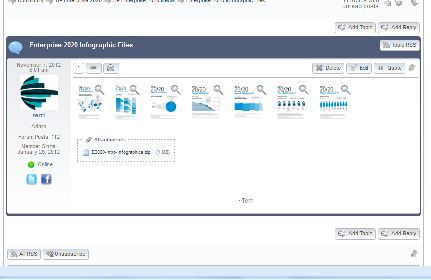
attachment.pngNo-attachment.jpg

YS Yellow Swordfish
Yellow Swordfish
Member

Have you granted them the permission to download attachments?

TS Terri Stratton
Terri Stratton
Member

They have perms – ‘Can download other file type attachments.’  Is there another setting somewhere that I haven’t found.

MP Mr Papa
Mr Papa
Member

what other permissions does the user have?  mainly talking about the view ones here…

looks like the post content is hidden…  we dont have any permission or facility for not displaying embedded images…

might be worth a quick resetting of auths cache on forum – toolbox – housekeeping…

TS Terri Stratton
Terri Stratton
Member

One of our mods just tried uploading a large zip file and now we can’t access the site at all.  Everything just sits and spins, including the admin page. If I try to go to the main dashboard, I get the connection reset message.

We’ve allowed zips and have uploaded them previously and there’s no size limit set due to the forums being private and used for client files.

RESOLVED – I think it was an issue with our host because I couldn’t log on to their site for about 15 minutes, then it just suddenly came up.  they said they had no issue, but could have just been a backup.

I’ve done the housekeeping, so we’ll see if that helps.

YS Yellow Swordfish
Yellow Swordfish
Member

Don’t forget that you may have no size limit set in the SP settings but there WILL be a size limit imposed by your php settings – i.e., imposed by your host. The usual default for file uploads is 2MB and you want that to be bigger you may have to ask your host to raise it.

TS Terri Stratton
Terri Stratton
Member

I’d asked them last night and was told that there is no limit set on their side.  Is it possible that there’s a setting in the code that our dev did?  I’ll check with him and see if he remembers.

YS Yellow Swordfish
Yellow Swordfish
Member

Check the php.ini setting for upload limits.

TS Terri Stratton
Terri Stratton
Member

Done, changed and verified.

From the dev –

the “upload_max_filesize” directive in your php.ini is showing 32MB , but I see when I go to the media upload that the upload limit is 8mb

the phpinfo is showing upload max filesize correctly, but post max size as 8mb. 

I just checked the media uploader and it now says the limit is 32MB

TS Terri Stratton
Terri Stratton
Member

Better, but not great.  Still can’t upload a larger file.

I just created a new zip and it went to 100%, then started uploading again and went to 99% again (same upload) when I got a ‘null’ error.  This is what shows on the forum error -Error 999 – Unknown server error (check image size – may be exhausting memory)

This is a different error than the one I got on the original one, although the size is about the same.  There may be a size limit elsewhere that he’s missed.

MP Mr Papa
Mr Papa
Member

reading back on this topic, not sure this was asked and wouldnt affect a moderator… did you check the upload allowed size on forum – components – uploads?

how big is the file?

also, in your php.ini file, check your post_max_size setting… if its too small, the file might need to be chunked (an option in file uploader)….

TS Terri Stratton
Terri Stratton
Member

Ever option for the 3 groups of files shows a 0 for the size limit.

This is what I’d posted from our dev.  Is there something else he’s missing?

From the dev –

the “upload_max_filesize” directive in your php.ini is showing 32MB , but I see when I go to the media upload that the upload limit is 8mb

the phpinfo is showing upload max filesize correctly, but post max size as 8mb. 

I just checked the media uploader and it now says the limit is 32MB