the color is a bluish grey, with blue lettering, I don’t have a single thing blue on my whole site, thank-you
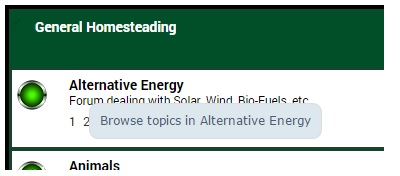


the color is a bluish grey, with blue lettering, I don’t have a single thing blue on my whole site, thank-you


I had the same problem the first time I tried, not easy to inspect something that floats under the cursor!
yeah, but I actually added it to my custom theme in the first place! 
It was this that I had to add per the codex
|
2
3
4
5
6
7
8
9
10
11
12
13
14
15
16
|
.ttip {
}body .ttip {
} |
the old custom theme seems to be working by the way
Good stuff. I was going to check after answering the waiting posts, glad to see all is working well!