Goodmorning everyone
Using the theme Reboot
I want to know how to change the gray background in white
and how do you see the greatest character because they are difficult to read
see attached photo
thank you


Goodmorning everyone
Using the theme Reboot
I want to know how to change the gray background in white
and how do you see the greatest character because they are difficult to read
see attached photo
thank you

Hey Ivan,
First off you can make any colour changes you like using a child theme which is quick and easy to set up, please see Creating a Child Theme, and to make it easier we also supply child theme frameworks for free in our store. Be sure to download the Reboot child theme framework and set it up as outlined in the Codex link I posted above.
You can also do this using the custom CSS overrides box under Forum > Themes > Custom CSS. Using this you can add anything you want to be loaded after your forum theme to override it. If you could point me to the exact element you want to change I can give you an example of how to change the colour that way – Whatever is easiest for you.
As to the second question, I’m really not sure what you mean and also don’t see an attached picture, please could you re-phrase, and re attach a picture?
IKE, thanks for the help, I did not realize that the image was not loaded
I would change the gray background of the boxes
and the characters are not very readable, I would like to make them bigger
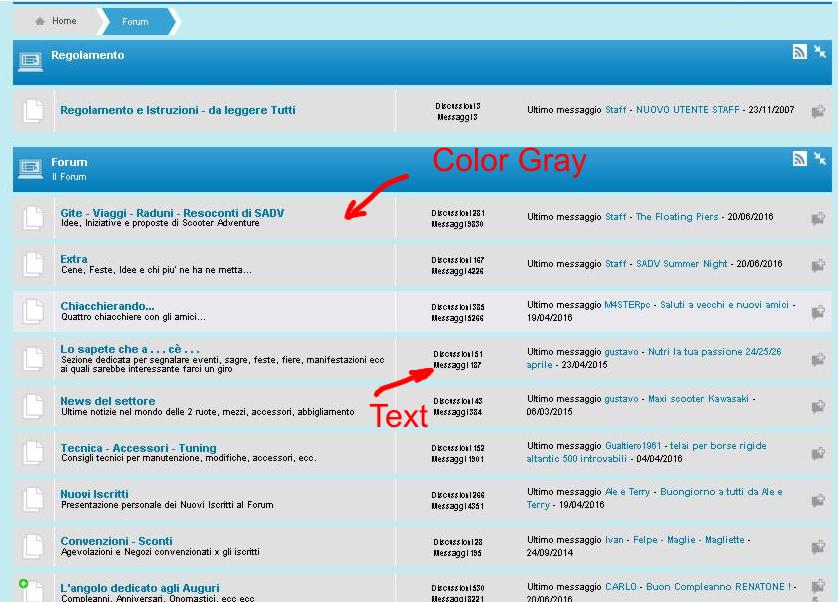


we can help you with the changes… a link to the site would be easiest so we can inspect the css…
have you decided if you are going to make a child theme? if so, would be best to have it prepped too…
what overlay is that?? asking because that theme doesnt seem to quite match our reboot overlays…but could be due to issues with WP theme…
in our reboot, the grey color is controlled by this class:
#spMainContainer .spGroupForumSection.spOdd, #spMainContainer .spForumTopicSection.spOdd, #spMainContainer .spMemberListSection.spOdd
you can set background to whatever you want… you will likely want to handle the hover background changes as well for this class:
#spMainContainer .spGroupForumSection.spOdd:hover, #spMainContainer .spForumTopicSection.spOdd:hover, #spMainContainer .spMemberListSection.spOdd:hover
as to the text,not sure what you want to change… just the text that one column? then adjust:
#spMainContainer .spColumnCount
I thank you for the help you are giving me
I only enabled Child Theme and entered in theme editor
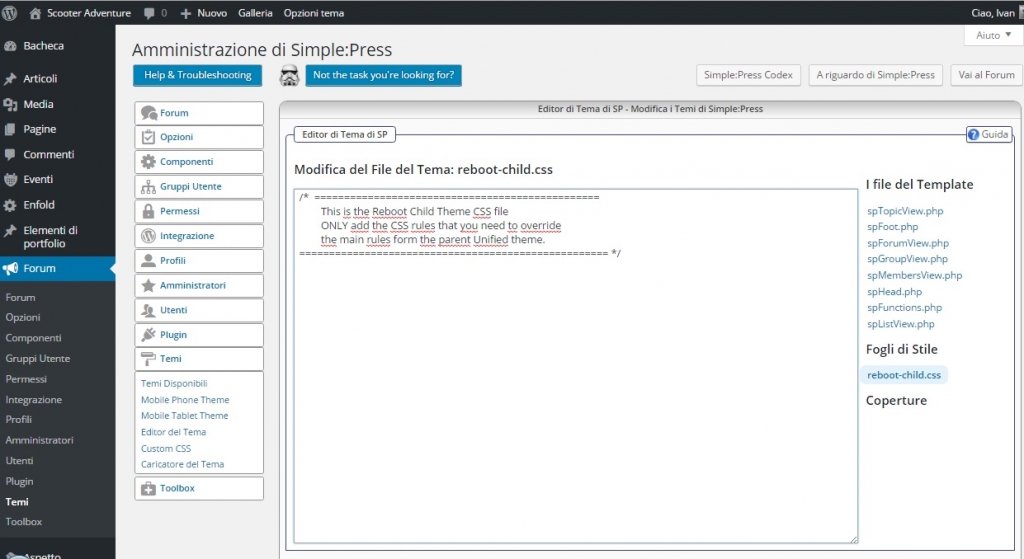
This attached is what I see from the control panel, but can not find what you wrote to me:
#spMainContainer .spGroupForumSection.spOdd, #spMainContainer .spForumTopicSection.spOdd, #spMainContainer .spMemberListSection.spOdd
this is the link to my forum I imported from PHPBB
scooteradventure.it/forum/
Today I’m resetting the entire WP graphics with Enfold theme
After this operation, the forum reads better, but the characters are still small, I would like to enlarge the font in the forum
and all the boxes you see in gray I would like to make them white

OK well getting the child theme in place is a good start.
For a start, you can change the font size throughout the forum by adding something like the following to the child theme’s CSS file (as you’ve pictured above):
#spMainContainer {
    font-size: 110%;
}
You can choose any size that suits your needs by changing the ‘110%;’ to something more suitable.
You can also change the font size of specific sections, for example the forum font might be fine but you may want to increase the post content font size. To do this you can do something like:
#spMainContainer .spPostContentSection {
    font-size: 110%;
}
Again, changing the 110% to your liking. You can do this for any section by using the browser tools to inspect a section to find it’s unique class and tag it on to the end of spMainContainer as I’ve done above, although if you want to know how just point us to the section you want to change and we can supply the CSS.
As for the grey sections, are we literally talking about everywhere the grey is used? If so you can change the ‘baseColor’ in the overlay. Start by checking what overlay you’re using from the theme selection panel then copy it from:
forum-themes > reboot > styles > overlays
Paste it in to the same folder structure in your child theme so:
forum-themes > yourchildtheme > styles > overlays
You can then change the ‘baseColor’ values at the top of the overlay, for example using the blue overlay, $baseColor7 is #E0E0E0 being grey. You can change that to white #FFFFFF.
You then need to select your custom overlay for your child theme from the theme selection panel in the admin.
If that’s not what you mean, please post a screenshot of the area of the forum you wish to turn grey to white.
Hope that helps!