
Support Forum

Custum overlay – border question

ME Meztli
Meztli
Member

Hi guys,

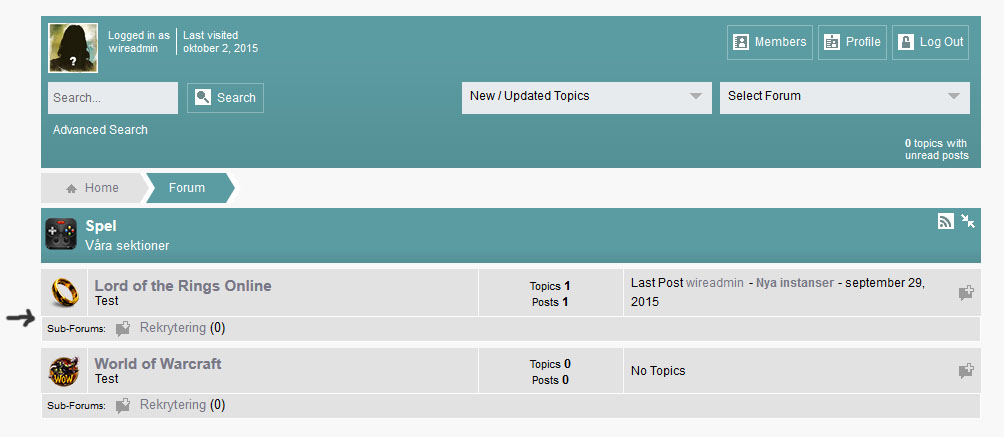
I started to create a costum overlay, but i can not find out how to change the color of the border that surrounds the subforum. Please take a look at the submited image.

Would appricate if you could point me in the right direction.

Thanks in advance!border.jpg
15 Answers

New Answer

IK Ike
Ike
Member

Hey Meztli,

You can remove the sub forum row border in the overlay by changing the value of $inRowSubsBorder. You can assign it an independent colour, or remove it completely using ‘none’.

Remember, if you ever need to find out what to change, inspect the element in your browser, copy the classes of what you want to change (in this case #spMainContainer .spInRowSubForums), find that in your stylesheet and it will show which variables from the overlay need changing.

Hope that helps!

ME Meztli
Meztli
Member

Thanks Ike.

I did accually inspect the element before posting, but i am not very familiar with the tool which is the reason i did not find $inRowSubsBorder.

Whish you a nice weekend!

ME Meztli
Meztli
Member

By the way, is it possible to make $inRowSubsBorder create only a top-border?

At the moment $inRowSubsBorder do circle the entire sub-row.

IK Ike
Ike
Member

Unfortunately not just using the overlay. The rule for the border is in the stylesheet, all that’s in the overly is the thickness and colour. If you wanted to change it, just add the following to your child themes stylesheet:

#spMainContainer .spInRowSubForums {
    border: none;
    border-top: <?php echo($inRowSubsBorder); ?>;
}

The reason it has border: none is because it’s overwriting the parent themes rules. Since border-top is a different rule to border altogether you’d end up running both border and border top. Border none get’s rid of the border and border-top re-applies it to the top.

ME Meztli
Meztli
Member

Thanks Ike,

I am fine with using the stylesheet as well.

The submited code does remove the borders, but it do not add a top-border.

IK Ike
Ike
Member

Strange, works just fine for me..

Have you already changed the value of $inRowSubsBorder to ‘none’ or a different colour?

ME Meztli
Meztli
Member

Ike said
Have you already changed the value of $inRowSubsBorder to ‘none’ or a different colour?

Yes in my child theme overlay i did change the color of $inRowSubsBorder. But before getting back to you, i removed my costum overlay and tried all of the original SP overlays and it´s not working with them either.

This is my current child theme css:

#spMainContainer {
    background: #F8F8F8;
}


#spMainContainer .spInRowSubForums {
    border: none;
    border-top: ;
}
IK Ike
Ike
Member

Sorry Meztli, been a while since I have used child themes obviously!

The standard child theme stylesheet is a .css file, so PHP won’t work. You can either specify a border with a hex colour like:

#spMainContainer .spInRowSubForums {
    border: none;
    border-top: 1px solid #FFFFFFF;
}

Or you can keep the variable as above and just rename your stylesheet to change the extension to .php i.e reboot-child.php..

Again, sorry for not realizing this yesterday!

ME Meztli
Meztli
Member

No problem Ike.

Hex colour is perfect for my needs, but i am afraid it´s still not working.

Take a look at my test site: http://support.sethwire.com/forum/

IK Ike
Ike
Member

It still shows .css as the child theme file, so what CSS have you used there?

ME Meztli
Meztli
Member
#spMainContainer .spInRowSubForums {     border: none;     border-top: 1px solid #FFFFFFF; }

I can try to change friskyttarna.css to friskyttarna.php and add the other code line if you want?

IK Ike
Ike
Member

Typo, my fault, try removing one of the F’s from the hex colour embarassed

ME Meztli
Meztli
Member

No problem.

I should have seen that my self. smile

Now it´s working. Thanks a lot for your help.

Much appricated!