
Support Forum

Post update layout issues

JI jim
jim
Member

Mr Papa said
@yellow-swordfish is working up a codex page for the changes (sorry for delay)..

Thanks! Looking forward to it, I’ve tried various things and there is still something clearly causing theme/layout problems in our forums.

do you use css or js caching?  perhaps try clearing it (though the update does clear)…

Cleared both css and js cache, yet problems persist.

and what are the display options you have on forum – integration – page and permalink…

Page is correct. Updated permalink in SP and WP with no affect. None of the other settings have changed. See screenshot:
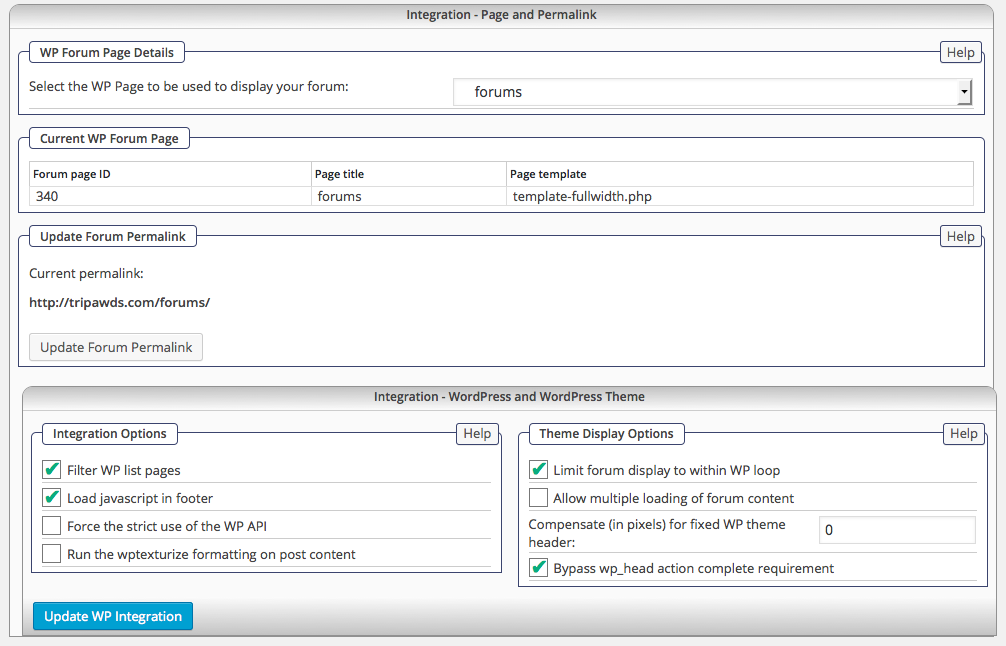
Screen-shot-2015-08-20-at-8.55.42-AM.pngI also noticed this warning in the error log this morning:

20 August 2015 8:45 am | spaErrWarning | 3 | phpfile: /simple-press/sp-api/sp-api-plugins.php
line: 589
function: filemtime
Warning | filemtime(): stat failed for wp-content/sp-resources/forum-themes/rebootkid/styles/rebootkid.css

Sorry to hijack this topic, but thanks in advance for any feedback!

18 Answers

New Answer

JI jim
jim
Member

Yellow Swordfish said
They are indeed now available…

Ok, I’ve made any applicable changes to my child theme templates, and the one overlay change. No need to edit the main style sheet as I don’t have a modified child version of that.

Yet, layout issues persist. The problem does not occur in the previous version we still have running on our test site.

And…if I activate the primary Reboot 1.04, i get the same styling issues. Any suggestions?

Please feel free to move this discussion to a new topic, or I can start a new thread…

JI jim
jim
Member

@yellow-swordfish or @mr-papa 

Please advise regarding any danger, and the process for rolling SP back to the previous version so I can get our live site working right and troubleshoot this further after updating or test site.

Thanks!

IK Ike
Ike
Member

Unfortunately some things I believe were WP dependant, so a previous version might not be the best option.

What happens if you disable CSS / JS caching?

JI jim
jim
Member

Ike said
What happens if you disable CSS / JS caching?

Thank you for moving this thread @ike 

After much troubleshooting, I believe I may have resolved the issue. Based on where the page broke, I deactivated all SP plugins, and the page loaded completely! Weird thing is, I discovered no specific conflict. After reactivating all my desired SP plugins, the forums are still loading and functioning.

So there was clearly some hiccup somewhere during the update.

Will report back id issues persist.

Thanks again!

IK Ike
Ike
Member

Very strange. Assuming you’d lost CSS it’s only you and one other who has reported a similar issue. At least you are back up and running, it’s possible Andy or Steve may have a few questions.

I may as well start – Where did the page break? Were you able to narrow it down to a specific plugin?

MP Mr Papa
Mr Papa
Member

quite odd… would indeed be interested in knowing what error/condition was causing an issue…  it has not been a general issue…

NJ Nancy Johnson
Nancy Johnson
Member

I am also having the problem. www.clangregor.com/forum-2

Formatting is gone, followed instructions in FAQ, cleared cache, no joy.

I’m going to try the disabling SP plugins solution.

Update: It didn’t work.

Please help me get my layout back!


Nancy

YS Yellow Swordfish
Yellow Swordfish
Member

Try this if you would please:

First stage – just so we can see of there is anything actually being reported about this can you:

  1. Go to the forum admin > toolbox > error log and clear the errors with the button at the bottom of the page.
  2. Load a forum page on the website.
  3. Go back to the eror log (reload the error log page). If there are any actual ‘Errors’ (pink) or ‘Warnings’ (yellow) can you please copy and paste them in this thread.

After that:

  1. Go to the forum admin > options > global settings.
  2. Over on the right hand side ensure that both the CSS and JS combined caches are NOT checked. And Update the panel.
  3. If possible look on your server at (default) the wp-content/sp-resources/forum-cache folder to make sure that there are NO files in it. If there ARE any files please delete them and let us know.
  4. Clear your browser cache and run the forum to see if that corrects things.
NJ Nancy Johnson
Nancy Johnson
Member

Followed all directions. No success.

error-log-1.PNG

Both the CSS and JS combined caches were not checked.
The wp-content/sp-resources/forum-cache folder had no files in it.

Cleared the cache. No change.
www.clangregor.com/forum-2

MP Mr Papa
Mr Papa
Member

looks like you have a permissions issue on your server… trying to access the stylesheet yields this error:

<!DOCTYPE HTML PUBLIC "-//IETF//DTD HTML 2.0//EN"> <html><head> <title>403 Forbidden</title> </head><body> <h1>Forbidden</h1> <p>You don't have permission to access /wp-content/sp-resources/forum-themes/default/styles/default.php on this server.</p> </body></html>

so since the stylesheet cannot be loaded, you get no styles...
YS Yellow Swordfish
Yellow Swordfish
Member

If you do not feel comfortable trying to fix up your sever permissions then I would ask your hosting support to look into it.

The bottom line is that ALL folders beneath the ‘wp-content’ folder require the same permissions. This would normally be 755 for folders and 644 for files.

It is also important that they check the UID and GUID (they will know what these are) on all items to ensure they also are set correctly to allow web access.

Perhaps the more important question is why your permissions here are incorrect. Your host support may have an answer. But getting things running again is more probably more of a priority.

JI jim
jim
Member

Mr Papa said
quite odd… would indeed be interested in knowing what error/condition was causing an issue…

Sorry for the late reply…

We recently moved all our sites to a new server with newer versions of PHP, cPanel, et.al. The broken style issue we had was clearly a permissions issue. WE actually had some legacy permissions from the old box set to 777 long ago that addressed past permissions problems. (I know, bad practice, but it was a quick fix long forgotten.)

On the new server, 777 perms for directories that include executables are not allowed, hence the server error preventing style files from loading. Changing permissions to 755 for /simple-press and /sp-resources did the trick!

I discovered the cause when discovering certain theme images were not loading. Upon investigation, I noticed and changed the folder permissions.

Hope this helps @macwebgrrl too. As Steve noted, there is clearly a permissions or access problem with the styles directory:

GET http://www.clangregor.com/wp-content/sp-resources/forum-themes/default/styles/default.php [HTTP/1.1 403 Forbidden 102ms]

Nancy, you may want to check your server logs if changing permissions does not fix the problem. If your server is running mod_security, there may also be a rule preventing access to the file(s). I had to whitelist various mod_sec rules on our new server to get everything running smoothly!

Thanks again…

JI jim
jim
Member

In fact, I might investigate (or ask your server manager/host) the mod_sec issue first Nancy. Looking at the actual request URL:

/wp-content/sp-resources/forum-themes/default/styles/default.php?overlay=ice&theme=default&device=desktop&ver=4.3

Reminds me of similar dynamic URLs that were throwing false positives for some of the rules in the comodo mod_sec rule set, which resulted in 403 (access forbidden) errors.

God luck!