Support Forum

Simple:Press 5.1 themes sneak peek

BR Brandon
Brandon
Member

One of the benefits of being a member of the support site is that you get a sneak peek at some of the updates that are coming out soon.

As an example highlite the search form entry with your cursor. Notice the little glow around the entry form? Something similar is coming to all themes and not just for the search form.

Not to mention other theme, layout and features that the support site may be using in final testing before release.

Like what? Click on reply to this post and you may notice a new button next to the “cancel’ one that allows you to preview before posting.

Also check out your profile page. Want to subscribe to specific forums? You just might find a way to do so there. wink

Lots of cool new stuff is coming out in version 5.1 and if a member you get a little sneak peek. Pretty cool if you ask me.

18 Answers

New Answer

CF Conrad_Farlow
Conrad_Farlow
Member

A preview button, I remember asking for that.

Yabba dabba dooooo

Works too wink

When can we expect see a release of V5.1?

YS Yellow Swordfish
Yellow Swordfish
Member

We don’t have a target release date yet.

CF Conrad_Farlow
Conrad_Farlow
Member

OK well can I get my hands on that preview code, it’s great!

MP Mr Papa
Mr Papa
Member

not yet…  its a new plugin and still working the kinks out testing…

CF Conrad_Farlow
Conrad_Farlow
Member

Another impatient request from me.

I have noticed that when you use the quotes in the tool bar that the tinymce editor shows the quoted text in a shaded box rather than just indented as before.

I had a quick look in bug tracker but nothing lept out at me.

Can I get my hands on that code, it would be very very helpful indeed!

Conrad

YS Yellow Swordfish
Yellow Swordfish
Member

It’s just an edit of the tinymce content.css file… you can make the same changes now… next release of tinymce will allow you to drop in the css file into your sp theme and have it used instead of the one with the plugin… but for now, just make the changes in the tinymce css file itself… style how you want…

CF Conrad_Farlow
Conrad_Farlow
Member

I want to basically replicate this in the tinymce content.css file.

#spMainContainer .spTopicPostSection .spPostSection .spPostContentSection .spPostContent blockquote {
    overflow: hidden;
    background: <?php echo($alt4BackGround); ?>;
    color: <?php echo($alt4Color); ?>;
    border: <?php echo($alt4Border); ?>;
    margin: 0 0 1em;
    padding: 1em 1em 0 1em;
    <?php echo($smallRadius); ?>
    font-weight: <?php echo($mainFontWeight); ?>;
}

So forgive my ignorance here, in order to recreate this do I merely replace the php functions with actual css declarations?

So for the background $alt4BackGround for my overlay is = ‘#ddcfa1’; so do I just declare the background like this?

blockquote {background: #ddcfa1; color: #333333; border: 1px solid #c6ba91.........etc}

Sorry but I have never derived css from a php file and I’m not sure if I can actually just use the php even. Hope you don’t mind me asking.

Conrad

MP Mr Papa
Mr Papa
Member

no, dont put php in there…  get the actual css from firebug or something…  you want straight css…

then you will need to clean up the element descriptor a bit…  for example, instead of

#spMainContainer .spTopicPostSection .spPostSection .spPostContentSection .spPostContent blockquote {

just use

blockquote {

CF Conrad_Farlow
Conrad_Farlow
Member

Hi all I added the following code:

blockquote {
        -webkit-gradientborder-radius: 5px; 
        border-radius: 5px;
        overflow: hidden;
        background: #ddcfa1;
        color:#333333;
        border: 1px solid #c6ba91;
        margin: 0 0 1em;
        padding: 1em 1em 0 1em;
        font-weight: normal;
}

to the file

…./wp-content/sp-resources/forum-plugins/tinymce-richtext/tinymce/themes/advanced/skins/default/content.css

It appears not to work at all, do I have the wrong content.css?

Conrad

YS Yellow Swordfish
Yellow Swordfish
Member

SP doesn’t use the ‘default’ tinymce skin. It uses the ok something something one. But the default has to be there for image sharing.

CF Conrad_Farlow
Conrad_Farlow
Member

Edited …./wp-content/sp-resources/forum-plugins/tinymce-richtext/tinymce/themes/advanced/skins/o2k7/content.css

Still no joy, I put it here what is wrong, the syntax is OK I think.

/* SP CHANGED
body, td, pre {color:#000; font-family:Verdana, Arial, Helvetica, sans-serif; font-size:10px; margin:8px;}
body {background:#FFF;}
*/
body, td, pre, p {background:#FFF; color:#000; font-family:Tahoma, Helvetica, Arial, Verdana, sans-serif; font-size:15px; margin:3px 8px 0px 0px; padding: 0;}
p {padding-bottom: 5px;}
blockquote {
        -webkit-gradientborder-radius: 5px; 
        border-radius: 5px;
        overflow: hidden;
        background: #ddcfa1;
        color:#333333;
        border: 1px solid #c6ba91;
        margin: 0 0 1em;
        padding: 1em 1em 0 1em;
        font-weight: normal;
}
MP Mr Papa
Mr Papa
Member

what are those funky characters?  if real, they will cause the css to not work…

have you verified that the css is on server? access it from web…  and make sure browser cache cleared…

CF Conrad_Farlow
Conrad_Farlow
Member

Those funky characters seem to be little boxes showing the colour specified in the css and part of the syntax highlighting.

The tip to check that the code was actually there was useful there was a write permission issue.

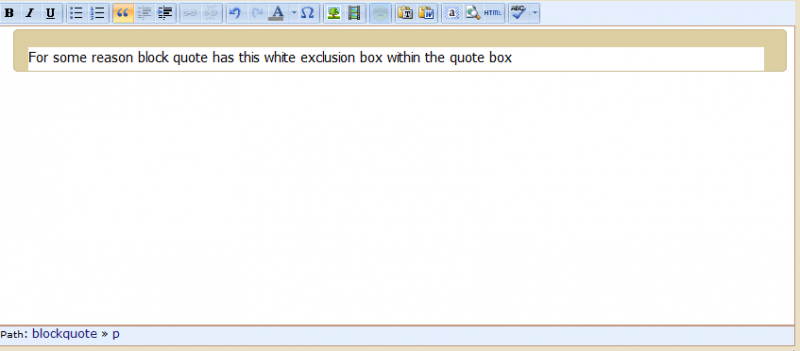
So now I have this:

blockquote_in_deitor.png


Here is the code, should we move this to a more suitable topic title? I didn’t expect this to be a long job confused


/* SP CHANGED
body, td, pre {color:#000; font-family:Verdana, Arial, Helvetica, sans-serif; font-size:10px; margin:8px;}
body {background:#FFF;}
*/
body, td, pre, p {background:#FFF; color:#000; font-family:Tahoma, Helvetica, Arial, Verdana, sans-serif; font-size:15px; margin:3px 8px 0px 0px; padding: 0;}
p {padding-bottom: 5px;}
.mceContentBody { margin-left:15px; padding-left:0;}
blockquote {
        -webkit-gradientborder-radius: 5px; 
        border-radius: 5px;
        overflow: hidden;
        background: #FFF;
        color:#333333;
        border: 1px solid #c6ba91;
        margin: 0 0 1em;
        padding: 1em 1em 0 1em;
        font-weight: normal;
}
/* end of SP changes */

body.mceForceColors {background:#FFF; color:#000;}
h1 {font-size: 2em}
h2 {font-size: 1.5em}
h3 {font-size: 1.17em}
h4 {font-size: 1em}
h5 {font-size: .83em}
h6 {font-size: .75em}
.mceItemTable, .mceItemTable td, .mceItemTable th, .mceItemTable caption, .mceItemVisualAid {border: 1px dashed #BBB;}
a.mceItemAnchor {display:inline-block; width:11px !important; height:11px  !important; background:url(../default/img/items.gif) no-repeat 0 0;}
span.mceItemNbsp {background: #DDD}
td.mceSelected, th.mceSelected {background-color:#3399ff !important}

/* SP CHANGED
img {border:0;}
*/
img {border:0; padding: 1px 2px;}
/* end of SP changes */

body, td, pre, p {background:#FFF; color:#000; font-family:Tahoma, Helvetica, Arial, Verdana, sans-serif; font-size:15px; margin:3px 8px 0px 0px; padding: 0;}
p {padding-bottom: 5px;}

table {cursor:default}
table td, table th {cursor:text}
ins {border-bottom:1px solid green; text-decoration: none; color:green}
del {color:red; text-decoration:line-through}
cite {border-bottom:1px dashed blue}
acronym {border-bottom:1px dotted #CCC; cursor:help}
abbr {border-bottom:1px dashed #CCC; cursor:help}

/* IE */
* html body {
scrollbar-3dlight-color:#F0F0EE;
scrollbar-arrow-color:#676662;
scrollbar-base-color:#F0F0EE;
scrollbar-darkshadow-color:#DDD;
scrollbar-face-color:#E0E0DD;
scrollbar-highlight-color:#F0F0EE;
scrollbar-shadow-color:#F0F0EE;
scrollbar-track-color:#F5F5F5;
}

img:-moz-broken {-moz-force-broken-image-icon:1; width:24px; height:24px}
font[face=mceinline] {font-family:inherit !important}
*[contentEditable]:focus {outline:0}

.mceItemMedia {border:1px dotted #cc0000; background-position:center; background-repeat:no-repeat; background-color:#ffffcc}
.mceItemShockWave {background-image:url(../../img/shockwave.gif)}
.mceItemFlash {background-image:url(../../img/flash.gif)}
.mceItemQuickTime {background-image:url(../../img/quicktime.gif)}
.mceItemWindowsMedia {background-image:url(../../img/windowsmedia.gif)}
.mceItemRealMedia {background-image:url(../../img/realmedia.gif)}
.mceItemVideo {background-image:url(../../img/video.gif)}
.mceItemAudio {background-image:url(../../img/video.gif)}
.mceItemIframe {background-image:url(../../img/iframe.gif)}
.mcePageBreak {display:block;border:0;width:100%;height:12px;border-top:1px dotted #ccc;margin-top:15px;background:#fff url(../../img/pagebreak.gif) no-repeat center top;}

CF Conrad_Farlow
Conrad_Farlow
Member

It was a cache issue in firefox showing a previous version with a different background colour.

I would have liked to have a different background colour for blockquote but obviously I can’t accept the bleed through.

How do I make the background specified in the blockquote css dominate the background of the editor body? I know at the moment that they are both the same but that is to avoid what you can see in the image in the above quote.

Conrad