Support Forum

Unexpected Actions Menu Behavior with Reboot on Mobile

JI jim
jim
Member

Hiya! I’ve been troubleshooting this frustrating issue for some time now, and am just stumped.

Reboot v.1.0.8
SimplePress v.5.6.4 (Build: 13880)

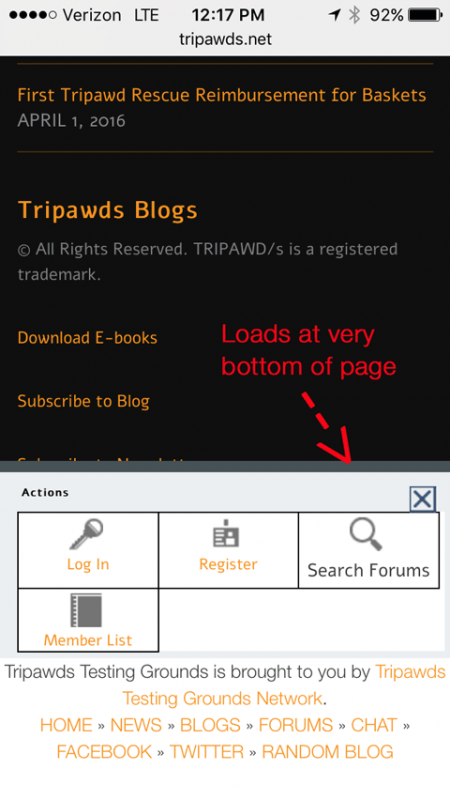
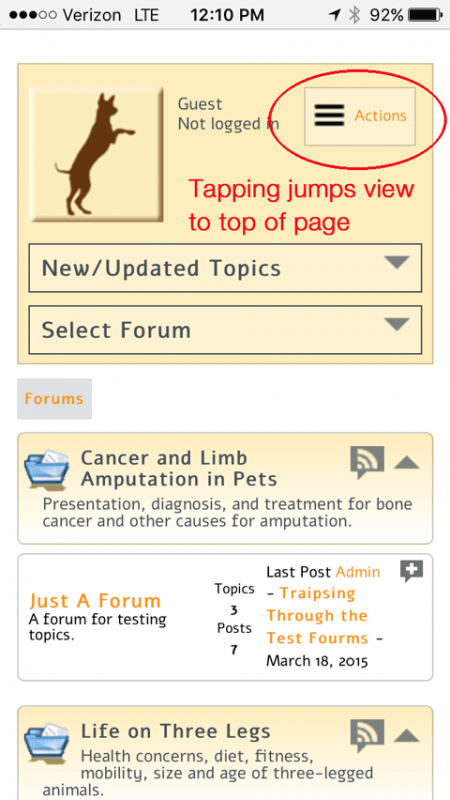
Clicking the Actions Menu on a mobile device jumps the view to the top of the page. Scrolling all the way down the page reveals that the pop-up with the options has loaded down in the footer.

If the Actions button is supposed to pop-up the options, I would expect it should do so within the user’s view—not jump the view to the top, and load the options at the bottom.

Screenshots from iPhone are attached, the issue occurs in Safari and Chrome. Using Chrome, Safari, and Firefox dev tools to emulate the user agent allowed me to replicate the issue on desktop browsers, but no errors hint at the cause.

FYI: I have ruled out any SP or WP plugin conflict.

I found what I think is the code for the Actions button (below), but I’m not sure where to go from here. I’ve opened up our dev install at http://tripawds.net/forums for public viewing to help test, but the issue is really nagging me on our live site at http://tripawds.com/forums

Anyone care to try and replicate this for me? Any help identifying the cause and implementing a fix is greatly appreciated. Thanks!

spheadMobile.php:109-123
(I am using a Reboot Child theme, but have not edited this file.)

        sp_MobileMenuStart('tagClass=spButton spRight&tagId=spHeadActions', __sp('Actions'));

            sp_LogInOutButton('tagClass=spControl&mobileMenu=1', __sp('Log In'), __sp('Log Out'));
            sp_RegisterButton('tagClass=spControl&mobileMenu=1', __sp('Register'));
            sp_MarkForumRead('tagClass=spControl&mobileMenu=1', __sp('Mark forum read'), __sp('Mark all topics in this forum read'));
            sp_UnreadPostsInfo('tagClass=spControl&mobileMenu=1', __sp('Unread Posts (%COUNT% topics)'), '', __sp('Mark all topics as read'));
            if (function_exists('sp_PmInboxButton')) sp_PmInboxButton('tagClass=spControl&mobileMenu=1', __sp('Inbox:'), __sp('Go to PM inbox'));
            sp_MobileMenuSearch('', __sp('Search Forums'));
            sp_ProfileEditButton('tagClass=spControl&mobileMenu=1', __sp('Your Profile'));
            sp_MemberButton('tagClass=spControl&mobileMenu=1', __sp('Member List'));
            if (function_exists('sp_SubscriptionsReviewButton')) sp_SubscriptionsReviewButton('tagClass=spControl&mobileMenu=1', __sp('Unread Subscriptions (%COUNT% topics)'), __sp('Review subscribed topics'));
            if (function_exists('sp_WatchesReviewButton')) sp_WatchesReviewButton('tagClass=spControl&mobileMenu=1', __sp('Unread Watches (%COUNT% topics)'), __sp('Review watched topics'));
            if (function_exists('sp_RankInfo')) sp_RankInfo('tagClass=spControl&mobileMenu=1', 'Ranks Information', __sp('Display Forum Ranks Information'));

        sp_MobileMenuEnd('listTagId=spHeadActions&tagClass=spOptionsList spRight');
sp-actions.pngsp-options.png

34 Answers

New Answer

MP Mr Papa
Mr Papa
Member

The page shouldnt scroll at all…  the slider (not technically a popup), slides up and is attached to the bottom…

And no, cannot replicate it…  does it do it here for you?

so need more information… what device?  what os?  and what browser?

JI jim
jim
Member

Mr Papa said no, cannot replicate it…

Sigh…

does it do it here for you?

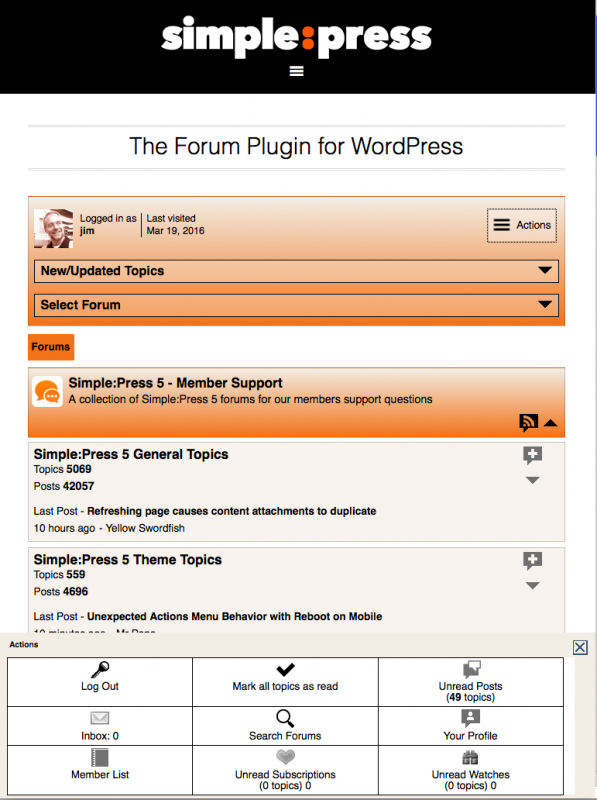
Yes. Options slide in from bottom and stick there. See screenshot below using iPhone User Agent emulator in Firefox is attached. I also created this screencast of the issue in action.

… what device? what os? and what browser?

iPhone 6s (And Desktop US emulators) iOS 9.3.1 Safari & Chome on iPhone Safari, Chome & Firefox on desktop with UA emulation

Screen-shot-2016-04-09-at-1.27.21-PM.png
MP Mr Papa
Mr Papa
Member

cant seem to watch the video… unsupported encoding…

but are you saying it works properly here for you?  I think you are…

my guess after a quick look at your site is that its related to all the content you have located above the forum… but just a guess…

the action for the actions button seems to be fixed at # which normally wont cause the big jump you are seeing…  changing it to #spMainContainer instead seems to make it work….  but more testing needed…  might be better to use some jquery/js and stop the action all together…

JI jim
jim
Member

Mr Papa said
… are you saying it works properly here for you?  

No, I’m saying I get the exact same behavior here.

This video works for me:

https://www.dropbox.com/s/xcy07vbgd9f8ziy/SP_Actions-Jump.mp4?dl=0

JI jim
jim
Member

Mr Papa said
actions button seems to be fixed at # which normally wont cause the big jump you are seeing…  changing it to #spMainContainer instead seems to make it work….

I could do that, but what about the options at the bottom, instead of in view?

MP Mr Papa
Mr Papa
Member

you missed the point… it shouldnt jump, so the actions would be at the bottom…

I could replicate on your site, but not here (our site works fine)…  with my iphone 6…   could replicate on my test site by adding content above the forum like your site…

the temp fix I posted fixes your site and my test site…  but release next week should have a permanent fix in it for you…

MP Mr Papa
Mr Papa
Member

btw… your video in post #5 is exactly how its supposed to work… the slider should open at the bottom like that… that is the design and implementation…   guess I dont understant the issue?  on  your site, it jumps to top of page, so the slider is no longer seen…

JI jim
jim
Member

Mr Papa said
…release next week should have a permanent fix in it for you…

Excellent! Thanks so much.

the temp fix I posted fixes your site and my test site…

action for the actions button seems to be fixed at # which normally wont cause the big jump you are seeing…  changing it to #spMainContainer instead seems to make it work…

I guess I just don’t know what line of code in which file to edit for this.

Thanks again!

JI jim
jim
Member

Mr Papa said
… the slider should open at the bottom like that…

So close…

After updating to SP 5.6.5, I no longer experience the jump to #top when clicking the Actions button. Yay!

The Actions pop-up/slider, however, still slides up from the very bottom of the page, not from the bottom of the viewable area. Instead of sliding up from the bottom of the browser window in plain view, I have to scroll all the way down to the bottom of all page content to discover it has slid up at the very bottom, and stuck there.

The screenshot below shows the slider stuck at the bottom, after scrolling all the way down.

FYI: I cannot replicate the issue on this site. In these forums, the Actions slide up within the current view as expected.

What might cause this behavior so I can troubleshoot further. I have once again ruled out any plugin conflict.

So…progress is good, but the issue on our site is only half fixed! cool

IMG_5680.PNG
IK Ike
Ike
Member

I’ve been looking at it for well over half an hour and can’t see a way within the browser console to get the menu to scroll with the page.

There are a couple of things I guess could be interfering, I’ve noticed that it renders the SP actions popup at the very bottom of your page footer, but below that is some extra stuff, and also there is an arrow that takes you to the top of the page that scrolls with the page perfectly.

Just ideas to look at, sorry I can’t be more helpful but I will take another look later after a break!

JI jim
jim
Member

Ike said
I’ve noticed that it renders the SP actions popup at the very bottom of your page footer…

Yes, but here it opens at the bottom of the viewable browser window as expected. confused

…but below that is some extra stuff, and also there is an arrow that takes you to the top of the page that scrolls with the page perfectly.

I did test this with both of those items (global footer content and scroll-up link) turned off. Tools still slid up from the bottom of the page, not bottom of the window.

Thanks for taking a look! Any other suggestions for further troubleshooting gladly welomed.

JI jim
jim
Member

Interesting… iPhone UA emulators in Chrome and Firefox on may desktop (MacBook) show the expected behavior, with the tools sliding in at the bottom of the viewable browser window, yet on my iPhone 6, they still stick at the boot in the footer, in both Safari and Chrome…. confused

OK. Just confirmed it’s the theme. Activated Twenty Fourteen on our dev install, and the slider shows within the window. Bummer. Any tips for making this work with our theme? Is there some function or CSS going on that I might be able to hack in and get this working?

Any thoughts are certainly appreciated, but I do understand this may reach beyond the scope of support here. Thanks again!

YS Yellow Swordfish
Yellow Swordfish
Member

Pretty much stumped at the moment!
What WP theme are you using? If I can get hold of a copy I might be able to work out what the issue is… although it’s a long shot.