
Not sure what might be wrong. I am paid through into November. Thank you!


Not sure what might be wrong. I am paid through into November. Thank you!


Hi:
You need to add your license key to the FORUM->TOOLBOX->LICENSE SCREEN. You can get your license key from your ACCOUNT page on our site.
Thanks.
Thanks. The payment is there but there is no licence key. Perhaps this is because I paid for SP to upgrade my forum?
Activated the licence but got an error updating:
An error occurred while updating Admin Bar: Update package not available
hmmmm….no idea why you would be getting that message. However, I reset the download data for that item on our site so please give it another shot.
If that doesn’t work you can always download it directly from our site. Just login and then go to the product page for the admin bar – you should see a button allowing you to download it.
Thanks.
Sorry I’ve been slow to get back to you. The reset did not help but I was able to download and install the plugin, successfully. Thank you!
I am having this problem again with “subscriptions”. I realize I should be able to download and install manually but every time I have to do this, I have to contact my webhost to increase upload limit. I can’t leave it high because users are allowed to upload to my site directly. Basically, this is a pain. And as you can see, my licence is current.
I realize I have not paid for support but I did pay simplepress to change my forum over. I have never received the updates normally. I think this maybe your error to fix?
Thanks.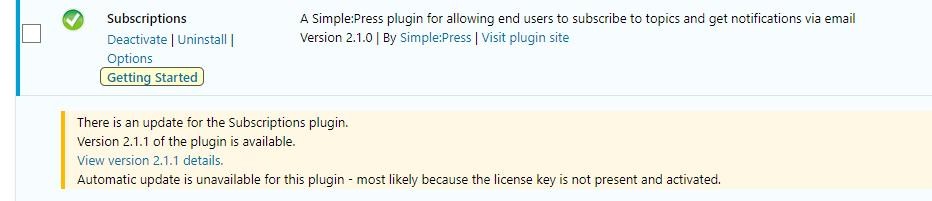
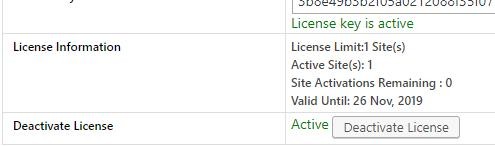


So, the license key is added to the subscriptions plugin on the license page and is activated but you’re still getting the message that you cannot update? If so, what happens if you go to the licensing screen and click the CHECK FOR UPDATES NOW button? That should recheck your license key.
Thanks.
Okay, that solved it. Thank you!
The key was entered in the main area / forum. It was not entered in any of the plugin modules. That should be part of your upgrade service or at least, let the customer know this is necessary.
But I’m a satisfied customer. Cutting and pasting now. 🙂
Great, glad to hear that you’re all set.
Thanks.
PS: The reason the license key wasn’t added in during your upgrade service is because they weren’t a feature in the initial 6.0 release. They were added in version 6.1 which was only released after your upgrade service was performed.