Support Forum

Paid Memberships Plugin?

BL Bluedrake42
Bluedrake42
Member

So I’ve just realized that your Simple:Press forums have an integrated paid memberships plugin… is this available for purchase? We are wanting to do something similar for our community (and we actually were for our old Xenforo forums) and we WERE looking at using a WordPress plugin, but if Simple:Press already has this functionality… could we just use that instead?

16 Answers

New Answer

IK Ike
Ike
Member

Sorry to disappoint but we don’t offer any kind of membership plugin paid or otherwise. We use a combination of Easy Digital Downloads and Restrict Content Pro here.

Since there are so many options out there for good membership plugins and because Simple:Press doesn’t have unique users (just WordPress users) it makes sense to leave that one down to WordPress!

BL Bluedrake42
Bluedrake42
Member

Ah okay I see!

How do you sync the user groups with the paid membership? Because I see it says my membership level on the forums here

YS Yellow Swordfish
Yellow Swordfish
Member

https://simple-press.com/documentation/codex/faq/how-to/how-to-configure-simple-press-with-membership-plugin/

This is a link to an FAQ on using and configuring a membership plugin with SP. It is geared towards the WishList Member plugin but the principle is the same with all of them. The tie up with SP is performed via WP roles mapped to SP user groups. When set up this can be a completely automatic mechanism.

using a membership plugin that supports Wp roles is best – which WishList does not! – as it just makes things simpler.

BL Bluedrake42
Bluedrake42
Member

So this is interesting, does this only synchronize users when I manually tell it to “map users”?

If so does that mean every time someone is given a user group in WP, do I need to manually tell SP to synchronize those roles to its user groups? If that’s the case I may have to shy away from that =/ I don’t want to have to refresh our user groups every day

I’ve been playing around with the user mapping, and testing it… and that seems to be the case. The only time any roles are ever reflected is when I manually tell it to Map Users. Any way to automate that?

IK Ike
Ike
Member

I’m not sure I follow there, once a WP role is mapped to an SP user group any new members of the WP role will automatically become part of that SP user group. You don’t need to refresh anything as it’s automated as Andy said.

Sorry, if I’m getting the wrong end of the stick there please explain further..

YS Yellow Swordfish
Yellow Swordfish
Member

As Ike says.

The only time this might not work is if you are using some sort of membership plugin that does not utilise the proper and standard API and does not fire all of the correct and required action ‘hooks’.

Rare, but we have seen it before – although not for a long time and I honestly do not recall the name of the problem plugin now,

BL Bluedrake42
Bluedrake42
Member

Ah… okay.

Well in that case its just straight up not working then haha

I have all the users mapped, but whenever I make a change to a user’s WP roles its not reflected in SP until I manually press “Map Users.”

I’ve tested this back and forth a few times now. The only thing I’m using is a WP “Members” plugin to assign multiple roles, and create/delete others. I don’t know why that would affect things.

Here’s the plugin I’m using: https://wordpress.org/plugins/members/

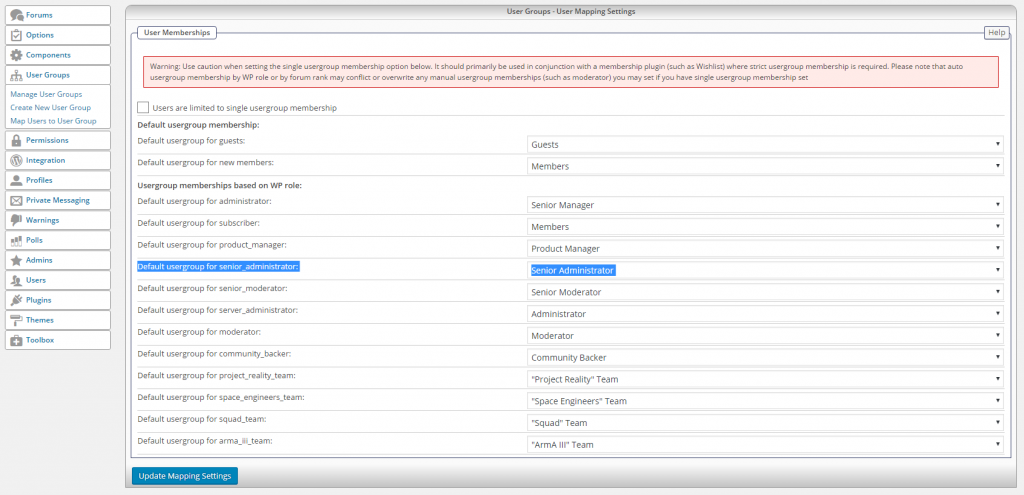
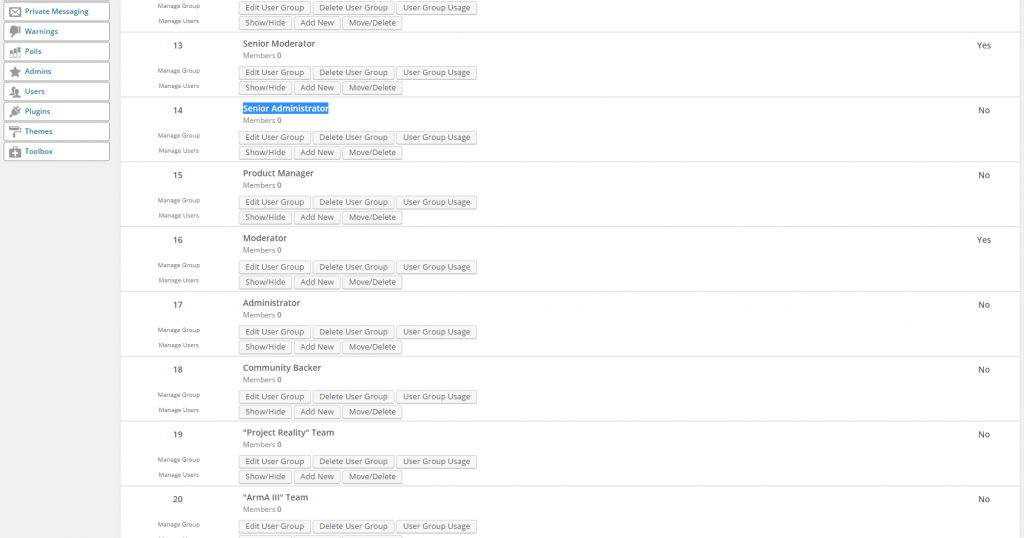
Here’s some screenshots showing the issue I’m having. For example I have one user who has “Senior Administrator” and “Project Reality Team” roles in WP, and they’re mapped correctly in SP, but they’re not updating in SP user groups.

I COULD press “Map Users” in the map users SP menu, but I have to press that every time in order for users to sync properly. Otherwise nothing happens automatically.

Screenshot-2016-01-22-13.46.14-1.png
Screenshot-2016-01-22-13.47.05-1.pngScreenshot-2016-01-22-13.47.17.png

BL Bluedrake42
Bluedrake42
Member

If you all want, I could give you admin on my website and you could have a look yourself… I’m not sure if you all have the time to do something like that however. I’m sure there are others who need assistance.

BL Bluedrake42
Bluedrake42
Member

Yellow Swordfish said
As Ike says.

The only time this might not work is if you are using some sort of membership plugin that does not utilise the proper and standard API and does not fire all of the correct and required action ‘hooks’.

Rare, but we have seen it before – although not for a long time and I honestly do not recall the name of the problem plugin now,

Ah okay, so that probably is the issue then. Do you know of any WP role management plugin that allows me to have multiple roles for a single user? That’s rather important in our community.

YS Yellow Swordfish
Yellow Swordfish
Member

Hang on… is this user group a group of admins? And by that I mean users who are assigned an SP admin role? If so then they don’t have a ‘real’ user group as their permissions are global and blanket. and it makes no difference what WP role they have as that has no relevance. So is this the case?

BL Bluedrake42
Bluedrake42
Member

No no no sorry I should have clarified that. Yeah I’m aware of the admin user group issue.

A Senior Administrator in our community isn’t a forum administrator, nor do they have any admin permission on the website. They are Senior Administrators for our game servers. They have permissions on a completely different platform, our website is only where they coordinate (our Senior Managers are the forum admins)

YS Yellow Swordfish
Yellow Swordfish
Member

OK. .So let’s backtrack. I may be wrong here but I wasn’t aware that WordPress allowed for multiple roles for a single user. It’s natural and standard state as I understand it is one user/one role. So what plugin are you using that allows for this? And perhaps you need to talk to the plugin authors about firing the right hooks.

BL Bluedrake42
Bluedrake42
Member

Here’s the plugin I’m using: https://wordpress.org/plugins/members/

and here’s the crazy thing though, if I actually press map users… it actually does work with multiple roles. Like for instance that guy had Senior Administrator AND Project Reality Team, and while it doesn’t happen automatically… if I press the map users butting, it does actually add him to both groups on the SP forums.

YS Yellow Swordfish
Yellow Swordfish
Member

So – a few things first. SP allows for users to belong to multiple user groups (although you can turn that off).

When you use the explicit ‘map users to user group option’ – SP will trawl through the users and the roles they are associated with and implement the mapping rules you have set. This is always going work.

I do not know how fully you understand WP action and filter hooks so excuse me if I cover ground you are familiar with. When an action occurs – such as a user is assigned to a  WP role – an action is triggered. Think of it like a message being broadcast and all your plugins can pick up that message and they know if they have to do something in response.

SP knows it might have to adapt the users role/user group mappings on a WP role change or assignment. But only if that message is sent.

When a plugin takes over responsibility for a task then it is supposed to trigger the same actions – i.e., send out the same messages for plugins to pick up. This is where some plugins have been seen to go astray. They fail to replicate standard WP API behaviour as they are supposed to. The net result is, of course, that plugins like SP do not get the message and hence – do not respond as expected.

I am, of course, merely speculating at this juncture. But this is, as I have said above, something we have encountered before wth a membership plugin and it is possible that this was the one – I just don’t recall the name and frankly, searching for the term ‘Members’ through the forum topics is going to yield a very high result count!

Which lead to my suggestion that perhaps asking the plugin authors if they do correctly call all of the WP filter and action hooks as expected – might be a good idea. Especially in the area of role assignment and role change.