Support Forum

TinyMCE plugin issues when using Internet Explorer 8 or 9

ES Ellen Shuman
Ellen Shuman
Member

Hello Everyone,

There is an issue present in the TinyMCE plugin. Performing tests on my own forum and the public demo forum (http://demo.simple-press.com/forum/) provided by simple-press, I have discovered the script errors below, which at present seem to be causing a serious side-effect in Internet Explorer :

————————

Webpage error details

User Agent: Mozilla/4.0 (compatible; MSIE 8.0; Windows NT 5.1; Trident/4.0; InfoPath.2; .NET CLR 1.1.4322; .NET CLR 2.0.50727; .NET CLR 3.0.04506.30; .NET CLR 3.0.04506.648; OfficeLiveConnector.1.3; OfficeLivePatch.0.0; .NET CLR 3.0.4506.2152; .NET CLR 3.5.30729; .NET4.0C; .NET4.0E; IPH 1.1.21.4019)
Timestamp: Fri, 22 Mar 2013 14:10:44 UTC

Message: Syntax error
Line: 1
Char: 1
Code: 0
URI: http://w.sharethis.com/button/buttons.js

Message: ‘stLight’ is undefined
Line: 241
Char: 17
Code: 0
URI: http://demo.simple-press.com/forum/demo-forum-1/editing-posts/

Message: ‘title’ is null or not an object
Line: 140
Char: 18561
Code: 0
URI: http://demo.simple-press.com/wp-content/sp-plugin-scripts-footer.js?ver=12

Message: ‘tinyMCE.activeEditor’ is null or not an objectLine: 2Char: 14435Code: 0URI: http://demo.simple-press.com/wp-includes/js/jquery/jquery.js?ver=1.8.3

————————

The issue quoted above is causing me much headache at the moment. This could be a side-effect of parallelism in the processing of JavaScripts, as jQuery is parsed first before the TinyMCE JavaScript libs located in the body. TinyMCE itself doesn’t use jQuery but perhaps there is a namespace collision, or some definition error. 

There is an issue here, and its in relation to IE and these scripts. Please test this for yourself. These errors cause the editor to fail in loading.

This needs to be fixed. Can anyone offer some resolution or insight into this issue.


26 Answers

New Answer

YS Yellow Swordfish
Yellow Swordfish
Member

Well they don’t actually for anyone here trying it with IE of any versions 8 through to 10 – although, just for the record – I will ask someone here that uses IE to test one more time. So will have to come back on this one.

BR Brandon
Brandon
Member

I tried IE 8 on the demo site and it all seemed to work fine.When do those notices actually pop up?

I also see a reference in your post to Sharethis. Are you running the Share this plugin on your site too? If so it might be worth a quick check to disable it temporarily and do a quick test. 

ES Ellen Shuman
Ellen Shuman
Member

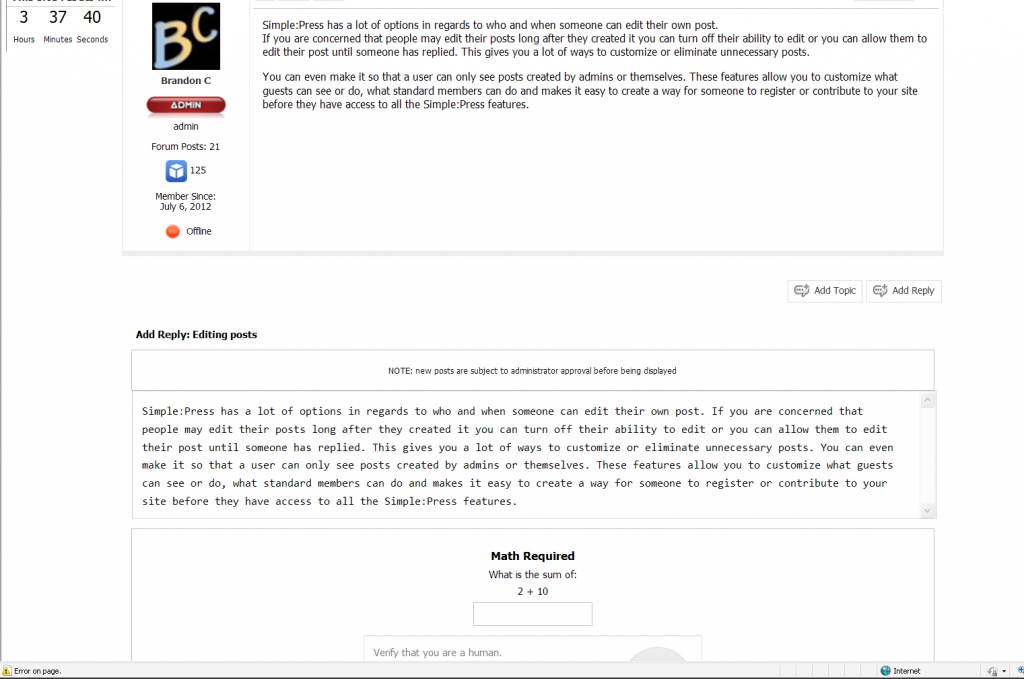
This is a screenshot of the demo forum; I attempt to quote a response (in IE8). You can see here that no WYSIWYG TinyMCE editor is loaded. In the bottom left hand corner of the screenshot you can see IE telling me about the script errors, which I supplied earlier.

Is this considered working fine? When I try this in FireFox it “works fine”, but on a clean PC, fresh install of XP and IE8, when using your demo forum this is what I get. So, what in your opinion is causing this? Am I missing something here?


demo-post.PNG
ES Ellen Shuman
Ellen Shuman
Member

As you can read in my first post, the big issue I hold in common with the demo forum and my forum is this error:

Message: ‘tinyMCE.activeEditor’ is null or not an objectLine: 2Char: 14435Code: 0URI: http://demo.simple-press.com/w…..?ver=1.8.3

I’ve tried both forums on multiple PCs and this one error comes up on all in IE8.

ES Ellen Shuman
Ellen Shuman
Member

Ellen Shuman said
As you can read in my first post, the big issue I hold in common with the demo forum and my forum is this error:

Message: ‘tinyMCE.activeEditor’ is null or not an objectLine: 2Char: 14435Code: 0URI: http://demo.simple-press.com/w…..?ver=1.8.3

I’ve tried both forums on multiple PCs and this one error comes up on all in IE8.


I can confirm the issue exists in IE8 exclusively, on my forum and the demo forum. Oddly enough, the TinyMCE editor works fine on this forum; it loads up and functions correctly in IE8. So what’s the difference? Is there a plugin being used by the demo forum that isn’t present here?

YS Yellow Swordfish
Yellow Swordfish
Member

The first question I have is the one you didn’t respond to in Brandon’s post regarding Share This.

second question is how many ‘multiple’ PC’s have you tried this on?

ES Ellen Shuman
Ellen Shuman
Member

Four different computers so far.

I didn’t respond to the “Share This” question because that error is being generated from a script running on the demo forum and I don’t have that specific error on my Forum. The errors I reported are the same on all four PCs I’ve tested the demo forum on using IE8.

The error we share in common is:

Message: ‘tinyMCE.activeEditor’ is null or not an objectLine: 2Char: 14435Code: 0URI: http://demo.simple-press.com/w…..?ver=1.8.3

Which looks like it may be creating an issue on line: “685: if ( typeof(tinymce) == ‘object’ )”

For some reason the activeEditor method is not being set, or, is null in this case and is failing, causing the TinyMCE editor to never load. A plugin for TinyMCE could be causing this. The interesting part in all this is that when using IE8 to post here, TinyMCE works fine. So, is there a plugin on the demo forum, or for TinyMCE specifically, that is different from what you’re using here? There must be something different, beside the obvious.

YS Yellow Swordfish
Yellow Swordfish
Member

No – they are all running the same versions here and on the demo. Although I believe the demo does have the share this plugin active but we can not replicate any errors there either.

Personally I can’t test anything because I use a Mac – one of my better past decisions – so do not haver IE of any version. But two people at SP both use and test it regularly. when we have had other IE issues with tinyMCE – and there have been some – then it usually come down to something else interacting. Or – as has happened – the probpem mysteriously went away…

BR Brandon
Brandon
Member

I think your screenshot helps in narrowing this down. Are you logging in to the demo site as one of these users by chance?

godzilla, bunny, mouse


I do see an script error using ‘bunny’ as the user but not when I tried earlier as myself or ‘Elvis’
If you did login as one of those users and you want to try logging in there as Elvis, password sp_demo it would be interesting if it then worked for you.

I need to do a little testing with various permissions and settings for those users and then get with Yellow Sowrdfish on my results. May be tommorrow now before we have an answer.

BR Brandon
Brandon
Member

@ellen, Still investigating but Looking at the Demo site there may be an issue with PLUpload and it’s JS causing an error for users. So 2 questions.  Do you have the SP plugin PlUpload installed and activated? Do you receive the error when logged in as an Admin on your site or just as a user?

If you have PL Upload installed and activated check the permissions and see if these are all on. Can upload images in posts, Can upload media in posts, Can upload other files in posts. If not try turning them on, for the permission you would log in as, and see if there is still an issue.

ES Ellen Shuman
Ellen Shuman
Member

For TinyMCE I have the following plugins: inlinepopups,media,spoiler,spellchecker,paste,wordpress,wpdialogs,sphelp. On the forum, I have the following plugins installed: Admin Bar, TinyMCE, Post Review, Private Messaging System, Subscriptions, and Watches.

To your previous question, I tested the demo site using the “mouse” account. I’ll try the demo forum out using the elvis account in IE8 and see if it works.

Thanks for the continued assistance.

ES Ellen Shuman
Ellen Shuman
Member

Brandon C said
I think your screenshot helps in narrowing this down. Are you logging in to the demo site as one of these users by chance?

godzilla, bunny, mouse


I do see an script error using ‘bunny’ as the user but not when I tried earlier as myself or ‘Elvis’
If you did login as one of those users and you want to try logging in there as Elvis, password sp_demo it would be interesting if it then worked for you.

I need to do a little testing with various permissions and settings for those users and then get with Yellow Sowrdfish on my results. May be tommorrow now before we have an answer.


I tried using the demo forum as Elvis and the TinyMCE editor loaded with no errors reported in IE8. You said this might be related to permissions? I’d be very interested to learn what you find in your testing.

Hopefully, we can resolve this issue yet!

BR Brandon
Brandon
Member

Thanks,

It’s looking to me that it has something to do with PL Upload plugin for Simple:Press.

Regarding my questions above:

Do you receive the error when logged in as an Admin on your site or just as a user?

On your site if you have PL Upload installed and activated check the permissions and see if these are all on. Can upload images in posts, Can upload media in posts, Can upload other files in posts. If not try turning them on, for the permission you would log in as, and see if there is still an issue.

We probably will have to wait for Mr. Papa to check into this. He is on vacation until April 1st.

ES Ellen Shuman
Ellen Shuman
Member

I can’t find any reference to PL Upload anywhere on my server! I’ve looked under the Simple:Press plugins I have installed, and this is NOT a plugin I have.

I think you are on to something regarding the permissions issue. It’s possible that “a permissions issue” could cause a script to load partially or not load causing a side affect of this script issue and TinyMCE’s failure to load. I experience this issue as both admin and under some test user acounts as well, so I don’t know if there would be any permissions in SimplePress that would affect the Admin? Also, I’ve seen this issue in other browsers as well: Chrome, Safari, IE8/9, I think looking at the browser may have narrowed the scope of this issue.

On a post on the demo forum, when testing with user “Mouse” the TinyMCE editor would fail to load. Then, that very same post, logged-in as Elvis, TinyMCE loads up fine. This issue seems to vary though from post to post. I am posting “this” while logged in using IE8, yet if I was to try posting a new post under user “Mouse” in this forum section :http://demo.simple-press.com/forum/demo-forum-1/editing-posts/ then I would get that script error.