Support Forum

5.0 Up and running. Minor Issues.

MY MyGarageShop
MyGarageShop
Member

5.0 is up and running

If you look at the link you will see the first issue.
mygarageshop.com/forum

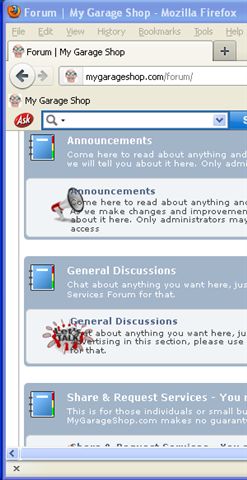
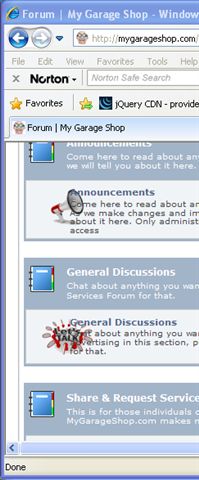
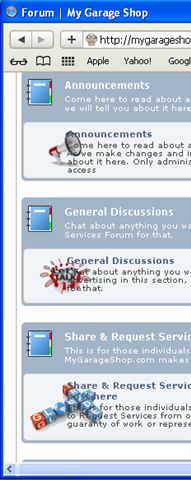
I use custom icons and the text is overlapping.
I tried to adjust it in CSS but I did not find a solution

When you log out it still says “Welcome MyGarageShop”

During instal if you did not choose the storage location
update option, how can you it after?

And a question. I use high slide all over my site
and I stylized it. Can I hook into the current image display
and replace the call to my image display.

53 Answers

New Answer

MP Mr Papa
Mr Papa
Member

sorry, not following…  there is no overlap between text and icons – at least not in FF…  if there is overlap in other browsers, you might just need to increase the column width in your theme…

storage locations are set on forum – integration – storage locations…

have you disabled our image enlarger?  is that what you want highslide to do? 

BR Brandon
Brandon
Member

On question 1, the icons overlapping, you would need to change the percentage of width that column uses.

Take a look at the spForumView.php in your default theme’s templates folder. Around line #69 you will see column #1, #2, etc.

Change #1 from 6% to about 10%. Then subtract 4% from another column. Probably column #2.

If you are familiar with Firefox’s Firebug add on you can test the changes without having to manually do them in the theme’s file first.

#2 – Where does it say that and what if any redirect are you using on logout?

#3- You can go to the Forum admin Integration – Storage Locations and change them there.

#4 – I don’t know f an easy way to do that. Maybe Steve or Andy does.

MW Mike Warren
Mike Warren
Member

Brandon C said

#2 – Where does it say that and what if any redirect are you using on logout?

I’ve noticed the same thing (although it doesn’t bother me). Logged out users have “Welcome back User
Please log in to post” in the top left where it it normally says “Logged in as User“. I assume a cookie is causing it.

MP Mr Papa
Mr Papa
Member

on forum – options – member settings there are a couple of options that could affect this…  disallow members to log in as guests…  and the guest settings section…

MY MyGarageShop
MyGarageShop
Member

4 PARTS TO THIS POST: Part 1 and 2 are important to me the others are just issue reports for version 5.0 unless I am supposed to report those somewhere else?


Part 1

I edited the file spForumView.php in the /wp-content/sp-resources/forum-themes/default/templates directory.

There are 2 places where column exist I edited them both no change. Yet if I change it in chrome or firefox it makes a difference. I clipped the line that I changed in chrome.


<div class=”spColumnSection spLeft” style=”width: 11%; min-height: 55px;”>

Is there another place to change this?


Part 2

Replacing you current image display with Highslide. I use highslide through out my site.

It adapted it mo my needs and I have a consistant look through out the site.

I would like to replace your current image display with mine.

It was Andy who helped me previously when I wanted to modify the highslide implementation in version 4.x.x to match my site, so I think I will need to direct this to him again.


Part 3

I only posted the Login display error as an FYI… Its only minor to me, but thought you would want to know if we find something.


Part 4

I posted these items to help you with finalizing the 5.0 Version.

When I test my site I test it in:

    Internet Explorer, FireFox, Safari, Chrome, iPad, & iPhone

This overlapping problem exists in all environments.

See 4 attachments
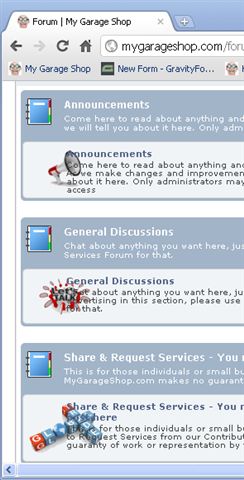
Text-Overlap-in-Chrome.jpgText-Overlap-in-FireFox.jpgText-Overlap-in-IE.jpgText-Overlap-in-Safari.jpg

BR Brandon
Brandon
Member

On #1 – Your forum is using the default theme.  It was installed when you installed SP  5.0. It will be in the directory/folder shown in your Admin pages Forum > Integration – Storage Locations. There you will see the location of your themes folder.

Go to that folder and you will see a templates folder under the default folder. There is where you will find the spForumView.php file.

MP Mr Papa
Mr Papa
Member

part 1

spForumView is part of the SP theme your using…

ignore the zip… only used during upgrade from 4.4 to 5.0 one time…

part 2

can wait on Andy if you like – he certainly knows highslide better than I…

part 3

still not sure what ‘error’ you are referring too…

part 4

I do not see that on your site with latest FF… and as I said, you added oversized icons so you need to increase the width of that column in the theme…

MY MyGarageShop
MyGarageShop
Member

Ok for highslide I will wait for Andy… Stupid Question… How will he know I am waiting for him?

MY MyGarageShop
MyGarageShop
Member

ok one more question


is there a way for me to do a mass update to all of my existing posts for a change to the smiley and image directories…

With this upgrade all of my smiley and image links are broken.


I would prefer not to have to do 200ish pages by hand.

YS Yellow Swordfish
Yellow Swordfish
Member

Really? Did you re-locate the forum smileys folder? If so then putting it back where it was should sort it out.

But to answer the question… if you know what you are doing and feel confident then exporting your database to a sql text file, loading it into a good text editor and performing a search and replace and then re-importing to your site would work. You need to close the site down while you do it of course and you have to be careful but that is how I would do it! The dirty way smile

As to HighSlide, we sadly dropped this (I seem to remember telling you we were going to) because of the licensing issue. It also enabled us to focus on using the jQuery UI library which already comes bundled with WP meaning we didn’t have to supply any extra scripts. HighSlide was, to be frank, probably an easier, more versatile and robust tool to use but it is not GPL and requires a license fee when used commercially.

I am not really sure if it would be that easy to swap out the current implementation to use HighSlide for images instead. What happens if you turn off the use of our ‘popup enlargement’ feature? Do you have HighSlide set up to automatically detect and load images when clicked? I am not even sure of that is possible but it might be.

MY MyGarageShop
MyGarageShop
Member

First… Great job on version 5 I am very impressed. great coding, great design… I like it…

Now back to the issues at hand.


1…

ok That is a great idea I will export and do a search and replace…

I just did this it worked great and I was able to clean up a lot of issues with changes in the site and forum.

It works great now, so item 1 is closed…

Item 2 & 3 are still open.


2…

Next issue I have a highslide license and I did this before you told me which file the highslide call was in and I modified it and it worked flawlessly.

I would like to do the same again… if you can tell me what directory, files and approximate line I will go in and mod the code to call my highslide instead of your default viewer. that is the right way to do this


3. a new one today I can edit my postes if I use tinyMCE it works for all of the other editor types?

When you select tinyMCE as the editor you see the text you would be editing flash by and then there is a blank and somewhat (one shade darker) background which is blank? I tried everything I could see am I doing something wrong?

MP Mr Papa
Mr Papa
Member

have to leave #2 to Andy…. cry

on #3 need more info, including a screencast or screenshot…  havent heard of this one before…

MY MyGarageShop
MyGarageShop
Member

I tried this in firefox because that is what you seem to be using but has the same result in firefox, safari, chrome, and IE


1 .go to my site http://mygarageshop.com/forum


two problems:

    I have both the math and drag and drop spam control… I cant seem to remove math.

    the edit screen in disabled and blank

    if some way you can post something, save it and try to edit it.


it works for every editor and if you select html from tinyMCE and it works on your site?

I am stuck and no one can post or edit posts on my site including me as supervisior…


I need help on this one it has been almost a week now…