
Support Forum

5.2.2 Upgrade Issue

MK Mark Kneen
Mark Kneen
Member

Hi,

Just tried upgrading through WP dashboard and get the message all went OK
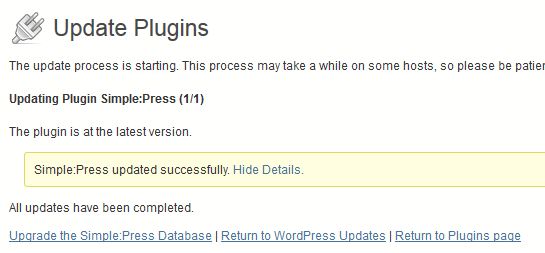
spupdate.JPG

However, the update notification is still there in my plug-in list as if the update hasn’t been done and when I clcik on ‘Upgrade the Simple:Press Database’ I get the message ‘You do not have sufficient priveleges to access this page’. I’ve tried with a couple of admin accounts.

Mark


17 Answers

New Answer

MP Mr Papa
Mr Papa
Member

did you click on the ugprade database link there?  that just means the files were moved over… you still need to execute the upgrade…  you need to do this with a sp admin (wp admins are not the same – you can add more on forum – admins – manage admins but wont be available until after upgrade)…

after doing the update… what happens instead of clicking on the update database, you click on the wp dashboard…  then under the forum menu item in wp admin nav, what is shown?  can you go to the forum admin?

MK Mark Kneen
Mark Kneen
Member

Yes, I can get to the forum admin just fine, got all the usual nav links under wp forum admin.

YS Yellow Swordfish
Yellow Swordfish
Member

And if you go to the forum admin > Toolbox the first panel will tell you what version and build you are using. So let;s make sure that is correct. Although it sounds like it is.

MK Mark Kneen
Mark Kneen
Member

Version 5.2 build 9495..so it looks like it’s not updating even though I get the positive confirmation?

YS Yellow Swordfish
Yellow Swordfish
Member

That does suggest that the WP Updater is not, in fact, updating the plugin code.
Steve: Does that suggest anything to you?

MP Mr Papa
Mr Papa
Member

wonder if wp cannot remove the old plugin or write the new one…

what is permissions and uid/gid on wp-content and plugins directories?

MK Mark Kneen
Mark Kneen
Member

Both 755. Setting to 777 makles no difference. Not sure what uid/gid are?

MP Mr Papa
Mr Papa
Member

they say which user owns the directories… can you usually tell with ftp, ssh or your server control panel filemanager…

MK Mark Kneen
Mark Kneen
Member

I just updated manually via ftp and all went fine, so don’t know why it wouldn’t work through the wp dashboard.


MK Mark Kneen
Mark Kneen
Member

I should also have said updating has worked before via wp dashboard, I’m the only full SP admin and permissions haven’t been changed.

MP Mr Papa
Mr Papa
Member

odd… please let us know how the next update goes…  hopefully, not too soon… ;)

MK Mark Kneen
Mark Kneen
Member

Just an update on this, I think I may have unearthed what the problem was. I noticed that several other plug-ins weren’t even notifying me that an update was available.

After trying various things, I went through the plug-ins one by one, turns out a plug-in called Comment Images (for adding images to comments) was stopping plug-ins indicating there was an update.

 Although Simple:Press was in fact indicating an update was available, it seems probable that this was the reason it wouldn’t update… we’ll see next time.


NB as a final note… ironically the plug-in has been updated to correct this but I didn’t know….!

CA Carlos
Carlos
Member

The same for me…  when i tried to upgrade the same problem to me… 

I had to reinstall simplepress from zero

YS Yellow Swordfish
Yellow Swordfish
Member

Both good news. Hope all goes well from now on.