
Support Forum

Accidentally deleted my SP Admin Account

WP William Pirkle
William Pirkle
Member

Well, during some preventative maintenance operations, I deleted my WP Admin account (because it had an unsafe username). I had already created another admin account to do the deletion. 

However, before the deletion, I forgot to make the new admin a SP Admin. So now I can not access my own Forum on the Dashboard with the error message: 

“Please note that while you are a WP admin, you are not currently an SP admin. By default, WP admins are not SP admins

Contact one of the SP Admins listed below to see if they want to grant you SP admin access on the SP manage admins panel.”

I do have two other SP Admins, but neither of them can make my new user account a SP Admin; at best, they can only make me a Moderator of a group. Neither of them have WP Admin capabilities. 

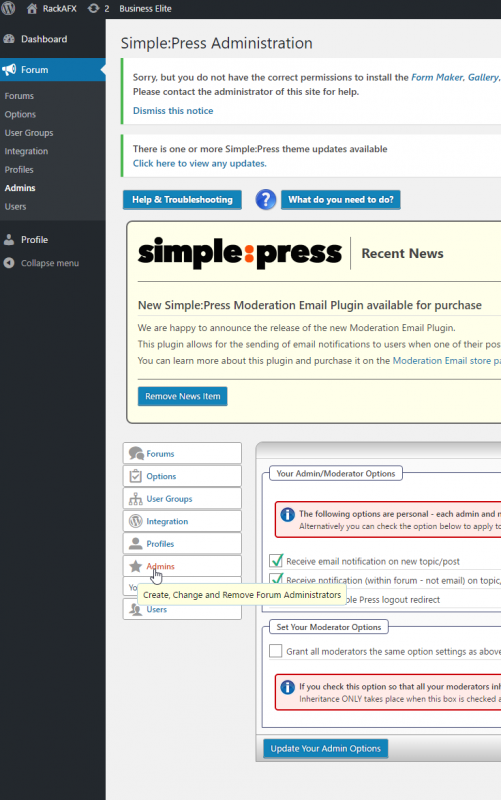
One of them replied with the attached screenshot.

1) Is he looking in the proper place to make me an Admin again?

2) Does he need WP Admin privileges for that?

3) is there any “back door” way I can regain access to be a Forum Admin?

Thanks!!!

– Willspimage_2.png
12 Answers

New Answer

YS Yellow Swordfish
Yellow Swordfish
Member

Yes if you do not mind getting into the database. The following links to a post where this was discussed – the details are in there although you can ignore the actual problem that user had.

https://simple-press.com/support-forum/sp5-general-topics/manually-add-new-simplepress-forum-administrator/#p158568

So are you definite that there are no other SP admins and the two people who were offered to help you were only moderators? It should not offer them so I may have to open up a ticket of you confirm this…

WP William Pirkle
William Pirkle
Member

The other two guys are SP Admins, not moderators, but they are not WP Admins on my site. The screen shot above was from one of them; he couldn’t find a way to add me – he wondered if he also needed to be a WP Admin in order to add me back – if so, that’s easy. So that was the original issue. Hopefully I won’t have to get into the database… 

– Will

MP Mr Papa
Mr Papa
Member

No, that is the beauty of the system…  you can make any user an SP admin and they wont get access to anymore of the wp backend then as regular user (except of course for the forum stuff)…

any SP admin with the manage admin capability can make users SP admins… its done on forum – admins – manage admins…  down towards the bottom, find the users in the Add New Admins section and then after moving to the right window, hit Add New Admins button at the bottom…

if you have no SP admins, then all WP admins can access the simple press admin pages…

WP William Pirkle
William Pirkle
Member

OK thanks – I’ve pinged one of them again to see if he may have success. I will also send your instructions. Only problem is they are both on the other side of the pond…

– Will

WP William Pirkle
William Pirkle
Member

also, I don’t remember if I gave them “manage admins” capability… ugh : (

MP Mr Papa
Mr Papa
Member

Worst case, we can give you some data to load into your mysql database that will re-enable it for you…  but lets if they can first, since you mentioned not wanting to mess with database…

WP William Pirkle
William Pirkle
Member

Thanks a ton – yeah, I will find out tomorrow what happened with them. And, I’ve never poked into a SQL database so that’s something that is a last resort… 

Thanks again

WP William Pirkle
William Pirkle
Member

OK both Admins do not have the ability to manage other Admins. The second admin sent a screenshot with a lock next to “Manage Admins” so, although I do have 2 admins, they can’t manage other admins and get me back in. 

So it looks like I am going to need to use the fix above.

However, I do not know what file he is talking about in that post, or how to open/get into it. I have never looked at SQL code (I’m a C++ programmer) so that looks as greek to me as Javascript…

Could you please provide some details on how to get into that database (which one is it? where is it located? what tool to use to open it?) and any other details about this fix? 

Thanks!

Will 

YS Yellow Swordfish
Yellow Swordfish
Member

Manually editing a database table is more or less the same as editing a spreadsheet.

Your hosting package will (virtually always) come bundled with a database viewer and set of tools. The most common is called phpMyAdmin and would be found on your hosting control panel.

One opened you are presented with a list of databases. The db in question will be whatever you specified when you set up the site but is named in your wp-config.sys file. This also lists the table prefix which you will need to know. Again – this would have been specified at setup time.

Select the database and you will then see a list of the tables. You will need to know your user ID. This can be discovered in the ‘users’ table. Note all tables are prefixed with your table prefix. The default is ‘wp_’ so the table might be called ‘wp_users’.

When you view a table it is just like a spreadsheet. If you know your user ID then skip the rest of this sentence. If you do not then you will need to search the ‘users’ table to find it. Note you can change the sort at any time by clicking on the column headers.

Once you know your users ID find the table called ‘sfmembers’. Locate the row where the user_id column matches yours. There is a column called ‘admin’. It will be set to zero. Change this to a 1.

Then follow the directions in the other post linked to to change the capabilities in the ‘usermeta’ table. Be careful with this. In that forum post in the block with the data is a button labeled ‘raw code’. Click on that and copy the code from the popup window. That is what needs to be pasted into the db table cell.

It is actually all very easy and straightforward. It looks worse than it is!

WP William Pirkle
William Pirkle
Member

Hi Yellow and Papa

Just wanted to let you know that I fixed the admin issue and everything is back to normal now – also created a backup admin in case this happens again… : )

I really appreciate the detailed description and yeah, you are right – looks a lot harder than it really is. 

So, thanks a bunch!!

– Will

YS Yellow Swordfish
Yellow Swordfish
Member

You are more than welcome and this is great news.