Support Forum

All forum links and rss feeds ssl and upgrade difficulties

59 Answers

New Answer

MP Mr Papa
Mr Papa
Member

Now that you mention it, yes… Also, why is the wp – settings – general urls using https?  Both of those indicate the front end is intended to be SSL..

KE Kenn
Kenn
Member

Sorry could you clarify wp-settings – general urls

We are using the WPMU Dev domain mapping plugin and have set login and admin pages to ssl which I believe is the same as adding the two lines as true in the wp-config

I haven’t set anything else as https

MP Mr Papa
Mr Papa
Member

In the wp admin, the settings – general admin panel…. The settings for site url and blog url….

I seem to remember those having https in them…   And as you mentioned, the forum – integration – page and Permalink panel…   If https there, that is for whole front end…

KE Kenn
Kenn
Member

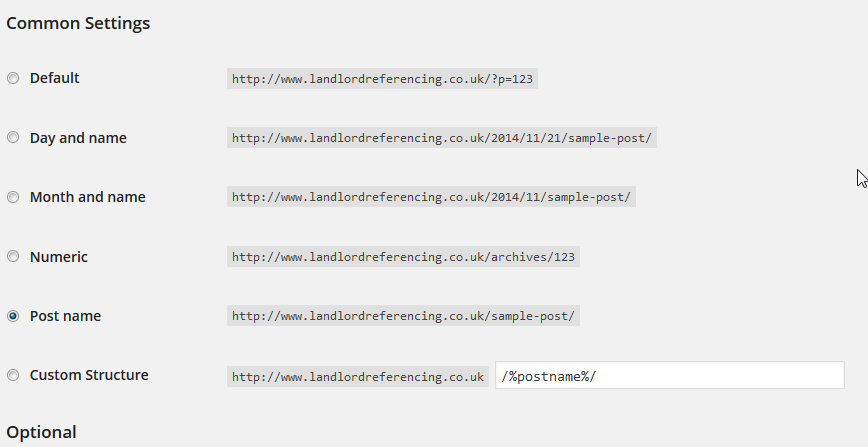
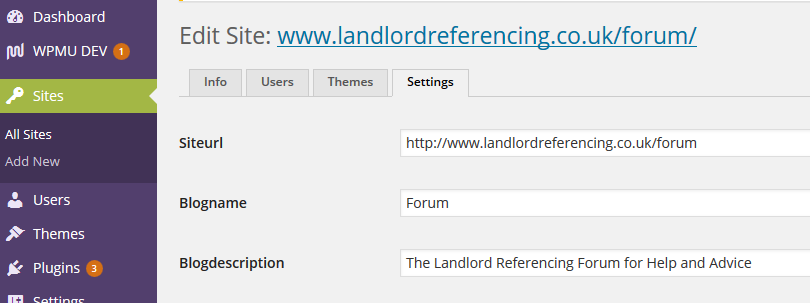
Thanks for the reply, 2 screenshots attached show network settings>edit site permailnk

and

Permalink site for the site with the forum on all showing http?permalink-settings.png

 site-screenshot.png

MP Mr Papa
Mr Papa
Member

well, as I said, I thought I remembered seeing…  but that still leaves the one on the sp integration panel… have you tried updating it recently?  that schema would come from wp…

perhaps I missed it, but did  you ever say how this domain mapping plugin thingy does it job?

KE Kenn
Kenn
Member

I tried to explain in post 8 what I understand it to do.

Here is a link to the plugin http://premium.wpmudev.org/project/domain-mapping/

KE Kenn
Kenn
Member

Ike said
Sorry, I skimmed through the first page there!

You can set up a redirect through Forum > Components > Login and Registration, and you can remove the login form from the template by commenting out:

<br />

#sp_LoginForm($loginForm);

<br />

from spHead.php.

Was this the thread you were referring to?

Hi Ike,

Removed the form, worked great but the button isn’t redirecting to the link I have input in the login and registration page?


Edit: Re-read my post in case unclear I don’t think the ‘Log In’ button is assigned from the login and registration page, I just need to apply a link to the button sitename.co.uk/wp-login.php

Hope you can help.

IK Ike
Ike
Member

Hey Kenn,

Try adding the logInLink argument to your sp_LogInOutButton function in spHead.php:

sp_LogInOutButton(‘tagClass=spButton spRight&logInLink=www.sitename.co.uk/wp-login.php’, __sp(‘Log In’), __sp(‘Log Out’), __sp(‘Log in and log out’)); 

Codex ref: sp_LogInOutButton

You can do the same for register if you need to – see sp_RegisterButton – using the argument ‘link’ in the same way logInLink was used in the login button function.

Hope this helps!

KE Kenn
Kenn
Member

Thanks Ike, worked perfectly.

I am going to deactivate the domain mapping plugin in the evening to see if this is the cause of the https issue.

If so I will report back here.

KE Kenn
Kenn
Member

Hi both,

I have deactivated the domain mapping plugin, went to the forum integration page and updated the permalink but it remained https. I have also followed Ikes posts and removed the login form from the forum.

So yes the problem still remains.

All we want to achieve is all admin areas (wp-admin) and login forms to be https and all front facing pages to be http.

Any more ideas?

MP Mr Papa
Mr Papa
Member

so, we get the schema of the url from WordPress…  can you run a couple tests for me?

on the forum page, we need to output a couple strings…  perhaps in you spHead.php template file, you can add these lines:

echo site_url();
echo home_url();

then near the top of the forum header, you should see two urls output… please post them back here… interested to see if they are http or https…

another test to run…  in same location, try this

$slug = sp_get_option('sfslug');
$pageslug = basename($slug);
$page = spdb_table(SFWPPOSTS, "post_name='$pageslug' AND post_status='publish' AND post_type='page'", 'row');
echo get_permalink($page->ID);

will tell us what wp thinks the schema is for the wp page the forum is on… again, we use what it tells us… so want to be sure what wp thinks…

KE Kenn
Kenn
Member

All results returned as below:

Test 1

https://www.landlordreferencing.co.uk/forum

https://www.landlordreferencing.co.uk/forum


Test 2

https://www.landlordreferencing.co.uk/forum/


So I can see what your saying you are getting the https status from here but I’m not sure why.

I have also tested this on our test site and got the same result:

Test 1


https://lrsdev2.candsprint.com/forum
 
https://lrsdev2.candsprint.com/forum
 
Test 2
https://lrsdev2.candsprint.com/forum/discuss2/


KE Kenn
Kenn
Member
Had to split into 2 posts due to too many links.
 
However if you want to look at the test site, I have created a couple of pages with links in them
 
http://lrsdev2.candsprint.com/forum/test-page-1-for-simplepress-https/
 
You wills see as you hover over the links on the page they are linking to http, the forum link is also http however once in the forum pages all links are https?
 
Remember this is subsite so if you find yourself out of the lrsdev2.candsprint.com/forum/…  then you have navigated back to the main site. lrsdev2.candsprint.com
 
Again, thanks for your help, you can see why I’m also confused, why do all the pages navigate http but the forum is pulling https?