Support Forum

All forum links and rss feeds ssl and upgrade difficulties

59 Answers

New Answer

KE Kenn
Kenn
Member

Mr Papa said
you are not reading that code correctly….  the is_admin() check at beginning ONLY does it on admin pages…

the problem is home_url(), site_url() and get_permalink() from wp all report https…

So to confirm this only happens on the admin pages but when I click on ‘Update Permalink’ under integration I am on an admin page. Therefore will it not capture  SFHOMEURL as https: and input it into the permalink?

Would that not explain why when the plugin is activated it looks to site_url and sets it to http but when I click the button in the integration page because I am in an admin page over SSL it captures SFHOMEURL as https?

I tried to test this by adding

$permhome = trailingslashit(home_url());
define (‘SFPERMURL’, $permhome);

to sp-control.php so that I could get the home_url without it being manipulated to https to see if was causing the issue


and then changed in spa-integration-page-form.php line below to include SFPERMURL instead of SFHOMEURL

function spa_paint_update_permalink() {
    $site = SFPERMURL.’index.php?sp_ahah=integration-perm&sfnonce=’.wp_create_nonce(‘forum-ahah’).’&item=upperm’;
    $target = ‘adminupresult’;
    $gif = SFCOMMONIMAGES.’working.gif’;

    echo ‘<input type=”button” class=”button button-highlighted” value=”‘.spa_text(‘Update Forum Permalink’).'” onclick=”spjAdminTool(”.$site.”, ”.$target.”, ”.$gif.”);” />’;
}


But this just hangs because of insecure content being loaded (as screenshot) being blocked.

insecure.jpg

just to rule this out, are any of your test sites able to get an http permalink when in the admin screen under https?

MP Mr Papa
Mr Papa
Member

my ssl site is down… certificate thingy… again… so hard to keep it running… and doesnt get much use since its always been working…  and yours is the only issue currently… doesnt mean its not an issue, but more folks do use ssl…

No, the update permalink is not on an admin page… the actual update is via ajax and technically through the front end… but doesnt really matter since home_url(), site_url() and the code you pulled from sp-control.php are not involved…

I posted the permalink update code earlier for test 3…

$slug = sp_get_option('sfslug');
$pageslug = basename($slug);
$page = spdb_table(SFWPPOSTS, "post_name='$pageslug' AND post_status='publish' AND post_type='page'", 'row');
echo get_permalink($page->ID);

notice its simply a request to wp for the page permalink… completely outside the purview of simple press…  please note, I output the permalink for the test.. the code actually just stores it in the db…

So, our permalink update just gets the permalink from wp…  the code you referenced, comes into effect on admin page loads and we update permalinks to https if so directed by the config constants…

why is wp repeatedly telling us its https?  I dont know…  usually that is done by a plugin…

anything in your .htaccess that could be at play?

does it do with all other wp plugins disabled? and/or with the default wp theme?

KE Kenn
Kenn
Member

It definitely appears to be if in the admin page under h ttps then the permalink is recognized as h ttps

If in the dashboard as h ttp then the permalink is recognized as h ttp.

I have deactivated all the plugins possible and tested on the twentyeleven theme with the same results.


Done some digging – may be a waste of time but please let me know if this makes any sense.


You have been calling ‘get permalink’

which according to this https://developer.wordpress.org/reference/functions/get_permalink/#source-code

gets it from home url

But…

home url by default seems to pull everything after the http/s as the scheme default is ‘null’

http://codex.wordpress.org/Function_Reference/problem-with-post-edit-buttonome_url

According to the top of the page:

The home_url template tag retrieves the home URL for the current site, optionally with the $path argument appended. The function determines the appropriate protocol, “https” if is_ssl() and “http” otherwise. If the $scheme argument is “http” or “https” the is_ssl() check is overridden.

The is_ssl() page says that it takes the ssl status of the current page – ie the admin integration page not he front of the site?

http://codex.wordpress.org/Function_Reference/is_ssl


Is this relevant at all or am I going down the wrong track?

Thanks

MP Mr Papa
Mr Papa
Member

No, I think you are on the right track…  but still not sure why wp would be trying to force https for a front end page…  if what you are implying were true, then I would see get_permalink() return https now since we (and wp) almost always use an empty schema in that function… 

Since the permalink update is done through ajax, it actually goes through the front end (main wp index.php) with an ajax hook…  only thing that comes to mind there is if the home_url() link is incorrect (wouldnt think so, but cant test currently)…

Potentially, it seems, with this info, that if you updated the entire integration panel (vice just using the update permalink button), the is_ssl() function could return the wrong info (for front end post)…

what is more troubling would be why is this not globally happening?  we have a fair number of users doing ssl with simple press… and quite oddly, when they have an issue, its usually the opposite, they have trouble getting the whole site ssl, but only get the admin in ssl (settings correct that)…  no reports of not getting only the admin in ssl…  wonder if this could be multisite unique?

have I asked what version of WP is this?

perhaps this weekend, I can try working the ssl site again…

KE Kenn
Kenn
Member

Thanks, I think it’s the ajax part I wasn’t understanding that it was going to the front of the site to get the home url.

Hope you manage to get your ssl site working and look forward to hearing from you.

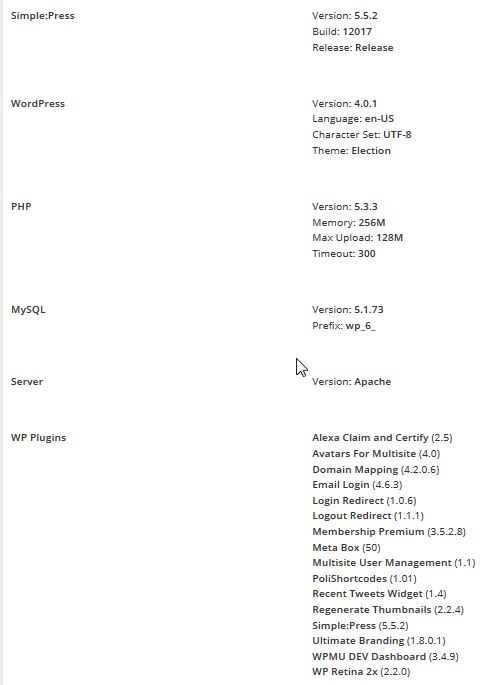
Screenshot attached of setup from toolbox – environment. Let me know if you need the other half with remaining sp plugins. It is worth noting I have had difficulties updating in the past but believe the 5.5.2 is accurate.

2014-11-26-16_30_45-Integration-‹-Forum-—-WordPress.jpg
MP Mr Papa
Mr Papa
Member

Good news:  I have SSL working again on a test site

Bad news:  I can recreate the situation in some cases (you might say good news!)

so will have to figure out the path where it breaks down…  and figure out a potential fix as that may be problematic given what wp is doing…

But what does always work:

1) disable SSL

2) update forum permalink

3) turn on SSL

4) admin will be in SSL but front page will be in http

This being a holiday time in States, time may be limited…  but can hopefully get a fix identified before we release 5.5.2 in conjunction with WP 4.1… 

btw, I am testing with wp 4.1….

KE Kenn
Kenn
Member

Thanks, it’s nice to know the problem can be recreated and I’m not going mad.

Yes you are right as a kind of fix I have found the method you’ve said remains http, as a note if you keep admin area as SSL and turn the plugin off and on it initially sets the permalink as http as well. But as you say if you click update permalink it changes to https.

The reason this has been such an issue is when the forum permalink changes to https but the front of site thinks it is http, the customer has adverts down a sidebar on their forum page and these all still load http giving us a security warning to users of mixed content, also the share this buttons and embeded youtube videos don’t load becuase they are all confissed if it is an http or https connection.


If you do figure out a fix please can you post it or email it to me as updating simplepress is really difficult on our setup and it would be easier just to make code amendments or update a file than update everything.

Thanks for investigating.

MP Mr Papa
Mr Papa
Member

turns out wp core has some issues with this too (tickets open)…  grabbing the permalink of a post or attachment or anything for front end while on an admin page, returns scheme for admin…

anyways, think I have a quick fix for this, if you want to try it…

in sp-site-support-functions.php, around line 326 (remember I am using dev version) find

            sp_update_option('sfpage', $page->ID);
            $perm = get_permalink($page->ID);
            if (get_option('page_on_front') == $page->ID && get_option('show_on_front') == 'page') {

with

            sp_update_option('sfpage', $page->ID);
            $perm = get_permalink($page->ID);
            $scheme = parse_url(get_option('siteurl'), PHP_URL_SCHEME); # get front end scheme
            $perm = set_url_scheme($perm, $scheme); # update permalink with proper front end scheme
            if (get_option('page_on_front') == $page->ID && get_option('show_on_front') == 'page') {

and see if that resolves it…

I will still have to dig a lot deeper for any side effects of that wp behavior, but think that gets you going…

KE Kenn
Kenn
Member

On test site worked perfectly. Just got to change on live site.

Thanks for working on it, especially during your holiday.

KE Kenn
Kenn
Member

Everything working well, going through all areas to test everything and found a small issue (I hope)

The forum front is all http now due to the permalink being right but when in the front and go to a users profile it changes to https again which due to adverts down the sidebar then gives us a mixed content warning again.

I thought this may be due to the ability to change the users account settings and password in this area so using the profile tabs feature stopped that one from displaying… still https though.

Any ideas?

Thanks

MP Mr Papa
Mr Papa
Member

and here in lies the wp acknowledged problem about selective ssl on front end pages…  something they hope to fix in the future… 

you seem to have the login ssl option set… if so, we are forced, to use ssl on the profile since the account menu has the ability for a user to change their password…  we cannot selectively use it on only some profile tabs/menus since most of the profile is ajax…  so its globally on for profile…

can we check if account menu active before forcing ssl? perhaps…  will investigate…

MP Mr Papa
Mr Papa
Member

still playing with this (almost time for some football!)… but something you can try for me…

in sp-api-profile.php, at the bottom, add these:

/**
* This function checks if tab is active
*/
# Version: 5.5.3
function sp_profile_tab_active($tabslug) {
    # get the current tabs
    $tabs = sp_profile_get_tabs();
    if (empty($tabs)) return false;

    # find the requested tab
    foreach ($tabs as &$thisTab) {
        if ($thisTab['slug'] == $tabslug) return $thisTab['display'];
    }

    return false;
}

/**
* This function checks if menu is active
*/
# Version: 5.5.3
function sp_profile_menu_active($menuslug) {
    # get the current tabs
    $tabs = sp_profile_get_tabs();
    if (empty($tabs)) return false;

    # find the requested tab
    foreach ($tabs as &$thisTab) {
        if (!empty($thisTab['menus'])) {
            foreach ($thisTab['menus'] as $thisMenu) {
                if ($thisMenu['slug'] == $menuslug) return $thisMenu['display'];
            }
        }
    }
    return false;
}

and then in sp-forum-support-functions.php, around line 373, find these lines:

    # profile via ssl if doing ssl logins
    if (($pageview == 'profileedit' || $pageview == 'profileshow') && force_ssl_login() && !is_ssl()) {
        if (0 === strpos($_SERVER['REQUEST_URI'], 'http')) {
            wp_redirect(preg_replace('|^http://|', 'https://', $_SERVER['REQUEST_URI']));
            exit();
        } else {
            wp_redirect('https://'.$_SERVER['HTTP_HOST'].$_SERVER['REQUEST_URI']);
            exit();
        }
    }

change to

    # profile via ssl if doing ssl logins
    if ($pageview == 'profileedit' && force_ssl_admin() && !is_ssl()) {
        if (sp_profile_tab_active('profile') && sp_profile_menu_active('account-settings')) {
            if (0 === strpos($_SERVER['REQUEST_URI'], 'http')) {
                wp_redirect(preg_replace('|^http://|', 'https://', $_SERVER['REQUEST_URI']));
                exit();
            } else {
                wp_redirect('https://'.$_SERVER['HTTP_HOST'].$_SERVER['REQUEST_URI']);
                exit();
            }
        }
    }

as discussed, if you want only force admin ssl,  you would need to disable the account setting menu..

KE Kenn
Kenn
Member

Still testing but made the change last night and all seems to be working well, profile page no longer https.

I will turn on the account form for you to see if it then turns it back to https for your other users.

KE Kenn
Kenn
Member

Yes works if the Account settings tab is turned on then the profile page goes back to https, turn it off and http again.


Thanks again for your quick response.

MP Mr Papa
Mr Papa
Member

cool.  thanks for the confirmation…  think a few other minor things at work…  plus WP has made a few changes in 4.0.1 and 4.1 on ssl stuff (minor)…