Support Forum

Can the Member page be modded?

TH Thorsten
Thorsten
Member

This one’s a “would be nice to” but understand if it’s not possible.

In an effort to enhance the forum for our students I was wondering if we can replace columns on the Member page, specifically “Registered” and “Last Visited”:
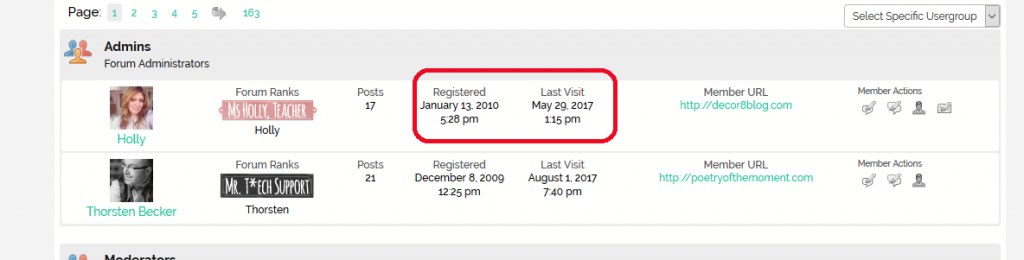
Capture-1.PNG


I’d like to have “Location” as well as a custom profile field I created included instead. Would that be possible?

16 Answers

New Answer

MP Mr Papa
Mr Papa
Member

the members page is controlled by page template like any other page view…  you can adjust the page as you like by editing the members page template in the sp theme  you are using… as always we suggest a child theme or a custom theme before editing it…

by adding display functions, or just simply grabbing wp/sp data and outputting, you can custom what is shown…

TH Thorsten
Thorsten
Member

I’ve read the through the codex again, which is a great resource for WP programmers, but alas I am not a WP programmer (my forte is data science, R, Python etc.), I can’t spend a lot of time trying to read myself into it all for a minor change.

I tried adding sp_ProfileShowLocation(”, __sp(‘Location’)); to spMembersView.php (custom theme), but it shows up blank. Same for adding sp_CustomProfileFieldsDisplay(‘Blog Category’, $spProfileUser->ID);.

MP Mr Papa
Mr Papa
Member

well, you cant use a profile show type function because those are designed for profile view, so the $spProfileUser user object wont be set up…  the user object that will exist here is $spThisMember… 

and then get the data via $spThisMember->location I believe… I think that will exist for your first example…

and then the second, use spThisMember->ID…

TH Thorsten
Thorsten
Member

Got it, thank you so much. I have the custom profile field displaying now and properly formatted.

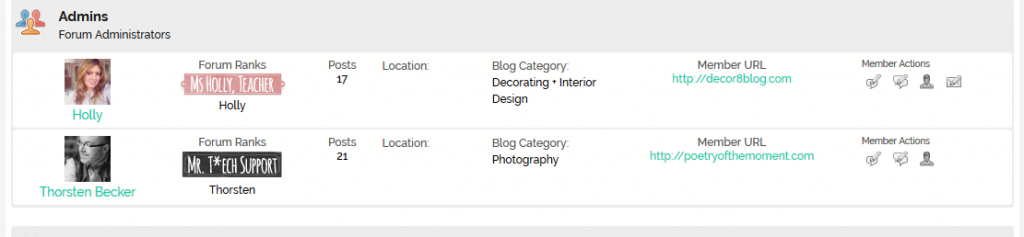
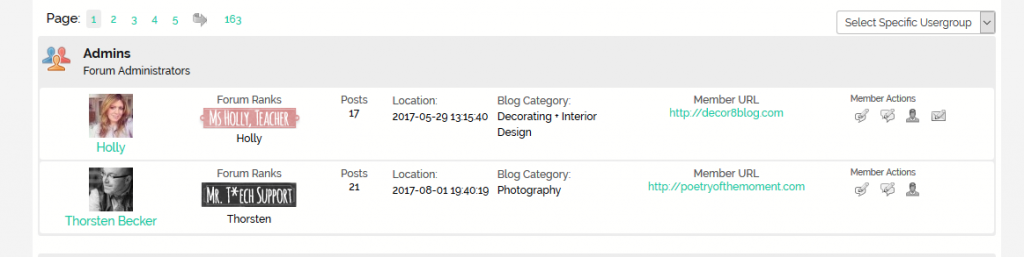
However, when I do echo $spThisMember->location; it comes up blank. Other options work fine, i.e. echo $spThisMember->lastvisit; displays the last visit date for each member. Attaching screenshots again:

Capture-2.PNG


Capture2.PNG
MP Mr Papa
Mr Papa
Member

are you sure they have a location defined in their profile?

if so, its possible the user object for members view is not a full user object… but you can always fill it with the data… before using, try adding this:

$spProfileUser->location = get_user_meta($spProfileUser->ID, 'location', true);

then you should have it available…

TH Thorsten
Thorsten
Member

Yes, several students and all the admins have location defined on their profile.

This worked now:

echo $spThisMember->location = get_user_meta($spThisMember->ID, 'location', true);

Thank you again for the help, much appreciated.

MP Mr Papa
Mr Papa
Member

you can optimize that a bit to be:

echo get_user_meta($spThisMember->ID, 'location', true);
TH Thorsten
Thorsten
Member

Ah ok, thank you so much. Now we have a much more useful member page. Appreciated.

TH Thorsten
Thorsten
Member

Sorry, I do have one more question: I noticed Member URLs open in the same window. I’d like to modify this to open in a new window. Would the be possible?

YS Yellow Swordfish
Yellow Swordfish
Member

Can you explain what you mean by ‘member url’ please? Or do you just mean the members listing? If so then we cannot redirect to another WP page I am afraid., All forum content uses the single, WP page object. It is possible to check what is about to be displayed if that might be of help…

MP Mr Papa
Mr Papa
Member

@yellow-swordfish he is talking about the member url listed for each member if they have entered one…

yes, you can change the target if you like… in the template file, find this similar to this line from reboot:

sp_MemberListUrl('', __sp('Member URL')); sp_MemberListUrl('', __sp('Member URL'));

and change it to:

sp_MemberListUrl('targetNew=1', __sp('Member URL')); sp_MemberListUrl('', __sp('Member URL'));

note, you are adding targetNew=1 to the first string… its possible you already have something in there while my example is empty string…  if there is something in that string, enter ‘&targetNew=1’..

Oddly though, the new tab option should be the default…

MP Mr Papa
Mr Papa
Member

oh darn… I see why… what I gave you wont work…  we do that only for website icon, not for the text…  not sure why, but how it currently is…

we use a WordPress function to build the url and it does not offer the option to add the target attribute…

two options…

one change the template tag call to be:

sp_MemberListUrl(‘showIcon=1’, __sp(‘Member URL’));

this will show an icon instead of the url text, but the icon will be clickable and will open in an new tab…

two, filter the url yourself and add the target attribute…  filter ‘sph_MemberListUrl’ and add ‘ target=”_blank”‘ to the url after the ‘<a’ characters…

TH Thorsten
Thorsten
Member

Thank you so much. I’ve added the icon, easiest solution. That looks good too.

For some reason I didn’t get a email notification for new posts on this thread, even though I am subscribed. Just wanted to mention that briefly.