Support Forum

DOMContentLoaded Performance issue

YL Yao Li
Yao Li
Member

The forum topic view always takes a long time to finish. I tested the page load time via chrome web developer tools. Below data is copied from the tool (I tested 10 times)

  • wordpress homepage: Finish: 5.02s | DOMContentLoaded 3.56s | Load 3.73s
  • SP homepage: Finish: 5.19s | DOMContentLoaded 3.72s | Load 3.98s
  • SP forum page: Finish: 9.56s | DOMContentLoaded 4.92s | Load 5.42s
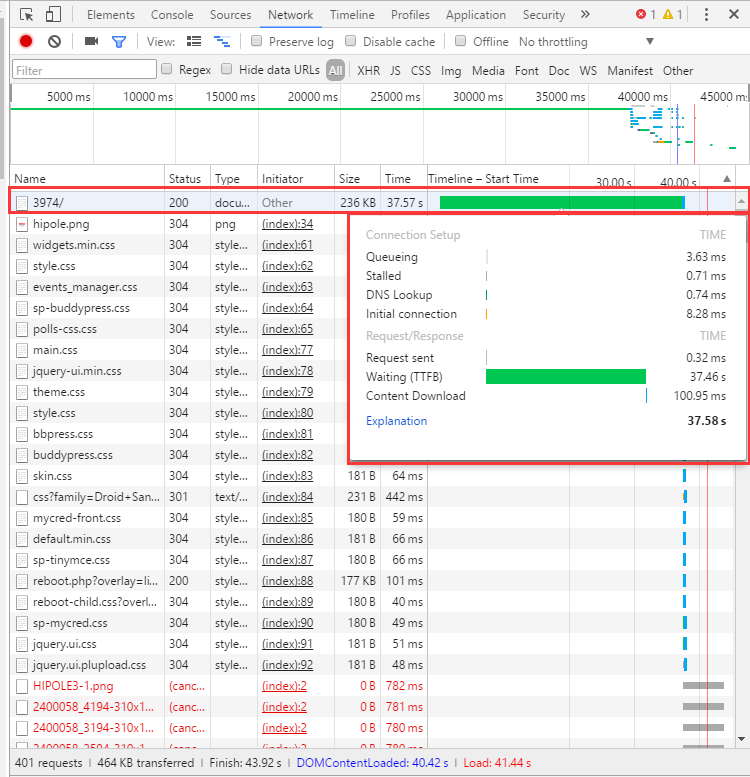
  • SP topic view: Finish: 43.92s | DOMContentLoaded 43.07s | Load 43.38s

From the data we can see that the DOMContentLoaded costed too much time in topic view. I don’t know much about the DOMContentLoaded thing … can you give me some tips/solution for this issue? Thanks in advance.

I’m stuck on the performance issue…let me know if you need more info. My server is Xeon E5-2630 2.3GHz, 4GB Memory, HHD,only installed WP and it’s necessary components. 

15 Answers

New Answer

MP Mr Papa
Mr Papa
Member

4GB is pretty low for servers (we run 32MB)…  that said 43 seconds is long…  it will take longer than any standard wp page since the forum is a whole lot more than static content of typical wp page… but again, 43 seconds too long…

could be many things… really need to look at the http requests and see what is slowing it down…

a couple things you could look at

o  forum – options – global settings, are you using the combined js and css caches? will increase performance

o  are you using gravatars?  if so are you using our gravatar cache plugin??

o assume you are running 5.7.2?

o how many posts per page are you showing in topic view?  forum – options – general display settings… less posts will be faster (but you dont need to really small)…

o what SP plugins are active? are you actively using them all? (though would like be more consistent from forum view to view)

what is your site?  we could take a look as something may jump out…

YL Yao Li
Yao Li
Member

Please see my answers inline. 

o  forum – options – global settings, are you using the combined js and css caches? will increase performance

[Yao] No, I’m not using them. I enable it now, but still the same performance…

o  are you using gravatars?  if so are you using our gravatar cache plugin??

[Yao] No, I’m not using gravatars. 

o assume you are running 5.7.2?

[Yao] centos7, apache 2.4.6, php 5.4.16, mariadb 5.5.47, WP 4.5.4, SP latest version.

o how many posts per page are you showing in topic view?  forum – options – general display settings… less posts will be faster (but you dont need to really small)…

[Yao] 12 topics per page, and 20 posts per page

o what SP plugins are active? are you actively using them all? (though would like be more consistent from forum view to view)

[Yao] Active: BuddyPress, Editor TinyMCE, File Uploader, myCred, Topic ID permalink

Inactive: Blog Post Linking

what is your site?  we could take a look as something may jump out…

[Yao] http://www.hipole.com/bbs/, you can test the topic view at http://www.hipole.com/bbs/hec/3974/

YL Yao Li
Yao Li
Member

as soon as the first request finished, the rest of page can be loaded in a very short time. the page seems “stuck” during the first request ..

document_slow.png
YL Yao Li
Yao Li
Member

To load a page, only the topic view costs so much time – 30 more seconds…

The forum view, topic list view, WP post view, all cost little time – 3 to 5 seconds.

YL Yao Li
Yao Li
Member

Hello,

I’m still working on it now…

It looks like that the “Time To First Byte (TTFB)” is too long while loading a topic view page. But the TTFB is kind of “black box” so I can’t look into it…

Do you have any suggestion on this issue? I don’t know what I can do now …as soon as this performance issue resolved, I can put the new SP forum online.

Really appreciate your help and looking for the response …

YS Yellow Swordfish
Yellow Swordfish
Member

Apologies for the delay 

I am on a short vacation and I only have my phone to look at things until I get back to my hotel. It’s not that easy to see the image you uploaded to be able to read it.

@mr-papa will be along a little later and hopefully he will be able to.

YL Yao Li
Yao Li
Member

@Yellow Swordfish, enjoy your vacation…

Yes it’s not a easy issue, so just take your time…

YL Yao Li
Yao Li
Member

Update,

I deactivated all SP plugins, and deactivated & deleted all unused WP plugins, got the same result as before.

MP Mr Papa
Mr Papa
Member

as you noticed, its the first part of the page loading that causes the big delay… wp has not even started loading yet  it appears…  so not sure how simple press is affecting that… but as you note doesnt happen on other pages…

has it been doing this since you started (have done lots of customizations wth you) or just start recently…

probably going to need some server sw  to monitor what is going on.. or perhaps the wp debug bar plugin for wp and some of the associated add ons to get more info…right now there is no page loading activity visible at all with the tools i have…

what wp theme is this?  wild thought but perhaps try going to forum- integration -page and permalink and enable the strict wp api option…

YL Yao Li
Yao Li
Member

it has been doing since started…

the wp thme is Sahifa, which is a paid theme from themeforest.

I enabled the strict wp api, now the topic view page loading time is decreased about 10 seconds – now it cost about 30 seconds…

—-

I have another question, is the “Time To First Byte (TTFB)”a client behavior or a server behavior? or is it browser related..? I asked some friends to test the topic view page, someone used 18 seconds while someone got 40 seconds…

MP Mr Papa
Mr Papa
Member

odd…would have expected no change or complete  overhaul…  that option exists for plugins or themes doing strange things…

the first time to first byte is really a server latency check… https://en.wikipedia.org/wiki/Time_To_First_Byte

which would not surprise that different folks get different times… its likely depending on server load…

couple things to try… just shooting in the dark here…

one, try switching to the default wp theme…  you disabled all plugins, lets just try a known quantity theme…

two, go to forum – options – global display settings and change the  number of posts per page from 20 to 10…  if big difference might give more insight into  server bottleneck…

YL Yao Li
Yao Li
Member

I’ve changed the posts per page number yesterday .. but no effect…

I’ll test on the default theme with all plugins disabled.

besides that,do you have further more suggestion now? Thank you.

MP Mr Papa
Mr Papa
Member

gave you a couple where suggested its going to take some sw on the server to dig up more data as to what is going on before there appears to be an server activity… wp hasnt even started displaying its page and launching the theme… so something is slowing it down before any page rendering starts… so as client (ie browser) on the page cannot get much further info… still could be something related to SP but just need to get at the data from the server, not the browser..

YL Yao Li
Yao Li
Member

update …. i disabled all WP plugins except SP, and used the default WP theme, then the topic view page still costed 30 more seconds … – seems that other WP plugins & theme are not the cause of this issue.. 

btw, if a disable all the other WP plugins and use the default WP them, the WP pages and the SP forum list pages’ loading time can be decreased by 50%.

as you mentioned above, sorry I don’t understand the meaning of “take some sw on the server to dig up more data “… and how/which data can I get from the server? Thanks you.