Support Forum

forum disappeared

SC Simon Coxshaw
Simon Coxshaw
Member

Hi,

Hopefully someone can help? Recently one of my clients reported that the forum had disappeared from their website, I checked and sure enough it had gone, just the original page I set up to contain the forum.

I logged in to the wp admin and the forum admin still remained, so I tried to get it back up live, after a few failed attempts I decided to try setting a new page and adding the forum, hey presto the forum was back up, fixed! Or so I thought… Now you can’t start new topics or reply to posts.

I have no idea what could have caused this – permissions?? The change to the new page?? Permalinks?? And why can’t I go back to using the original page?

Site is: http://www.silverhairs.com

Forum was here: http://www.silverhairs.com/forum

had to move to here: http://www.silverhairs.com/silverhairs-forum

Any help would be much appreciated.

Simon.

32 Answers

New Answer

MP Mr Papa
Mr Papa
Member

so what changed on the site? the forum wouldnt just disappear… wp upgrade? sp upgrade? had to be something…

so make the wp page slug (ie forum or silverhaird-forum) be whatever you want… on forum – integration – page and permalink, make sure that page is selected… then update the forum permalink in same admin panel…

SC Simon Coxshaw
Simon Coxshaw
Member

Thanks for the reply Mr Papa,

I am not sure what changed, I will need to see if i can find some logs somewhere.

I have tried many times to make the wp page slug ‘forum’ and then update the permalink but each time I do it just changes the page back to this: http://www.silverhairs.com/forum/ with no forum.

Both of them are pages and published?? Why does ‘silverhairs-forum’ work and ‘forum’ doesn’t?


YS Yellow Swordfish
Yellow Swordfish
Member

At the moment I am seeing a nice little graphic saying the forum is not available. Is this being displayed from content in the WP page named ‘forum’? I am assuming so but wanted to check. Clearly if this is the case then the site has no problem, as such, opening the ‘forum’ WP page.

As a separate issue – and I wouldn’t think this is responsible for the current behaviour but is a real problem – there is a WP plugin called, I believe, ‘sharebar’ active. This is actually throwing script errors and may result in stopping other jQuery based libraries from running code.

SC Simon Coxshaw
Simon Coxshaw
Member

Yes that’s right, I added the text to the graphic in the short term until I find a solution to the problem. This page that shows is the one that I am trying make the forum show on and this is where it was showing previously with no issue, but now I can’t get the forum to show up on this page.

I will de-activate sharebar…


YS Yellow Swordfish
Yellow Swordfish
Member

Sorry – guess I should have asked more questions at the start! So – it is not a matter of redirection or 404. The page is shown but the forum content is not attached. And I assume this is also the case for any of the forum URLs.

When you visit the forum admin > Integration > Page and Permalink panel – do you get a warning message at all? If that attachment were gone then I would have expected you to receive a warning…

Let’s try making the connection once more using the following steps. If this still fails I might have to ask for some database entry information. Are you able to look into the database tables if necessary?

  1. Load up the Page and Permalink admin panel.
  2. Select the page in the drop down list at the top.
  3. Click on the ‘Update WP Integration’ button at the very bottom of the panel.
  4. After the panel has saved and re-loaded, click on the ‘Update Forum Permalink’ button half way down the panel.

Finally – while you have that panel open – are any of the options in the bottom two sections checked on?

SC Simon Coxshaw
Simon Coxshaw
Member

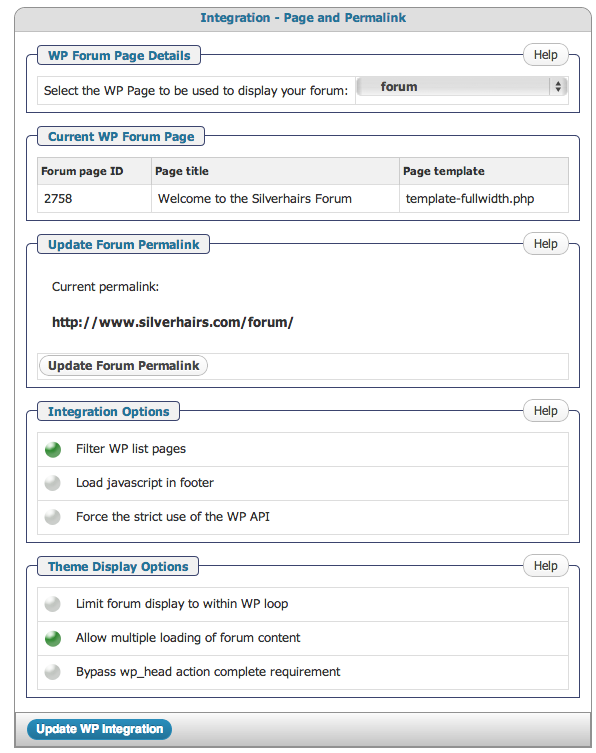
I have already done actions 1 through 4 with no effect. See attached screen shot to show options checked on.Screen-Shot-2013-04-19-at-13.37.51.png

YS Yellow Swordfish
Yellow Swordfish
Member

I know you have done those actions. I wanted to ensure they were performed in that particular set order. I will qassume this is the case.

You did not respond to the database question if we need to go down that route.

Can you perform an extra check for me? While it is not supposed to happen, we know from experience that it is sometimes possible to have more than one page with the same page slug. This can especially be the case if one of the pages resides in the WP trash. Can you please take a look to ensure this is not the case as such an object in existence can cause this sort of issue.

SC Simon Coxshaw
Simon Coxshaw
Member

Ok, I have run through the steps again just to make sure I didn’t miss anything and still no change.

And yes I can have a look at tables in the database if necessary.

I have also now deleted all items in the trash and no change.

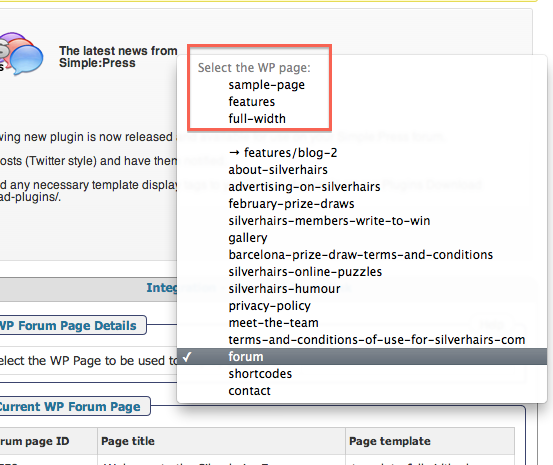
I did notice that when I added a page called ‘silverhairs-forum’ (which I have now deleted) and used this one to display the forum it appeared in the drop down list above forum in what appears to be a grouping of pages separated by a blank space. However the page ‘forum’ appears below this –  does this help at all? (See attached).Screen-Shot-2013-04-19-at-14.12.06.png

YS Yellow Swordfish
Yellow Swordfish
Member

Not sure about that empty space but I must say I don’t like it much. I think the bottom line still suggests that if the forum displayed with a different page object then there has to be something wrong about this one that is getting in the way. If you look at the generated source it also seems to be devising an odd canonical url but I might be misunderstanding that one completely.

If this were me I think my next step would be to delete (completely) the current ‘forum’ page object – also ensure it is not in the trash – and then create a completely new one and see what happens next.

(Steve: Any other ideas at the moment?)

SC Simon Coxshaw
Simon Coxshaw
Member

I think you are right about the canonical tag, have a look at the attachment, this is the page that the canonical tag displays and also have a look at the repetition of forum in the breadcrumbs, very odd!

I think you are right about getting rid of the forum page completely and starting again.

I’ll let you know…

Screen-Shot-2013-04-19-at-16.26.23.png
SC Simon Coxshaw
Simon Coxshaw
Member

Ok, I tried deleting the forum page and I mean deleted permanently, I then re-added a page with the permalink /forum

Still no forum showing, so I went to run through the page and permalink integration and another white space has appeared so I assume this is /forum I tried to select this and got the following error (attached).Screen-Shot-2013-04-19-at-16.38.04.png

MP Mr Papa
Mr Papa
Member

lets try this…  uncheck the limit forum display within loop and uncheck the display multiple options… then check the wp strict api option… and retry…

SC Simon Coxshaw
Simon Coxshaw
Member

OK, tried that and no change. Still no forum.

MP Mr Papa
Mr Papa
Member

something weird is going on…  wp thinks the forum page is an attachment page… look at the breadcrumbs…  an the link leads to an admin author page…  leads me to believe wp still has another element called forum…  a page?  tax? category?  author?  maybe an upload? weird but the permalink seems to be clashing…

any chance you tried a third party forum app?  and still have a /forum directory on your server root directory?

can you put it back to something very unique (ie silverhair-forums) like before so we can see what is going on with the attachment id stuff?

no caching, right?