Support Forum

Forum offline. Can't do a database upgrade.

ZD Zoran Dinev
Zoran Dinev
Member

After doing the update to 5.7.4, the forum is offline awaiting a DB update:

Your Simple:Press forum is temporarily unavailable while awaiting a database upgrade

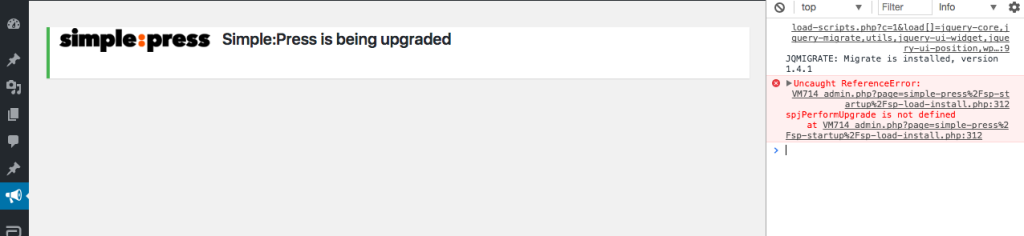
When I click on the “perform upgrade” button, all I get is the following message

Simple:Press is being upgraded

but nothing seems to happen. Can I get some help to troubleshoot this problem. 

Cheers

Z

12 Answers

New Answer

YS Yellow Swordfish
Yellow Swordfish
Member

Are you doing this from the admin? Any chance of a screenshot? Also – from which version are you upgrading from?

MP Mr Papa
Mr Papa
Member

Can you also try with browser console open and see if any errors reported? Could be another wp plugin hijacking the Ajax requests.

ZD Zoran Dinev
Zoran Dinev
Member

Thanks for the tip. Here is the reported error:

VM714 admin.php?page=simple-press%2Fsp-startup%2Fsp-load-install.php:312 Uncaught ReferenceError: spjPerformUpgrade is not defined at VM714 admin.php?page=simple-press%2Fsp-startup%2Fsp-load-install.php:312

I have also attached the screenshots. 

Cheers

Z

MP Mr Papa
Mr Papa
Member

sorry, no screenshots attached…

but sounds like something is hijacking the ajax request…  do you know what VM714 is?  perhaps some other plugin or security thing?

perhaps you can try it with other plugins disabled to see if one is interfering…

ZD Zoran Dinev
Zoran Dinev
Member

Sorry, attached this time. The three numbers in VMxxx seem to keep changing, but I have no idea what they are from. I have disabled all plugins, still get the same error. I’ll have to keep digging. 


Screen-Shot-2017-05-10-at-2.55.43-pm.pngScreen-Shot-2017-05-10-at-2.55.09-pm.pngScreen-Shot-2017-05-10-at-2.53.08-pm.png 

MP Mr Papa
Mr Papa
Member

maybe ask your host? just not sure what the VMxxx is…

what version of wp and sp is this?

and additional info in the php error log?

likely wont matter if its still an issue with all plugins disabled, but would still try using the default wp theme in case your there adds js or stuff in the admin..

ZD Zoran Dinev
Zoran Dinev
Member

Apparently it is not the host. They suggested increasing the php memory if there are any specific requirements, but I am pretty sure I adjusted that during install. 

Can I try a complete reinstall of Simple Press? Is there a procedure for this by which I can keep my simple press settings? I am not too concerned about the data. 

It is SP 5.7.3. to 5.7.4. on WP 4.7.5

Cheers

Zoran

MP Mr Papa
Mr Papa
Member

if you uninstall simple press, you will lose both your data and your settings…

have you tried disabling other wp plugins and see if it works?  would indicate a conflict, but let you upgrade…

ZD Zoran Dinev
Zoran Dinev
Member

Yes I have tried deactivating all the plugins. Did not help. 

My only option was to start fresh. The problem with that was that the data did not get removed after I uninstalled. When I reinstalled Simple press it was still asking for a database upgrade. I basically can’t follow the instructions for complete removal, i.e., “visit the Forum – Toolbox – Uninstall panel and check the ‘Uninstall’ option” because the forum button only allows the upgrade option. Are there any instructions for manual removal of all simple press files?

MP Mr Papa
Mr Papa
Member

you can do it in the database… via phpmyadmin or other db tool…  find all the tables that are like wp_sfxxxxxx  where xxxxxx is the varying table name… of course, your wp db prefix may be other than wp_…

no files need to be removed…  though if you really wanted, you could remove the wp-content/sp-resources directory (and subdirectories)…  if you purchased any plugins or themes, you will want to copy those before deleting…

once those db tables are gone, you will get to fresh install…

ZD Zoran Dinev
Zoran Dinev
Member

Thanks Mr Papa. 

I finally have this sorted, and I can report that it was definitely something to do with the theme, or changes made to the theme by myself or a plugin. In the end, I reverted to the original Divi theme instead of the child theme that I was using and the upgrade worked. 

I did try the complete uninstall and fresh install, which didn’t work. I got the same error during the fresh install that I was getting during the upgrade attempt. I then tried a fresh install on another website that was running the same theme, and there was no problem with the install, which is how I narrowed it down to the theme. 

Thanks for your help and patience. 

Cheers

Z

MP Mr Papa
Mr Papa
Member

assume you mean wp theme here?  glad its all sorted…  glad we could help!