Support Forum

Forums RSS Feeds Not Working

JI jim
jim
Member

I just noticed that the RSS feeds for our forums do not validate.

I doubt this is a big deal for most of our users, especially considering nobody has complained. But we use the feed in various ways, to populate a tab on our Facebook page for instance with the latest hot topics.

Anyway, I tried various feed validators, and when I enter the feed for all, forum, or group, it just reverts to the default feed for our site generated by WordPress. Odd…

All RSS: http://tripawds.com/forums/rss/

Example Group RSS: http://tripawds.com/forums/rss/?group=2

I have confirmed the RSS feeds are enabled for all forums in the global settings. I’m wondering if maybe the feed link structure has changed, and I need to update something in my theme templates?

We do have Private RSS feedkeys enabled, and guess what? Those feed URLs validate!

Mine, For Example: http://tripawds.com/forums/rss/36c9f6fa-ae79-4225-802f-a4789f9e41de/

Remove the key, and validation reverts to the main site feed?

Anyone else notice this? Thanks!

13 Answers

New Answer

JI jim
jim
Member

But notice how the source of the feed changes!

Reviewing the feed content also reveals the latest blog posts, not any forum data.

To clarify, when you enter the feed URL for our forum feed(s), the source URL automatically changes upon display of the validation results.

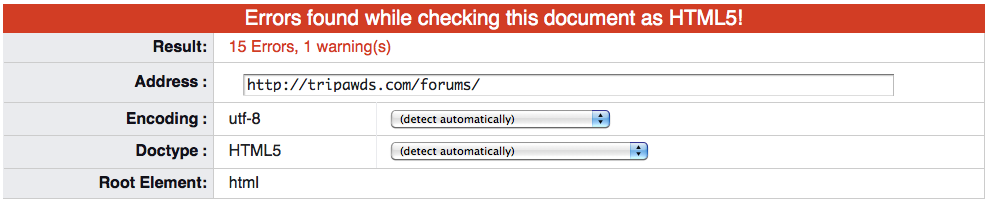
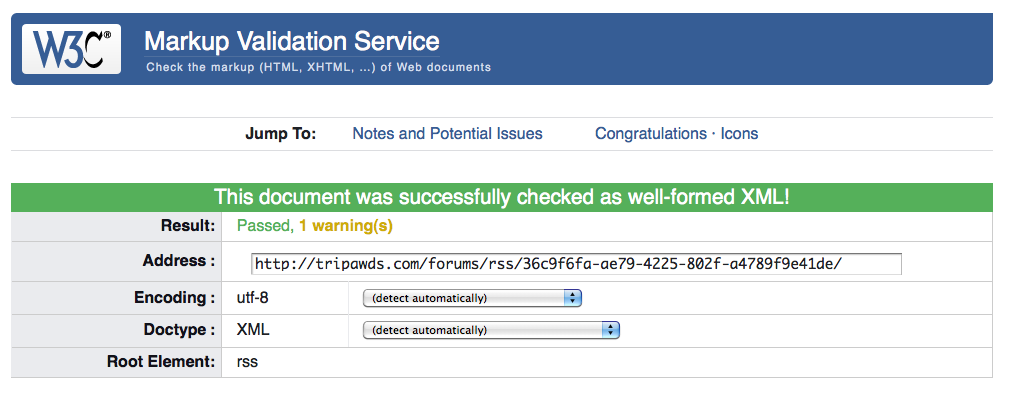
I just tried again using W3C, and it keeps the forums/ slug, but drops the feed/ resulting in failed validation. (Successful screenshot included feedkey.) Other validators just default to the standard WordPress feed… confused

Screen-shot-2014-09-24-at-8.32.14-PM.pngScreen-shot-2014-09-24-at-8.31.43-PM.png

MP Mr Papa
Mr Papa
Member

are you validating it as feed? or page? cant do the latter… try:  http://validator.w3.org/feed/

JI jim
jim
Member

Mr Papa said
are you validating it as feed?

Yes.

Using http://validator.w3.org/feed/ Enter the feed URL without the key, and watch what happens…the source changes to the default WordPress Feed URL and validates, pulling in our blog posts. Keep the key and it validates fine for the forums.

Forums feedkey URL:
http://tripawds.com/forums/rss/36c9f6fa-ae79-4225-802f-a4789f9e41de/

Public Forums URL:
http://tripawds.com/forums/rss/

MP Mr Papa
Mr Papa
Member

you have some sort of redirection going on there… do you use any kind of redirection plugin? or have some redirection in your .htaccess… the headers from your site:

http://tripawds.com/forums/rss/

GET /forums/rss/ HTTP/1.1 Host: tripawds.com User-Agent: Mozilla/5.0 (Windows NT 6.1; WOW64; rv:32.0) Gecko/20100101 Firefox/32.0 Accept: text/problem-with-post-edit-buttontml,application/xhtml+xml,application/xml;q=0.9,*/*;q=0.8 Accept-Language: en-US,en;q=0.5 Accept-Encoding: gzip, deflate Referer: http://tripawds.com/forums/ Cookie: PHPSESSID8649cf8e8fb601689a672700b700d9; sivtvqwuedabAtDq=sbwjmiyaqgkolenl; __unamv39673-148aa5fb1c5-5fa3527-7; __utma1229946.535684490.1411607671.1411607671.1411615039.2; __utmc1229946; __utmz1229946.1411607671.1.1.utmcsr=(direct)|utmccn=(direct)|utmcmd=(none); __utmb1229946.6.10.1411615039; __utmt=1 Connection: keep-alive

HTTP/1.1 301 Moved Permanently

you have a redirect that says the rss feed page is permanently redirected to the main forum page…

JI jim
jim
Member

Mr Papa said
…do you use any kind of redirection plugin? or have some redirection in your .htaccess…

Hmmm… no, interesting. This might also explain why many users are having trouble activating their account by being redirected to our home page when clicking the link in the their activation email.

Must. Investigate. Further.

Thanks for digging into this for me!

JI jim
jim
Member

Thanks again.

For the life of me, I cannot figure out what’s causing the redirect. And I don’t understand why the feeds validate with the feedkey, but not without… confused

MP Mr Papa
Mr Papa
Member

nothing in .htaccess?  and no redirection plugin?

JI jim
jim
Member

Mr Papa said
nothing in .htaccess?  and no redirection plugin?

Thank you for the additional thought on this Steve!

We have no redirect plugins running.

Below is our entire .htaccess file? Notice anything peculiar?

FYI: I tested removing the items in blue with no affect on the feed (in)validation.

RewriteEngine On
RewriteBase /

# uploaded files
RewriteRule ^(.*/)?files/$ index.php [L]
RewriteCond %{REQUEST_URI} !.*wp-content/plugins.*
RewriteRule ^(.*/)?files/(.*) wp-includes/ms-files.php?file=$2 [L]
RewriteRule ^(.*/)?sitemap.xml wp-content/sitemap.php [L]

# add a trailing slash to /wp-admin
RewriteCond %{REQUEST_URI} ^.*/wp-admin$
RewriteRule ^(.+)$ $1/ [R=301,L]

# redirect to non-www
RewriteCond %{HTTP_HOST} ^www.(.*)$ [NC]
RewriteRule ^(.*)$ http://%1/$1 [R=301,L]

RewriteCond %{REQUEST_FILENAME} -f [OR]
RewriteCond %{REQUEST_FILENAME} -d
RewriteRule . – [L]
RewriteRule  ^([_0-9a-zA-Z-]+/)?(wp-.*) $2 [L]
RewriteRule  ^([_0-9a-zA-Z-]+/)?(.*.php)$ $2 [L]
RewriteRule . index.php [L]

# security Measures
<files wp-config.php>
order allow,deny
deny from all
</files>

<files .htaccess>
order allow,deny
deny from all
</files>

# Block the include-only files
<IfModule mod_rewrite.c>
RewriteEngine On
RewriteBase /
RewriteRule ^wp-admin/includes/ – [F,L]
RewriteRule !^wp-includes/ – [S=3]
RewriteRule ^wp-includes/[^/]+.php$ – [F,L]
RewriteRule ^wp-includes/js/tinymce/langs/.+.php – [F,L]
RewriteRule ^wp-includes/theme-compat/ – [F,L]
</IfModule>

Options All -Indexes
# End Security

MP Mr Papa
Mr Papa
Member

you have a lot of non standard stuff in there… doesnt mean bad or wrong, just not what you get from a standard, default wp ms install…

that said, nothing jumps out to me as suspect…

Jim, you have a staging server, right?  does this occur there also?  If so, for grins, would try it with the default wp theme active and all other plugins disabled… lets just rule them out – or not… :)

JI jim
jim
Member

Mr Papa said
you have a staging server, right?  does this occur there also?

No. I believe this has something to do with the theme which raised it’s ugly head after recent WP updates.

Just can’t figure out what…but we have a long overdue in the works anyway. We’ll see what gets done first!

Thanks again.