Support Forum

How to upgrade to 4.50 release

CR crzy3rdgen
crzy3rdgen
Member

I keep getting this


Unpacking the package…

Installing the plugin…

Destination folder already exists. /problem-with-post-edit-buttonome/content/99/8663899/problem-with-post-edit-buttontml/wp-content/plugins/simple-forum/

Plugin install failed.


how should I go about upgrading without losing all of my forum information?  thanks for your time!


sean

42 Answers

New Answer

YS Yellow Swordfish
Yellow Swordfish
Member

Your topic says ‘upgrade to 4.5.0’. The forum you have posted in is for V5.0.0. So which is it?
If V4.5.0 then you wont be able to use the WP zip uploader. Use a good ftp client program (NOT Filezilla)

CR crzy3rdgen
crzy3rdgen
Member

Ah i did post this in the wrong section sorry.  4.50 upgrade, do I have to uninstall my simple press plug in?  I’ll lose my files wont I?

MP Mr Papa
Mr Papa
Member

what are you using? is the the plugin installer?  well, of course it cant install a plugin where one exists…

best bet is to ftp the new files up over the top of the old ones… 

or if you really, really want to use that plugin installer (be aware it has a 2MB limit by default unless you have modified your php and SP is larger than 2MB so may fail) you need to remove the existing plugin first then use the upgrader…  do NOT uninstall as that will remove data…

CR crzy3rdgen
crzy3rdgen
Member

yeah I was using the plugin installer with the previous version, I guess I could go into my ftp and change over all the files which need to be upgraded but exactly how many are there?  That was my main concern, and knowing which ones to change over.  thanks for your time!


sean

MP Mr Papa
Mr Papa
Member

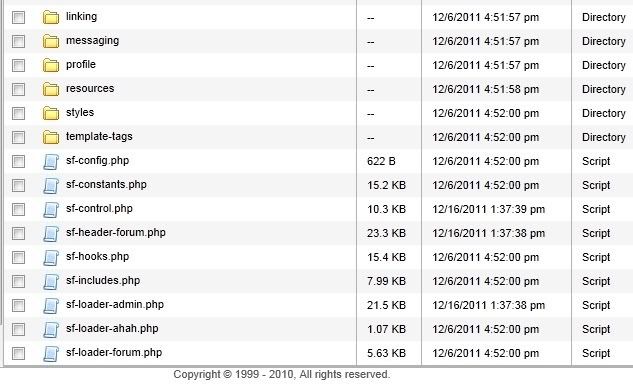
here is the changelog:

M sf-loader-admin.php
M sf-loader-install.php
M sf-header-forum.php
M sf-control.php

CR crzy3rdgen
crzy3rdgen
Member

ok so just replace those current 4.4.5 php file names you listed with the same ones in the 4.50 and i’ll be good to go.  Im kind of a noob still so im sorry if Im not catching on fast here.  The php files are template files right?  Just for the layout? It shouldn’t effect information on my forum right.  I’ll back them up just incase.  thanks again


sean

CR crzy3rdgen
crzy3rdgen
Member

i dont see sf-loader-install.php my only other sf-loader file is   sf-loader-ahah.php


Maybe that install.php is a new php file that doesnt replace any others?

YS Yellow Swordfish
Yellow Swordfish
Member

It has been a file in the root simple-forum folder since at least version 4.0 as have all four of those files.

You will not lose data by the way. That is all held in the database NOT php files. The only reason you need to update these files is because the Wp team moved the location of some Wp core program components that SP uses.

CR crzy3rdgen
crzy3rdgen
Member

ok thank you, i overwrote the 3 files I do see, I still dont see a sf-loader-install. php  the main directory for simple forum i dont see it.

CR crzy3rdgen
crzy3rdgen
Member

ok I feel like an idiot, i scrolled all the way down but my FTP wanted me to go to page 2 on the directory.  Didnt even notice that!!!!!!!!!!!!  Goodness im such a noob. sorry guys!!!

CR crzy3rdgen
crzy3rdgen
Member

Hmm, i can edit the forum and all, the layout shows up on my site however I cannot open any groups to the forum or sub groups, the path is wrong.