Support Forum

Member Name Profile popup no longer working since updates

BS BSABantam
BSABantam
Member

As per the title, there is no longer a response when clicking on a Members name or Avatar from within the Forums since the update to Version: 5.7.5.2 Build: 14775, although it still works from within the Member List & Private Messaging. All the relevant SP Plugins were also updated and WP was updated to 4.9 just prior to the SP updates being applied.

Member Name Linking in Options-Member Settings is set to ‘Members Profile’.

I tried changing the setting to ‘Do Nothing’ and back again but the problem remains.

17 Answers

New Answer

YS Yellow Swordfish
Yellow Swordfish
Member

Ah – that is happening here as well. Probably caused by the same late-changing WP mods but one we failed to pick up. I will open a ticket to get this fixed up. Apologies and thanks for letting us know…

If it is a simple code fix do you want me to let you know how to make the change?

YS Yellow Swordfish
Yellow Swordfish
Member

Actually – after more tests I do not see this happening on our 5.7.5.2 dev systems (this site is using an alpha 5.8). Can you clear the error log – and the try this again to see if anything is reported?

BS BSABantam
BSABantam
Member

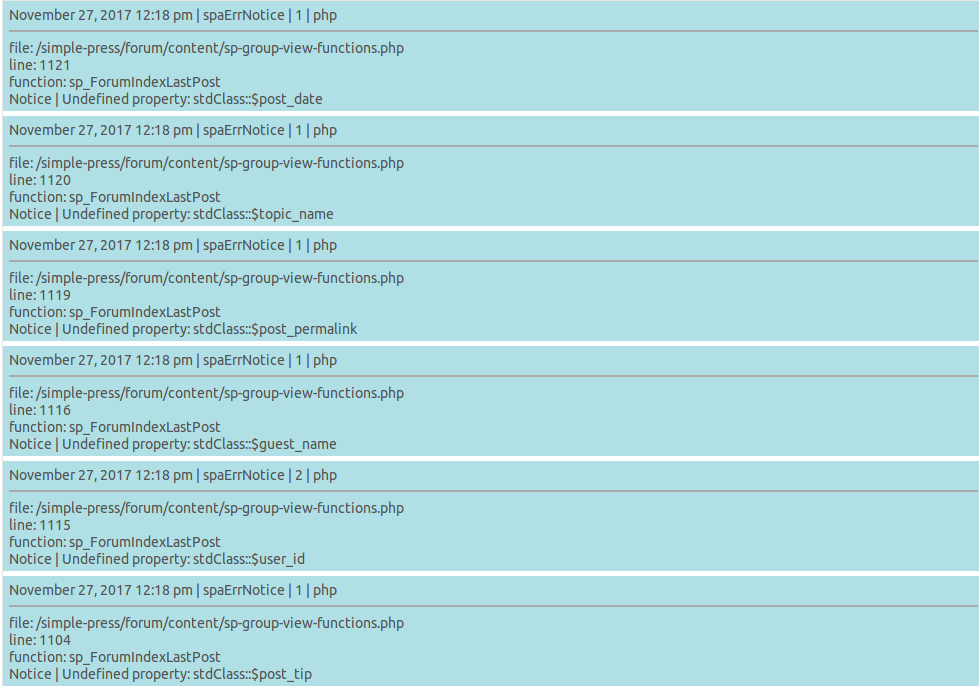
Cleared the log, opened the Forum in a new tab and navigated to a Topic, clicked on a Members Avatar and no popup. Re-loaded the log and it says

Screenshot-at-2017-11-27-122014.png

Cleared the log again and clicked the Members Avatar, no popup, re-loaded the log and it remains empty.

YS Yellow Swordfish
Yellow Swordfish
Member

Still investigating but still unable to replicate I am afraid. Trying to see what else you could try…
The above are not errors by the way – as they state. Unsure why they should show up as well. They suggest an empty post which doesn’t make much sense.

BS BSABantam
BSABantam
Member

OK, thanks. It’s not the end of the world but it does make things take longer, I got used to accessing profiles that way and I know some Members used it to send PM’s (I await the complaints frown) so it would be nice if we could get it working again.


YS Yellow Swordfish
Yellow Swordfish
Member

Being unable to replicate the issue makes it hard as that suggests a more local issue.

What else was upgraded besides SP and WP?

And – could you see if the browser console is throwing any JavaScript errors when you try the operation? See this FAQ for details of how to do that if unsure.

BS BSABantam
BSABantam
Member

There was a whole bunch of updates besides the WP update itself, SP update & SP plugin updates but unfortunately I can’t remember what they were!

The console shows this when I open a Forum

Screenshot-at-2017-11-28-231056.png

and the same when I open a Topic followed by a second error line when I click on an Avatar.

Screenshot-at-2017-11-28-231233.png

I originally stated that it worked in Private Messaging but I just checked and it’s not working now, gives the same error as above, however, it does still work in the Member List with no error shown. It also works in the Forum List if I click on my own Avatar or the name of the last poster on any Forum in the list with no error shown.

MP Mr Papa
Mr Papa
Member

so is this with one particular browser?  that kind of error is usually seen with Internet Explorer…  just curious if occurring in multiple browsers…

no caching plugins on forum page?

just for more data, have you tried with a default wp theme?   and with other plugins disabled?  since its really an error in tinymce (or at least a conflict), its usually related to another plugin doing something with tinymce that might be conflicting with the WP built in tinymce we use…  and the member popup, has nothing to do with tinymce (on our end at least)… so just gathering data…

also, do you have a link to your site, so we can look for obvious conflicts?

BS BSABantam
BSABantam
Member

To be honest I haven’t tried any other browser than Firefox (I never use IE and try to discourage others from using it too, for that very reason), we have no caching plugins installed and the WP theme we are using was written for us when we updated the site a year ago and hasn’t been changed or updated since. No new plugins have been added recently, just the updates as indicated above.

I can try a different theme and disabling plugins but it will have to be later in the week as I am travelling at the moment.

In the  meantime there is a link to the site in my details to the left, I would be grateful if it’s possible for you to take a look.

MP Mr Papa
Mr Papa
Member

nothing particular jumps out there…

I do notice that you are using our cached scripts capability… so, just to be sure, lets clear that out and let it rebuild and see if it makes a difference…  go to forum – toolbox – housekeeping and clear the combined scripts cache please…  then try again…

if that doesnt help, for another data point, try going to forum – options – general settings and disable the combined js cache…  and try again…  should be no different, but lets just check…

JI jim
jim
Member

Mr Papa said
if that doesnt help, for another data point…disable the combined js cache…

Just thought I’d chime in here before starting a new topic, as we very recently* started experiencing very similar issues (no profile pop-up), though much more severe:
– Admin Queue not working
– Unable to Reply to topic
– Unable to Add Topic
– Unable to navigate using Updated Topics or Jump to Forum Menus
– No profile pop-up

So…followed recent instructions found here. Resetting combined script (and/or CSS) cache did nothing.

BUT: Once I disabled combining and caching of forum script (JS) files, the above issues are resolved. Re-enable combined script cache and all issues re-occur.

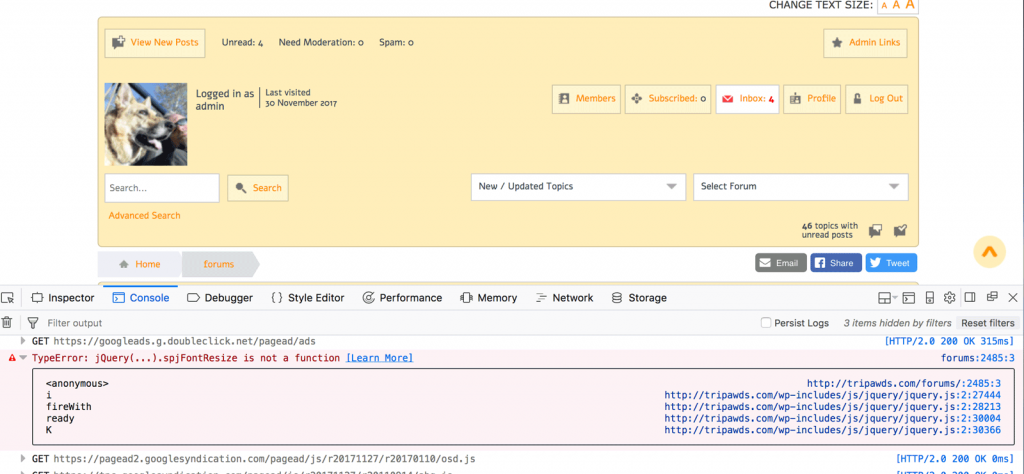
Screenshots of perhaps relevant console errors attached for reference. (FYI: We do use Font Resize SP plugin. Deactivation did not resolve issue.)


*This appears to have begun after recent WordPress maintenance release auto-update.

fontresize-console.png
JI jim
jim
Member

jim said
– No profile pop-up 

For the record, just thought I’d add that while turning off the combined script cache did resolve most of the issues I mentioned above, clicking the member avatar or username still does not pop up the profile dialogue.confused

SP Toolbox (sp_ForumTools) does still pop-up.

And: To clarify, those errors in screenshot disappeared when disabling combined cache. But console throws no error when clicking avatar or username.

YS Yellow Swordfish
Yellow Swordfish
Member

Following the WP 4.9.1 update the only one of the issues you list that I can replicate is the members profile popup. Either with the JS cache on or the cache off. But that is somewhat weird and let’s ask about the other issues first…

They could all be traced back to the font resize call (something which again we can not replicate at the moment) and you mention that you do not use the font resizer plugin but the screenshot clearly shows it active (at the top of the image). If you actually deactivate the font resize plugin, with the exception of the profile popup, do the other items then work as expected?

As to the profile popup then this is very weird behaviour. Could you do a test for me please…

Load a topic page. I assume the profile popup will not work but try it anyway. Then click on the Add Reply button which will open the editor. NOW try a profile popup action again. For me – it now works. Problem at the moment is that I have no idea why! But it gives me somewhere to start looking! Let me know if this happens to you also.

BS BSABantam
BSABantam
Member

@mr-papa 

I tried your cache sugestions, there was no difference.

Disabling the TinyMCE SP plugin makes the popup work again but re-enabling it reverts to non operation.

@yellow-swordfish 

I have the same behaviour as you found.