OK, weird…issue is not happening on our dev install, which is supposedly identical. For the life of me I can’t find any differences is SP forum setting.
Need to investigate further investigation!


OK, weird…issue is not happening on our dev install, which is supposedly identical. For the life of me I can’t find any differences is SP forum setting.
Need to investigate further investigation!
Found it!
The following combination of SP SEO settings causes the Page title to disappear, and any menu label for the page to be replaced with the page ID number.
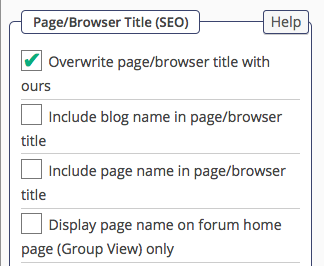
IF “Overwrite page/browser title with ours” = Yes
AND “Display page name on forum home page” = No
Then Title havoc occurs.
If overwriting the Page name, then Display name on forum home must be selected. Kinda makes sense. Problem solved!


Good stuff Jim! Sorry I have been away for a few hours so wasn’t able to reply not that I probably could have helped.
Thanks for sharing the solution, it’s a fairly frequent issue outside of this thread so hopefully this will help others!
Well, this issue apparently isn’t quite resolved yet…
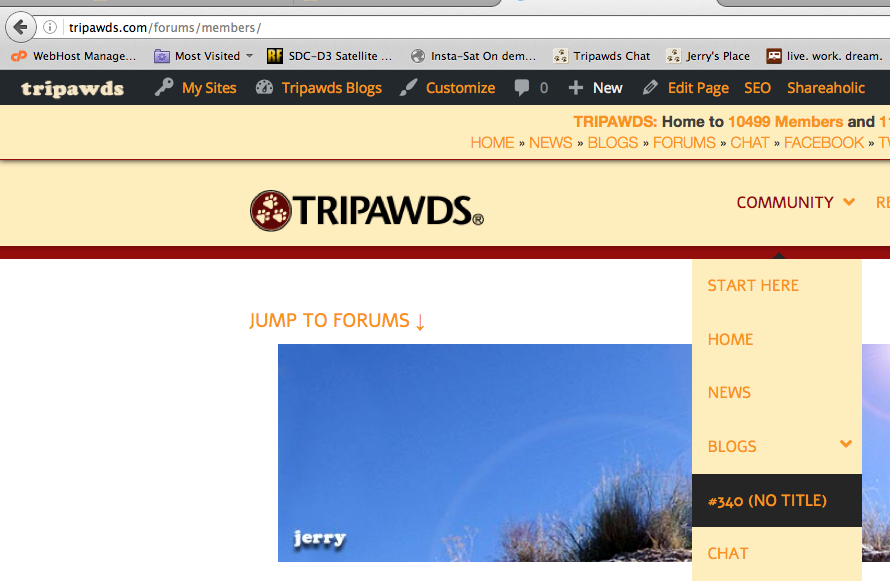
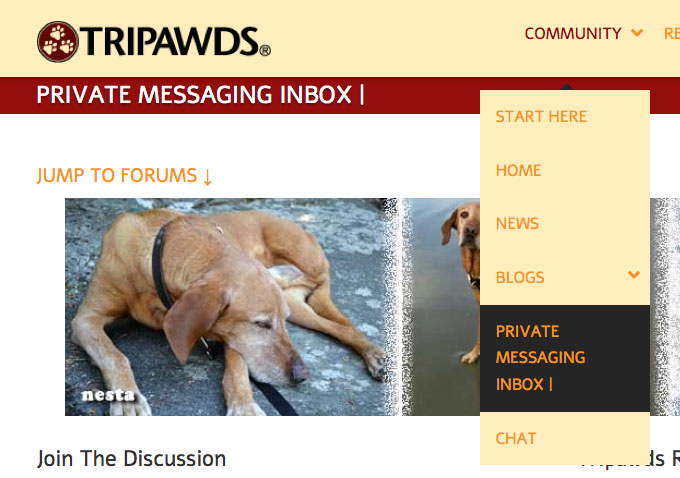
I just discovered the Page ID is still getting assigned to the Menu item in Members view and when viewing the PM inbox.
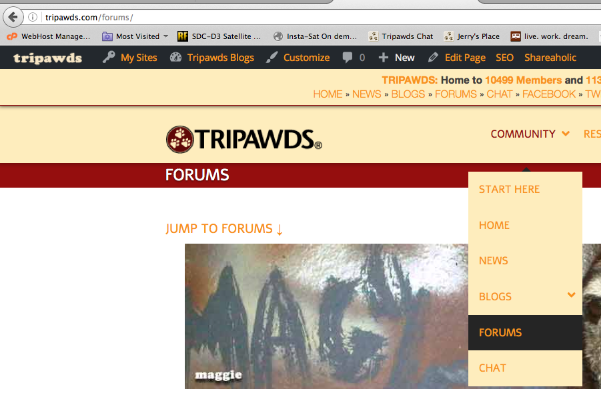
I’ve confirmed that he settings I provided above fix the issue when viewing forums, topics and search results. But when viewing the Members List or PMs, the ID# is there again…see screenshots for detail (PM view is same as /members).
Enjoy!
PS: I do not encounter the issue here. We use Reboot, and obviously have drop-down menu items, so maybe that has something to do with it, though I don’t see how that would make a difference.


I’m no expert on SEO but is it possible you have something else running that could be fighting with SP SEO?
Ike said
…is it possible you have something else running that could be fighting with SP SEO?
FYI: We do use All In One SEO, but after editing AIOSEO settings to exclude its operation on any forums/ pages, the page id# still appears in the menu for /members, /profile and /private-messaging pages.
 This is no show-stopper for us, just quirky. And I hate quirks. Happy to help troubleshoot further if I can!

are you sure its seo related?? would have thought it was caused by how theme was generating the page… does it happen with default wp theme?
Mr Papa said
are you sure its seo related??
No, I do not believe so. I was just responding to Ike’s assumption/question.
…does it happen with default wp theme?
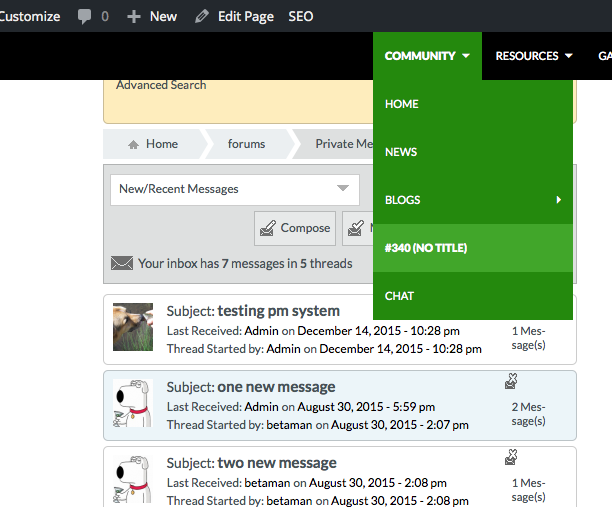
Yes…Twenty Fourteen shown below. (most recent WP default theme on our dev install)
ID# appears for Inbox, Profile, and Members pages

Sorry if I confused the issue, the only reason I mentioned SEO was because of you managing to fix it on the main forum pages with SEO settings. However, the fact that it’s remaining the same using the default theme is definitely strange.
Ike said
…the fact that it’s remaining the same using the default theme is definitely strange.
indeed…

As I have a copy of your WP theme Jim I am trying to replicate this and currently having little luck doing so,
Can you tell me the exact name of the menu item (by default it is the page title but does not have to be of course) and also how the menu link is created n the WP menu builder? I.e., is it just adding it because it is a page or is it a custom link?
I do not see any special menu building tool with the theme so I am assuming it is using the default WP menu building API… Or are you using any menu add-ons by any chance?
One last question… what is your WP permalink structure?
Yellow Swordfish said
I am trying to replicate this and currently having little luck doing so…
Perhaps because you may have already addressed it via SP SEO settings…
I just discovered the setting that fixes the issue, must have overlooked it before:
Checking “Include non-forum page view names (ie profile, member list, etc) in page/browser title” in SP SEO Component settings removes the odd page ID# from the Menu Item.
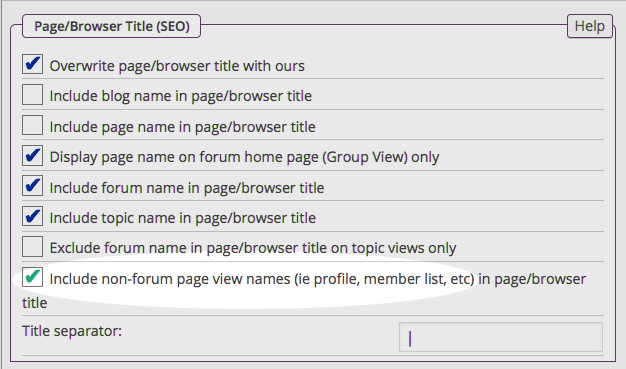
Interestingly, doing so even replaces “Forums” with the PM Inbox page title, however, Profile and Members pages still get titled Forums….
Can you tell me the exact name of the menu item…
Sure: Forums
and also how the menu link is created n the WP menu builder?
I tried both ways. With both Page, and/or Custom Link (and URL of page) the Page ID# appears in the menu.
I do not see any special menu building tool with the theme so I am assuming it is using the default WP menu building API…
No For the Cause (Woo Theme) has no special menu functionality. I’m just using WordPress Menus.
Or are you using any menu add-ons by any chance?
Nope, no other menu plugins or add-ons.
One last question… what is your WP permalink structure?
Day and name.
So… @kvr28 – I resolved the Page ID# in Menu issue by using the SP SEO Settings in my screenshot above (SP Admin -> Components -> SEO). Hope this helps!
@yellow-swordfish – if you’re still interested in figuring out how or why this is happening (no need to do that for me) I can provide credentials for our dev site to play around with menu and SEO settings.
I for one, consider this resolved!


I dont see how that would matter… so find it interesting… I use sp and aiseo on multiple sites and dont have this issue… but glad its resolved for you…
@yellow-swordfish will probably still want to investigate and he has a copy of the theme, so shall see what he has to say tomorrow… and we will want to make sure something hasnt gotten knocked recently…
I really need to see this error locally so am trying to replicate using your WP theme.
As far as I can tell your theme supports 2 menus – a ‘Primary’ and a ‘Top’. Leaving aside the fact that I have so far found no option to only use one of these! – which one is it that you are using and that shows the problem? I am guessing the one called ‘Primary’ but can you confirm please?
Yellow Swordfish said
…theme supports 2 menus…no option to only use one of these!
FYI: I use the Primary menu, and only the Primary menu, by just assigning no menu to the other (Top) location…
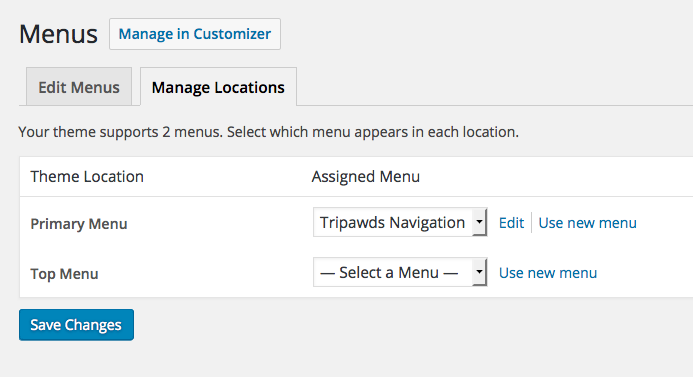
So, you got me thinking, and I thought you were on to something because we do assign a WP Custom Menu Widget in the Footer widget area. I thought that might explain the stuck location of the slider. But after removing that widget, and even deleting all but the (Primary) navigation menu, and clearing cache, the toolset still gets stuck in the footer.
