I thought probably primary. This just uses the wp_list_pages() function and that has always been a problem for us due to a very old, long-standing bug in WordPress
However – so far I am still unable to replicate this but I will keep looking…


I thought probably primary. This just uses the wp_list_pages() function and that has always been a problem for us due to a very old, long-standing bug in WordPress
However – so far I am still unable to replicate this but I will keep looking…

jim said
…I resolved the Page ID# in Menu issue by using the SP SEO Settings in my screenshot above (SP Admin -> Components -> SEO). Hope this helps!
Well, hate to beat this dead horse, but…
While the settings change I proposed above does fix the Page ID# menu item when viewing on the desktop, the issue persists in Mobile view.
I noticed it and though a recent AIOSEO update may have mucked up matters again, then I remembered I was viewing in responsive design mode, with simulated mobile UA. Then I just confirmed it on my iPhone.
Perhaps @kvr28 can replicate this…
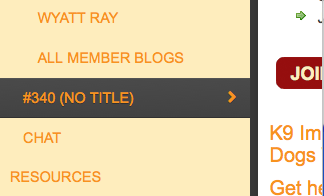
Mobile Menu on iPhone 6

Could we sort of restart this topic?
Could you give me a run-down of all your main SEO settings and a definitive method for recreating this. I would much prefer to nail it but really do have to replicate it to stand much of a chance.
Yellow Swordfish said
Could we sort of restart this topic?
I’ll leave that to @kvr28 since he started the topic. I was just trying to help by replicating the issue and offering a suggested fix via the SP SEO settings provided earlier.
With it only happening in mobile view, it’s not a major issue for us and I’d hate to have you spend your time and resources troubleshooting it.
Down to you then @kvr28 – but it would be useful if I could have a copy of your Wp theme to work with as well… let me know.

Hi I do have the same as @@kvr28 has.
Enviroment is SP5.6.6 (14173) WP 4.5.2 PHP 5.6.21 and I use Divi 2.7.4 as theme
SEO settings in screenshot,
best regards,

Hi,
Ok what worked for us 😉
Was just change the name from Forum in the Menu settings in WP settings to something else.
and it worked as a charme.
Ok will monitor it though but was happy to report back 🙂
Best regards,
http://www.jakestradingstrategies.com/forum/
Curious. We really do want to crack this one but we still have not managed to find the right mix and conditions to replicate the problem… I tend to think the SEO settings, as such, are probably a red herring however.
hi,
Well I did not change anything yet in the SEO section.
It looks like most of us with the issue have a menu plugin or a WP theme that can change the menu.
May be you can try that to replicate the issue.
best regards,
Not sure that is quite accurate. Jim’s theme doesn’t have a menu tool bundled with it and I don’t think he uses any menu plugin. And I have tried replicating this with his theme and still can’t.
We really do appreciate and realise there is some sort of underlying problem here – it is just trying to force it to happen so we can track it down to the code level….
Yellow Swordfish said
Jim’s theme doesn’t have a menu tool bundled with it and I don’t think he uses any menu plugin.
Correct, though the woo theme does have a couple menu locations.
OK – at last I think I may have a handle on this – largely thanks to the quirk that @jts found and reported above – that the problem disappears if you go into the menu tool and change the name of the menu.
Actually – it is a lot simpler than that. The problem only happens if the ‘menu name’ is the same as the ‘page title’ that the forum uses AND you are not displaying the page title on the forum page.
This is why we did not experience it here as our page title is ‘Support Forum’ but our menu name has been changed to just ‘Forum’. So – thanks Chris for the hint.
This has clearly been caused by some sort of change in WordPress core in the page title/menu name handling although it is probably not worth trying to track down in the hundreds of code changes they make for every version.
I have a rough and ‘dirty’ fix I can publish if anyone wants it. I am hoping it is not a final fix as it is a little memory hungry but to come up with something better is going to take time.
Alternatively for those not showing the page title above the forum, simply editing the WP page the forum uses and changing the title (NOT the slug of course) – or – changing the menu title – should sort things out.
Yellow Swordfish said
I think I may have a handle on this…
You sir, are quite the sleuth! That jives with the settings we had, since our title, slug and menu item were all “Forums” combined with the SP SEO settings.
Well done. I can certainly wait for any official fix since the settings changes have done the trick for us.


Yellow Swordfish said
The problem only happens if the ‘menu name’ is the same as the ‘page title’ that the forum uses AND you are not displaying the page title on the forum page.
Yes, that´s exactly how it´s done on my site.
However, the issue stil remained after editing the WP page name from forum to something else. But changing the menu name working as a charm.
I just want to add, that it also work with adding a font awesome string as well, if you want to keep the menu name to “forum”.
For example:
<i class="fa fa-share"></i> Forum