
Support Forum
 Support Forum


 Offline
Hello folks,
I can't reorder my groups and forums.
I am using the newest simple:press, with the newest wordpress.
I tried deactivate all wordpress plugins and all simple:press plugins but it still doesn't work.
It's hard to explain, so I recoreded the problem that appears.
Re-installed everything already, tried different browsers, other people can't change it too.
I just bought a new theme for the forum it would be a shame if it didn't work.
Is there a fix or a way to set the group IDs?
Here is my screencapture:
https://vid.me/NK0x
Thanks for your help
 Offline
That's messy indeed.
Can you try using the web console to check for script errors? (https://simple-press.com/docum.....r-console/)
I think we should consider that first as it is the most common problem...
Or we could do it for you if you want us to bt we would need an SP Admin account of course. If that is of interest then please PM credentials to both myself, to 'Mr Papa' and to 'Ike'. Please include in the PM a link to your site, a link to this thread and brief reminder of the problem. And one of us will take a look for you.
 |
YELLOW
SWORDFISH
|
Offline
Thank you for the fast reply, I have sent you, Mr Papa and Ike a PM.
Offline
Every time the mouse moves the cursor into the screen/form area a script error is generated. So it looks like a long line of errors...
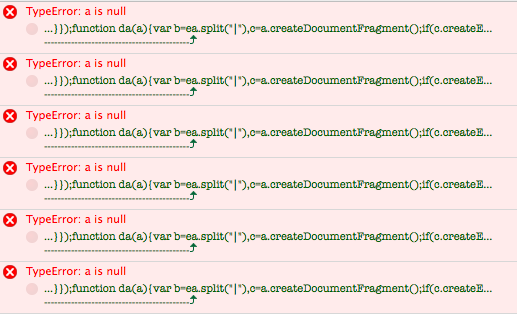

I have no idea what is actually causing this. It is going to be from another WP plugin or possibly the WP theme. Looking at what is being loaded then you do appear to have several plugins that are loading up scripts that are not used on the majority of admin pages and this is just bad programming. So it is one of them I am afraid.
I would start by temporarily deactivating the char plugin and then WP Rocket to see if either of thise are the problem.
|
YELLOW
SWORDFISH
|
Offline
Okay, I managed to find out what the problem is, it's definitely a issue with the theme.
It's not compatible, so if someone expierence the same or similar issues, here is what I did to at least work my way around it:
Just switch theme back to default
Reorder groups and forums
Switch theme back to custom
Thank you anyways for your help - I am just happy to be able to use your forum and not wasted a ton of money for plugins and themes lol
Offline
Well it's good you found it but if I were you I would definitely have a chat with the theme author as they must be allowing something non-standard and that is not good.
|
YELLOW
SWORDFISH
|
Offline
Ye, I don't think they care, because they recommend using some other forum plugin starting with b (not sure if I'm allowed to mention it).
Offline
Of course you can 🙂 but I thing I know the one you mean!
Sadly, WordPress is supposed to spawn themes and plugins that all work together nicely but it only needs a few to break th API and then all hell breaks loose.
|
YELLOW
SWORDFISH
|
Offline
🙂
Yes I see the problem, but welp - sadly nothing I can do about.
btw.
I have deactivated caching customized my theme for the forum, I can see the new theme on chrome, etc. but not on firefox.
I tried to delete all old cookies and caches even with ccleaner, but I still see the old theme.
Any ideas?
Also forgot to mention, that I can see all other changes, for example new icons, new font color and or new forum / groups, but the theme color seem to stay the same...
 All RSS
1 Guest(s)