Support Forum

Permission issue

GT Gord Tulloch
Gord Tulloch
Member

Hi there:

Users have been complaining about issues with the forums where they are missing text in some messages, like in the attachment.They can see and access attachments, see signatures, but not the text of the message. Yet in the message below you can see text. If they try to reply to this message, they get an “Access Denied – You do not have permission” error.  They can add a new message to the same forum so quite confusing why they can’t see the text.
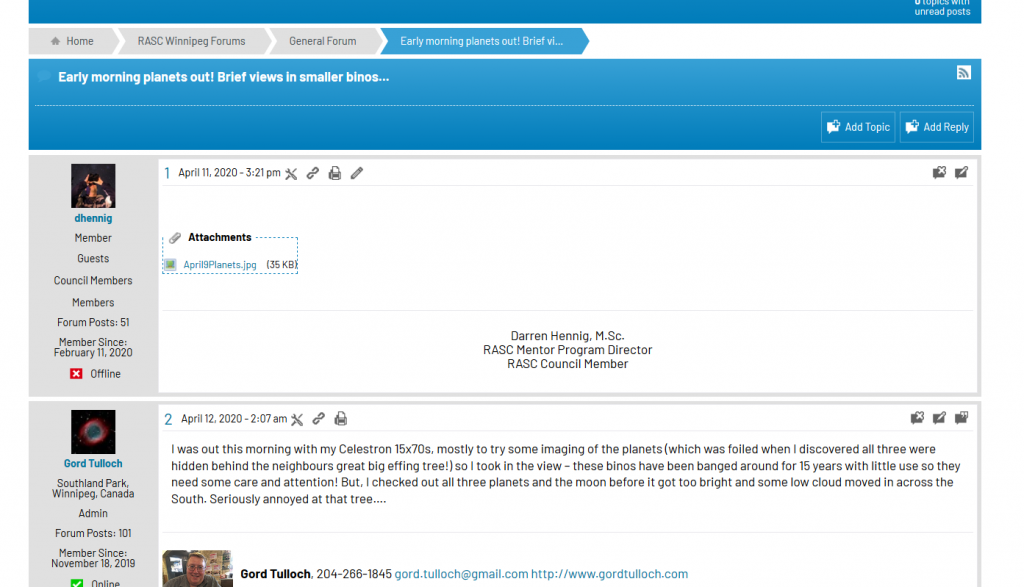
simple1.png

Any ideas?

16 Answers

New Answer

SP Simple Press
Simple Press
Admin

Possibly a caching issue?  Is the forum page excluded from any page caches you or your host might have installed?  Or maybe you have a CDN that is caching the page?

GT Gord Tulloch
Gord Tulloch
Member

I’ve shut off every cache I can in Siteground to no avail. I’ve asked them to let me know if there are other options.

However cache issues that only effect one forum? And only some users? And gives an error when replying ONLY to those threads where they are missing text? Seems like an odd group of symptoms for caching issues?

SP Simple Press
Simple Press
Admin

If its just one forum then check the WordPress debug.log file to see if there are any errors in there when the issue shows up.

If there’s nothing in there, it might be a weird conflict with another plugin and would require a little more drastic troubleshooting measures to verify that theory.

Thanks.

GT Gord Tulloch
Gord Tulloch
Member

That would be in wp-content? Nothing there. I’ll try disabling plugins to see if there’s any impacts.

SP Simple Press
Simple Press
Admin

Its usually in wp-content but only if the WordPress debug flags in wp-config.php are turned on.  And, sometimes your host can move it to a different folder so check with them to make sure they didn’t do that.

GT Gord Tulloch
Gord Tulloch
Member

I set up a new General conference just to see if it as a specific conference getting corrupted in some way but still an issue.  I set

// Enable WP_DEBUG mode
define( ‘WP_DEBUG’, true );
// Enable Debug logging to the /wp-content/debug.log file
define( ‘WP_DEBUG_LOG’, true );
// Disable display of errors and warnings
define( ‘WP_DEBUG_DISPLAY’, false );
@ini_set( ‘display_errors’, 0 );
in wp-config.php and will let the users know to try again. Is there any other debug settings I can turn on?
SP Simple Press
Simple Press
Admin

Turning on the debug flags isn’t going to automatically fix the issue.  But there might be info in the debug logs that could help determine what’s going on.  When you bring up the topic with the missing text, are there any new entries in the debug.log file?

Thanks.

GT Gord Tulloch
Gord Tulloch
Member

Yeah for sure – nothing in the debug log except imap_open() errors which happens sometimes. Someone sent me another example attached. For me this message has a body of text, for some people (seemingly without any particular rhyme or reason) they see a blank message body and get an security error when they try to respond.


error.png
GT Gord Tulloch
Gord Tulloch
Member

The user who can’t see the text is an admin – I can see it (as an admin) but others can without admin privileges.

SS SP Community Support
SP Community Support
Admin

hmmm…if you create a new admin, can the new admin see the text?

GT Gord Tulloch
Gord Tulloch
Member

Sorry got a little busy. I created a new admin and the new admin CANNOT see the text. Does that help?

GT Gord Tulloch
Gord Tulloch
Member

I switched the role to a regular member and the text appeared!