Support Forum

Pop-ups don't display properly

NL Noelle Leahy
Noelle Leahy
Member

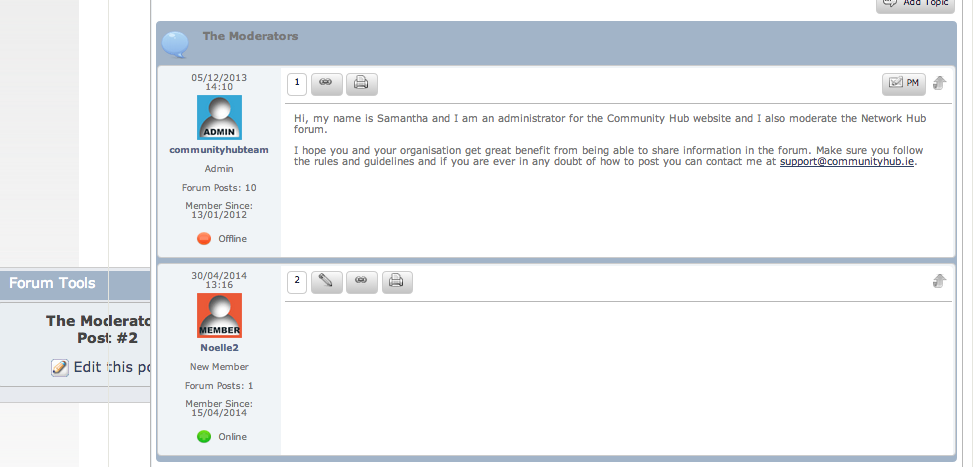
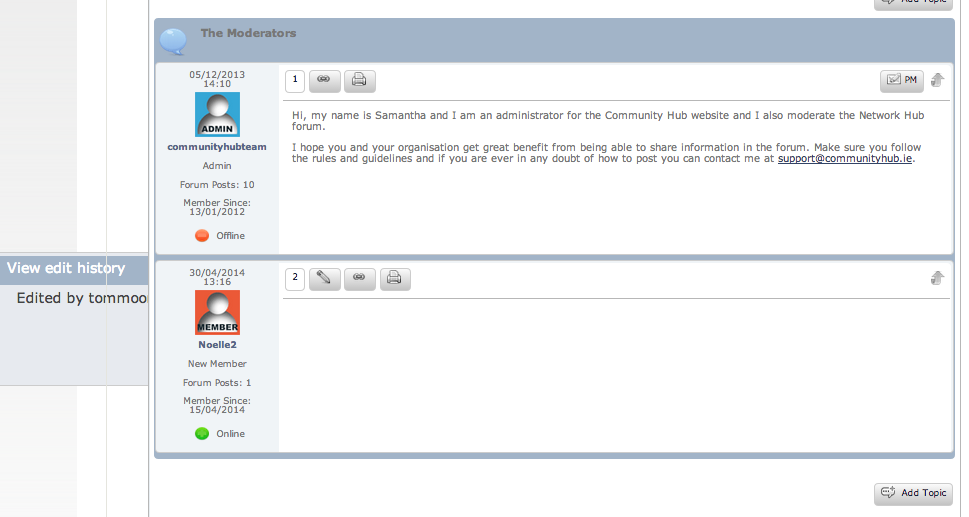
Hi. When I click either the ‘Forum Tools’ or ‘view edit history’ options on a post, the resulting pop-ups show behind the post and they don’t look good. I have attached 2 screenshots to show you. Thanks in advance.Screen-shot-2014-05-06-at-15.04.00.pngScreen-shot-2014-05-06-at-15.03.37.png

26 Answers

New Answer

YS Yellow Swordfish
Yellow Swordfish
Member

First question – are you using a customised Simple:Press theme? And whiuch versions of WP and SP is this for?

NL Noelle Leahy
Noelle Leahy
Member

I’m using the default theme – I haven’t changed the theme at all.

Also, i’m using WP 3.9 and SP 5.4.2.

MP Mr Papa
Mr Papa
Member

so likely then a z-index issue from your wp theme or another plugin on jquery ui dialogs… if you were to give us a link, we could take a look..

NL Noelle Leahy
Noelle Leahy
Member

Thanks a lot. You can see it here for the ‘view edit history’ button on the Noelle2 post: http://communityhub.ie/network/introduce-yourself/the-moderators/

YS Yellow Swordfish
Yellow Swordfish
Member

And you are the second person :)

rather than type it all out again – can I direct you to this post: https://simple-press.com/support-forum/sp5-general-topics/testing-a-new-theme/page-2/#p141036

Two small differences – if you are not using the ‘default’ theme then clearly use the theme file you ARE using. And in your case it looks like the z-index needs to be set to 10 and not 1 as was the case for the first user.

NL Noelle Leahy
Noelle Leahy
Member

Thanks Yellow. I can see the below code (see at the bottom of this post) in the default.php stylesheet, but where exactly will I add the .ui-dialog code because there doesn’t seem to be an entry already for it? .ui-dialog z-index: 10; }

Also, seems like we are not advised to edit this file because of future upgrades overwriting the changes. Am I better adding it to my WP theme? If yes, i’m afraid i’ll need help on where to add the code please. Thanks in advance.


/* UI Dialog
———————————-*/
.ui-dialog {
position: fixed !important;
padding: .2em;
width: 300px;
background: <?php echo($alt4BackGround); ?>;
border: <?php echo($alt4Border); ?>;
color: <?php echo($alt4Color); ?>;
<?php echo($largeRadius); ?>
font-family: <?php echo($dialogFontFamily); ?>;
}

.ui-dialog .ui-dialog-titlebar {
padding: .2em 1em .2em;
position: relative;
<?php echo($smallRadius); ?>
}

.ui-dialog .ui-dialog-title {
float: left;
margin: .1em 16px 0 0;
line-height: 18px;
font-size: 16px;
}

.ui-dialog .ui-dialog-titlebar-close {
position: absolute;
right: 12px;
top: 17px;
width: 18px;
margin: -10px 0 0 0;
padding: 0;
height: 18px;
background-image: <?php echo($ImageClose); ?> !important;
}

.ui-dialog .ui-dialog-titlebar-close:before {
content: ” “;
}

.ui-dialog .ui-dialog-titlebar-close span {
display: block;
margin: 1px;
}

.ui-dialog .ui-dialog-titlebar-close:hover,
#spMainContainer .ui-dialog .ui-dialog-titlebar-close:focus {
padding: 0;
}

.ui-dialog-content a {
color: <?php echo($alt1LinkColor); ?>;
text-decoration: <?php echo($alt1LinkDecoration); ?>;
}

.ui-dialog-content a:hover {
color: <?php echo($alt1LinkHover); ?>;
}

.ui-dialog .ui-dialog-content,
.ui-dialog .ui-dialog-content p {
border: 0;
padding: 2px !important;
background: <?php echo($plainSectionBackGround); ?>;
overflow: auto;
zoom: 1;
margin: 0;
clear: both;
}

.ui-dialog .ui-dialog-buttonpane {
text-align: left;
border-width: 1px 0 0 0;
background: <?php echo($plainSectionBackGround); ?>;
margin: .5em 0 0 0;
padding: .3em 1em .5em .4em;
}

.ui-dialog .ui-dialog-buttonpane button {
float: right;
margin: .5em .4em .5em 0;
cursor: pointer;
padding: .2em .6em .3em .6em;
line-height: 1.4em;
width: auto;
overflow: visible;
}

.ui-dialog .ui-resizable-se {
width: 11px;
height: 11px;
right: 3px !important;
bottom: 3px;
float: right;
background-image: <?php echo($ImageResize); ?>;
}

.ui-draggable .ui-dialog-titlebar {
cursor: move;
}

.ui-widget-header {
background: <?php echo($itemHeaderBackGround); ?>;
color: <?php echo($itemHeaderColor); ?>;
border: <?php echo($itemHeaderBorder); ?>;
height: 26px;
}

.ui-widget-overlay {
background: <?php echo($Imagesp_ImageOverlay); ?> !important;
opacity: .50 !important;
filter: Alpha(Opacity=50) !important;
z-index: 100 !important;
}

.ui-dialog .ui-dialog-content img.spPopupImg {
width: 100%;
height: 100%;
}

IK Ike
Ike
Member

Just add the z-index into your main .ui-dialog:

.ui-dialog {

z-index: 10;
position: fixed !important;
padding: .2em;
width: 300px;
background: <?php echo($alt4BackGround); ?>;
border: <?php echo($alt4Border); ?>;
color: <?php echo($alt4Color); ?>;
<?php echo($largeRadius); ?>
font-family: <?php echo($dialogFontFamily); ?>;
}

As I have done at the top there.

Also have a look at: creating-a-theme on the Codex. It doesn’t take much work as you can copy one of the base themes easily. This way your changes wont be erased upon updating.

NL Noelle Leahy
Noelle Leahy
Member

When activating my new SP theme (very carefully created using the above instructions), it seemed to be chugging away with a ‘please wait’ message. I refreshed my screen and now for my whole site i’m seeing a white screen http://www.communityhub.ie. Also when trying to access my WP Admin, also seeing the dreaded white screen here: http://www.communityhub.ie/wp-login.php Can you suggest what went wrong and how to resolve it? I have access to the control panel but don’t know what to do to reactivate the default theme. Please help!!!

When I refreshed the screen (because it was chugging away for ages), this URL was what I was actually refreshing, if that helps http://communityhub.ie/wp-admin/admin.php?page=simple-press/admin/panel-themes/spa-themes.php

If I just reactivate the default theme will that solve it and how will I do it via the control panel?

YS Yellow Swordfish
Yellow Swordfish
Member

That will usually denote a code or structural error. Maybe a missing php tag or some such…

Two solutions. One is to look at the php error log on your server as that will most certainly show a ‘fatal error’ message which will highlight the problem and allow it to be resolved.

The other method wont fix it but will get things back I believe. Go to the themes folder and rename the folder of the one you are using (your own?) – put an ‘x’ in front of the name or something. That will allow you to run the forum admin so you can then change the theme to the old one while you sort the problem (using the first option above).

NL Noelle Leahy
Noelle Leahy
Member

Pheww, thanks for the quick reply, back to normal now with the default theme.

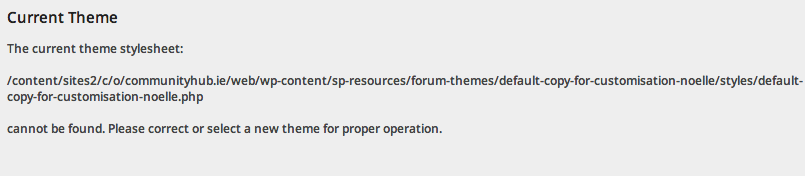
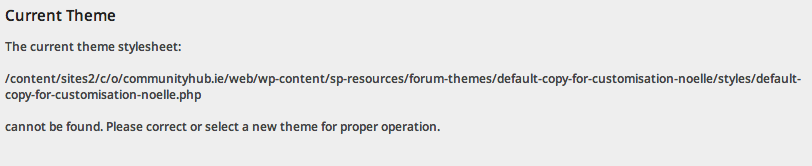
It’s all a bit odd because here is the message that I saw in the theme management section of Forum Admin when I went to change back to the default theme. 

Screen-shot-2014-05-08-at-11.56.19.png

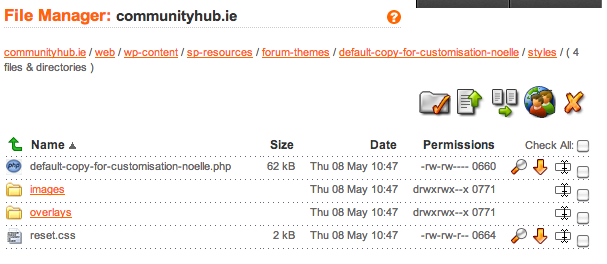
I could clearly see this stylesheet when I went looking for it here (new theme is default-copy-for-customisation-noelle):

Screen-shot-2014-05-08-at-12.18.30.png

I copied and pasted the name directly so there is no error there. Any suggestions? Thanks.

YS Yellow Swordfish
Yellow Swordfish
Member

The permission on the file you will see is set to 660. That is probably enough to stop it being loaded by the web server. Not sure what 660 means but try changing it to 644 – which would normally and should really be the default for web code files.

NL Noelle Leahy
Noelle Leahy
Member

I’ve changed it to 644, but the same thing happened. I actually got 2 messages – see attached. Any suggestions?Screen-shot-2014-05-08-at-17.36.06.pngScreen-shot-2014-05-08-at-17.36.11.png

MP Mr Papa
Mr Papa
Member

did you check the permission on sp-resources and forum-themes too? 0775 is more normal than 0771 for directories…

if all well there, next step is check the ownership, ie uid and gid… check wp-content… and compare to sp-resources, forum-themes and your custom theme directory…