
Support Forum

Re-ordering Forums Causes Second Forum to not Display Correctly

BC Ben Chandler
Ben Chandler
Member

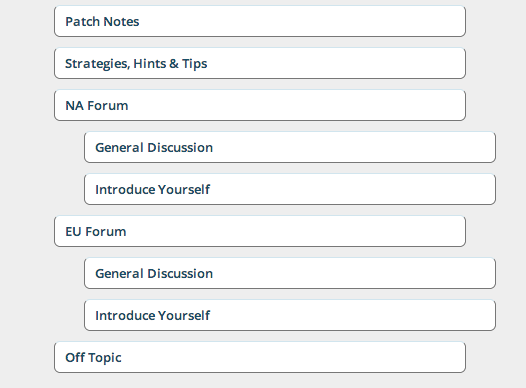
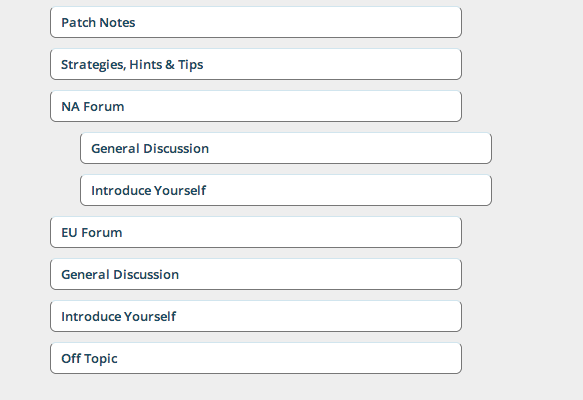
This one is hard to explain so here’s a visual example:

It should look like this:
Screen-Shot-2014-06-21-at-7.40.30-pm.png

..


However when I save, it saves like this:
Screen-Shot-2014-06-21-at-7.40.41-pm.png


Any ideas how I could correct this? I’ve tried putting the sub forums under another forum and rearranging. Right now I have to delete it and start again each time I want to add a new forum.


Disabling all plugins doesn’t fix it either.

5 Answers

New Answer

YS Yellow Swordfish
Yellow Swordfish
Member

First, quick question. Are you using the latest version of SP – 5.5.0?

BC Ben Chandler
Ben Chandler
Member

Yellow Swordfish said
First, quick question. Are you using the latest version of SP – 5.5.0?

Sorry for the late reply.

Just checked. Yes I sure am :)

YS Yellow Swordfish
Yellow Swordfish
Member

Very, very wierd and not something we have encountered.

If you do not have a large number of forums perhaps you could try something for us… Open the ordering panel for the entire set of groups/forums from the forum admin menu. And just click on the update button. Well – as long as it looks accurate that is. This will have the effect of cleaning up the data as it was possible a couple of versions back for this data to be incorrect but still display as expected.

Then – when this is saved – try the drag and drop again for the single group and see if that makes any difference…

BC Ben Chandler
Ben Chandler
Member

Hey mate, again sorry for the late reply.

I would love to try this, but we’re too close to launch now so I just created groups for everything instead of having forums within forums.

It seems to be working a lot better now.


Thanks for the tips though.