Support Forum

Remove Forum Rank Text and Usergroup in Post Profile

38 Answers

New Answer

HA Hari
Hari
Member

An additional question ( I moved it here, as I didnt want to overload the last question)

I recognized, that above solution only works for “normal” users. For them both ranks “normal” and “special” are shown now.

But for Admins and Moderators (which are part of the admins section) still the normal rank information with the number of posts is not shown!

I am pretty sure it has to do with the special admin/mod status, but I do not understand why you conceptionally mix the display of the “number of posts rank” with the display of special ranks and with the status as mod/admin? All three seem totally different ballgames to me.

But anyway, where is this dependency/behaviour for mods/admins coded, so that I can take a look for a change? I would like to understand what is needed, to exclude some additional members from showing the “number of post rank” that are no moderators. What is the “trigger” that defines this special status?

HA Hari
Hari
Member

Its me again. I try to visualize.

Please look at the two pictures appended. They are based on above code change.

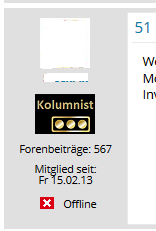
PIC1 is a Moderator with two “special Ranks”, the “Kolumnist” and the “Vice Admiral” Special Rank.

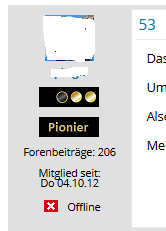
PIC2 ia a normal Member with a “post-counted Standard-Rank” and the “Pionier” Special Rank.

You can see my two problems:

(1) The sequence of the special ranks is “random”, I do not know how to influence them. Neither here in the Display left of every post, nor in den Rank-Overview of the Ranks-Plugin. This is bad, as obviously the “Vice Admiral” (=Moderator) should be first

(2) When combining a standard rank and a special rank as in PIC2, there is an empty line in between. Thats fine. But when displaying two special ranks together as in PIC1, there is none in between. I need this to be in Sync, ideally multiple special ranks have a seperation line too.

How can I achieve this?

Again, I believe this behaviour is a result oft a mix between authorization rights as Mod/Admin and the display of the ranks. An explanation of the concept behind and how to change it, would be great. Also I dont understand, why you a handle a “normal” rank and a “special” rank differently on display. Both are ranks, one is counted and one is assigned, but still they are both ranks that can&should be able to be combined?!

What I need is to keep the authorization rights (Admin/Mod) and the display of *what* rank I display & *where* completly seperate.

Pic-1-2.pngPic-2-2.png

YS Yellow Swordfish
Yellow Swordfish
Member

I think I am suffering with a bit of overload here with all the rank questions – not my favourite subject as you might guess! (I think we offer too many options!)

So I want to break this down into smaller chunks as I try and work out what you are referring to!

So first up – the difference between desktop and mobile. Because of space limitations, the mobile template uses a different, single function with optional display characteristics. Sadly – this function has not been documented yet in our codex and we are without out codex page author at the moment so it might take a while. The single function is sp_PostIndexUserBadges().

If you want the mobile display to be exactly the same as the desktop display I would suggest you just copy the three functions from the desktop into the mobile template and remove the current, single version – then you will get the same result.

Does that make sense?

YS Yellow Swordfish
Yellow Swordfish
Member

I am pretty sure it has to do with the special admin/mod status, but I do not understand why you conceptionally mix the display of the “number of posts rank” with the display of special ranks and with the status as mod/admin? All three seem totally different ballgames to me.

I don’t really quite understand what you are asking for here. Those users defined as SP Admins are not parsed through the standard ranking.

Can you explain in more detail what you are having a problem with and what it is you are asking for?

YS Yellow Swordfish
Yellow Swordfish
Member

Sorry – what is – or where is shown – this ‘Vice Admiral’ special rank? I don’t see it?

As to order – we can almost certainly change this but I believe special ranks are displayed in the order in which they were applied to a user. But I will check on that. (The problem with changing the ordering in code is that it would effect all users including any that are happy with what they have set up!)

Also – just for the record – I don’t think authorisations have anything to do with the display, sequence  etc. I believe most users want to keep standard and special rankings as separate entities.

But – where is this Vice Admiral ranking so I understand what I am looking at here…?

HA Hari
Hari
Member

The Vice Admiral is the “three stars with frame around”. You obviously never viewed Star Trek TNG. 😉

OK Reset.

I try to make things as easy as possible and refrain from asking conceptual questions that get to complicated. Just asking one step after another, with a concret answer to each question please. Maybe we can sort this out this way.

Preperation:

First, I mention again, that my questions are based on the changes made in the “Reboot Child Theme” in “spTopicViewDesktop” lines 136-141 as described above in post 15.

Second, you need to understand, that I am trying to display multiple ranks for a user in the posts. So for example a combination of 1 “normal rank” plus 2 “special ranks”.

Now the questions:

(1) If the user is a Moderator or Admin, the “normal rank” is still not shown, when a special rank exists. Even with above change. The Codechange works for “normal” users but not for Mods/Admin. Why is this? How can I change this?

(2) When a user has two or more special ranks, the sequence in that they are shown seems random. Why? Where is this handled in the code? How can I define the sequence? This “random display” applies in the post as well as in the “ranks overview list” coming with the “ranks plugin”.

(3) When I show the “normal rank” plus a “special rank” a Space is in between. Thats fine. Thats the case in PIC2 above. But when I show “two special ranks” in Desktop Mode, they are both shown together with NO Space between. This is what is shown in PIC1. Funny enough in Mobile Mode, the Space is there, even between two “special ranks”. Why? Where can I add a Space between two “special ranks” in Desktop Mode?

Lets start with this precise 3 questions

Thanks  

PS: Sorry pls delete the duplicate post above, that was unintentional. I just changed some Typos in the second version and obiously created a new version instead of updating. Sorry

YS Yellow Swordfish
Yellow Swordfish
Member

I more or less did answer questions 1 and 2 but I will expand.

  1. Admins and Moderators are not parsed for standard/normal post-quantity based rankings. Whether they should be or not  is perhaps a debate worth having, but they never have been and – to be fair – we have never been asked to change this. And option might be the best way to allow for this. 
    If you want to see the code that compiles these standard rankings then you need to look for the function sp_get_user_forum_rank() in the code file /sp-api/sp-api-common-display.php.
  2. As I said above, I believe this is sorted by the order in which the special ranking was awarded but I would need to set up some test data to be sure of that. I can do this but probably not today.
  3. Are these exclusively badge/images you are using? I will look up the code after I post this and let you know…

And as it happens I was a big an of TNG. Still am actually.

YS Yellow Swordfish
Yellow Swordfish
Member

Actually just looking at the code for item 2 I can see that this is the correct answer. 

As to question 3 I am puzzled by this. Both desktop and mobile just use a line break characters between special ranks so they should display the same.. .that i WILL need to test – unless you can link me to one of your forum pages where I can see this difference and I can interrogate the source…

HA Hari
Hari
Member

And as it happens I was a big an of TNG. Still am actually.

I expected you were/are (just profiling age/programming – most IT guys of our age are ;))

Therefore I expected you immediately see the Star Trek Badges. That in PIC2 is Lieutenant Commander (Data) 😉

OK.

Your answer to 1) leaves me puzzled. Because normal rankings *are* excluded for Mods/Admins. At least in my installation an the code mentioned above is the only change. What do I miss? I expect some sideeffect from the fact, that admins/mods are  not part of a usergroup but I have no idea why?

2) I will try by deleting a special rank and setting it up again. That should influence the sequence if your assumption is right. If that is the case, I could live with it, I just need to know how to influence the sequence. I come back to you in a few minutes after a test.

3) Yes this are my own badges uploaded, but this is irrelevant, they are simple .png of 60×20 size and are “full black” with no border around. The question is: Why is there NO Space between two “special ranks” in Desktop mode?

PS: Saw your post from 2 minutes ago after I wrote. Come back with a test soon

HA Hari
Hari
Member

I tested. Unfortunately I cant confirm 2.

Setup:

I have two special ranks. lets call them

SR1 (the “Kolumnist Badge”)

SR2 (the “Vice Admiral Bade”)

Before the test I had shown the sequence SR1-SR2 as in PIC1

As you didnt say whether this sorted ascending or descending by assignment I tested both directions

Testcase1: I deleted SR2. I checked in the Live-Forum that the Badge is gone. Check. Than I readded SR2 and assigned the users. No Change.

Testcase2: I deleted SR1. I checked in the Live-Forum that the Badge is gone. Check. Than I readded SR1 and assigned the users. No Change too!

Now what? There must be some influence from somewhere, maybe it is the same as in question 1) because again, the users involved are moderators.

??

HA Hari
Hari
Member

I did some additional testing and all points to the fact, that there *is* some strange sorting sequence applied to the “special ranks” in general.

Because all the display sequences I can see for a special user, are based on the general sequence off all special ranks shown in the overview via the “Ranks Plugin”. This general sorting seems to “trump” everything.

But I see no option to influence this random sorting. Deleting and re-adding a special rank doesnt change anything so it doesnt seem to be time of assignment

So I can rephrase my question 2) very precisely:

What is the sorting sequence of special ranks in the “ranks overview” of the Ranks Plugin?

And how – with what actions – can I influence this sorting?

That is question 2)

Questions 1 and 3 are open too. Because again, if the user is an admin or mod, the “normal rank” is *not* displayed, even after the changes you proposed. And still there is no Space between two special ranks.

PS:

Just a hint/idea. Maybe the problem is not the code to display them, I checked this code and I agree this doesnt show something pointing in parsing Mods/Admin. Maybe the problem is somewhere else, that Mods/Admins are not *counted for ranks* anyway (in another part of  the code) so there is nothing to display for them in the normal ranks? Just a hunch…

YS Yellow Swordfish
Yellow Swordfish
Member

i Think I have said it twice now. Admins and Moderators are NOT subject to normal/standard post counted ranks. See point 1 in post 22 above.

As to your question 3 –  you have not answered my question in my post #23 above asking if I can have a link.

As to question 2 – as I said earlier I can do some testing but sadly will not be today – especially as it is now getting very late in the evening. But my belief is that you are incorrect although I am prepared to find differently.

HA Hari
Hari
Member

i Think I have said it twice now. Admins and Moderators are NOT subject to normal/standard post counted ranks.

1)

Well thats (mis-)communication. I have read it twice too. And I have it read it in reference to my question interpreting it as “Admins and Moderators are not *spared* for … rankings”

Now the coin has dropped. My fault. I understand. There is no count, so there is nothing to be displayed. Period. Understood.

2)

I did some additional testing and found a circumvention.

I added by random new “special ranks” using numbers and characters at will and looked where they show up in the global special ranks list shown via “ranks plugin”. I could find no real system, most new special ranks were added at the end as you suggested, but some above. No clue why.

But when I grabbed one of the new special ranks listed at the end and have later overwritten the name and added the members, the rank stays at the bottom (end). After I deleted all the spam-ranks and just stayed with those I wanted, the sequence stayed as it should be.

So this way – by generating “place holders” and filling in the details after choosing the righly sorted  placeholders – I could circumvent the sequence problem. It would still be good to understand how this is handled, but it doesnt have high priority anymore.

3)

My forum is completly behind a S2Members wall and can only be accessed via a special login (payed content). If you think it will help to have access and see for yourself, please provide me with your E-Mail. I will sent then temporary login details and will point you to some threads to see for yourself.

But you can be assured, I have no code changes myself. I am on the latest SP Version with the only individual changes in the new child theme I pointed to above.

I repeat:

Multiple “special ranks” are shown without space under each other in desktop mode. In Mobile Mode the space is there. The combination of a “normal rank” plus a “special rank” has a space between.

What I need is the space between two ranks in *every* scenario, independent of type of rank or type of access (desktop/mobile).

Thanks

YS Yellow Swordfish
Yellow Swordfish
Member

It would be useful to take a look so I can see the source code and styling being applied.
All you need to do is send me a PM here with login credentials. But please do include a link to a page that shows both variants so i can compare them
thanks