
Support Forum

Strange bug – one forum details not showing

MY My
My
Member

I just installed the latest update and the details for one of my forums are coming up blank. You’ll see it about half way down the “Discussion of the TV series” section.

http://castletv.net/forums

If you click on one of the sub forms you can navigate back to the parent forum and everything seems fine, the info & link just aren’t showing on the main page.

28 Answers

New Answer

YS Yellow Swordfish
Yellow Swordfish
Member

So 5.4.1? From which version please? Was it 5.4.0?

YS Yellow Swordfish
Yellow Swordfish
Member

It would be useful to know the above but if it was from 5.4.0 then the update included no database changes so I don’t see that side of things having any bearing.

This is so obscure and unique I am not even sure what questions to ask!

I guess the first one has to be – when you go to the forum admin > Manage Groups and Forums then does this main forum show up properly in that list?

Is the forum slug supposed to be ‘behind-the-scenes-1‘? If you edit the forum record and then update it does it suddenly bounce back? If yes – by the way – it would be nice to know what, if any, changes you made to the record.

MY My
My
Member

Umm.. I’m not sure which version I updated from, I tend to run the updates as soon as I know they’re there though. I do recall a database update but I’m not sure if that was from updating this site or another one, it’s a bit fuzzy.

The slug should not be -1 but now you’ve pointed that out I’ve just noticed the parent forum (Behind the Scenes)  is showing in the main list but the sub forums aren’t connected to it, they’re connected to that “blank” forum instead. There is definitely only one “Behind the Scenes” when I look at the forums via the back end.

MY My
My
Member

BTW.. I really hate that I can’t set my own slugs for forums now! It completely messes up external links when I change a forum name (which I do sometimes for forums for episode discussion, I include the name of the episode once we know it)

YS Yellow Swordfish
Yellow Swordfish
Member

You can now and always have been able to create and subsequently edit the slug for forums.

Can you explain what you mean by ‘… the sub forums aren’t connected to it, they’re connected to that “blank” forum instead.‘?


MY My
My
Member

No, I can’t edit forum slugs it reverts to the default when you save (not just on the Castle site, I noticed it on the other site first)


If you look at castletv.net/forums you’ll see Behind the Scenes as a forum.. two down the list you’ll see the child forums connected to the phantom forum. Behind the scenes shouldn’t be ordered in the list where it is, it SHOULD be where the child forums are. So I’m thinking this is connected to the new way of ordering the forums…?

ETA: I can’t get the forum order page to load.. just get the “spinning” boxes

YS Yellow Swordfish
Yellow Swordfish
Member

Oh my the slug issue is a worry. I will investigate that as a priority.

We have one other user who has said he has had a problem with the new ordering and it is probably significant that both of you have quite a large number of forums. Our belief has been that it is is a resource issue and that the server is either running out of php memory or is timing out on the ajax request. His forum was returning no ajax response suggesting the server was abandoning the call.

So – one question is still should the ‘behind the scenes’ forum slug have a -1 on the end? And the other is – if you go to edit the first subforum under ‘behind the scenes’ is it’s parent set to the correct forum?

MY My
My
Member

No, it should not have -1 on the end (I did state this earlier)

I’m not sure what you mean by the second part. Do you mean in the admin section or the front end? Front end if you go to one of the sub forum and then navigate back to the parent forum from there it’ll take you to the one with -1 (which is the one that shows a couple of places up in the list, not the phantom one)

YS Yellow Swordfish
Yellow Swordfish
Member

Well you should be able to remove the -1 without a problem. if you can’t then it suggest that either there is another forum already with the same name or a blog post/page with the same name.

And when asking about the parent forum of the first subforum I was meaning in the admin (Edit forum)

MY My
My
Member

J can’t rename it, it reverts back.

There’s nothing else title Behind the Scenes, I did a search for “behind the scenes” in topics and there were a few with that in the title but not JUST that so their slugs wont’ be behind-the-scenes and there is definitely no forum with the title other than the one that’s causing the problem.

I can’t access the forum order (as previously stated) because it doesn’t load. There’s nothing in the section where you manage forum titles etc where it says what it’s a sub forum of that I can see.

MY My
My
Member

I renamed the forum to “Behind the Scenes Stuff” so the slug updated to something new, and the problem still exists. The Behind the Scenes Stuff forum is listed in the main forum list (front end) and the phantom one is still there with the forums attached to it, if you go back to the parent forum from one of the sub forums it shows the newly named forum.

Edit: searched the database and found a post with the same name so that explains that… but not the issue I’m having

YS Yellow Swordfish
Yellow Swordfish
Member

As I said – the other possibility is a blog post or page with that name. So if there is a ‘behind the scenes’ post or page outside of the forum that also requires a unique slug and if the forum detects that when a new forum is created it will then put a -1 on the end of the slug.

What I have been asking – or trying to ask! – is for you to go to the admin forum listing – open the first sub-forum under ‘behind the scenes’ in ‘edit forum’ and see which parent forum it is attached to. I understand what you see at the front end. What we need to try and do is look at the data as viewed from the admin forum set-up.

MY My
My
Member

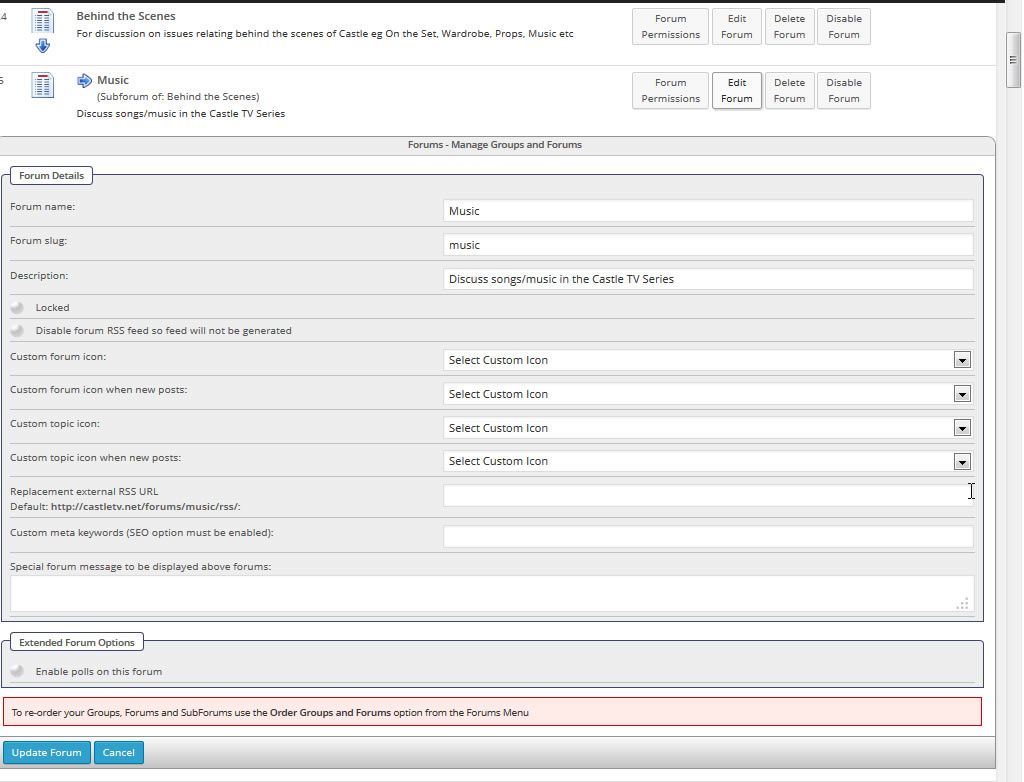
But unless I’m blind it doesn’t show any info in the edit section about what parent forum it’s attached to since you changed the forum order system.

subforum-bug.jpg
YS Yellow Swordfish
Yellow Swordfish
Member

Apologies. You are right of course. I getting mixed up with new and old styles.

Looking at your image though it does look like the relationship between the main forum and at least one sub-forum is intact and understood buy the admin. Which just makes it more strange.

As well as solving this I would very much like to try and get a firm diagnosis on what is wrong. Would it be at all possible for you export a SQL dump of your ‘sfforums’ table (which only holds the top level forum data – no topic, post or user data) so that I can look closely at the relationships to see what has fallen out of whack? It would be a great help if you could and might end  up being the only way we can resolve your own listing.