Support Forum

Template not found after update website.

MA Marcel
Marcel
Member

Hi,

Today I’ve update our WP site, but now there is an issue with the SP theme, the forum is working but all icons are gone and the following message is on the bottom of the forum:

Sorry, but the required template file could not be found or could not be opened.

This can be caused by a missing/corrupt theme or theme file. Please check the Simple:Press Theme List admin panel and make sure a valid theme is selected. Or please check the location of the selected theme on your server and make sure the theme and the required template file exist.

Anything I can do to fix this ?

Best Regards,

Marcel

31 Answers

New Answer

MP Mr Papa
Mr Papa
Member

first, try something real quick… go to forum – integration – page and permalink… and try updating the permalink…

if that doesnt help, please go to forum – themes – theme list and tell us what is selected and displayed?  perhaps just resaving the current theme?

on forum – integration – storage locations, is the theme location valid?

MA Marcel
Marcel
Member

1. forum – integration – page and permalink updated > no change

2. theme selected and displayed – Reboot theme, change the overlay to other colors is working, but icons not visible

3. forum – integration – themes – theme list > location found and write OK

MP Mr Papa
Mr Papa
Member

what version of simple press did you upgrade from?  and also updated all the themes and plugins?

do you have link to site so we can check?

are permissions on site for web user to access themes?

are you using combined css cache?  if so, might try clearing on forum – toolbox – housekeeping…

MA Marcel
Marcel
Member

I did not update SP, but the WP theme ( Jupiter ) and since then the icons disappear.

Please register yourself on the website and I’ll give you admin rights

http://www.ktmco.nl/wp/wp-login.php

YS Yellow Swordfish
Yellow Swordfish
Member

I am not so sure registering is going to help. And as a matter of policy we do not register on users sites but ask them to supply login credentials. But it is too early for that.

I think you need to make the simple check on whether an image/folder is actually there or not. Can you take a look for:

../wp/wp-content/sp-resources/forum-themes/reboot/images/darkpack/sp_controlclose.png

Let’ determine whether it is there or not. If in doubt on how to check for this your hosting control panel will normally have some kind of file explorer…

YS Yellow Swordfish
Yellow Swordfish
Member

So the images exist, with the right permissions (for the individual files at least) yet the server is returning a 404 when it tries to retrieve them. 

I must admit I have absolutely no idea why a WordPress theme update should have any effect on an unconnected folder full of images so I suspect something else is at play here. Perhaps a change to your .htaccess file for example.

I think your best course of action is to contact your hosting support to see if they can find why valid files are not being found. This surely has to be some sort of server based issue. 

But I would very much like to hear what they say…

MA Marcel
Marcel
Member

The .htaccess file did not change in months, the hosting company cannot help with issues within a website itself.

I’m pretty sure it’s a conflict within the WP theme or one of the plugins and SP, once I’ve found the issue I’ll let you know.

MP Mr Papa
Mr Papa
Member

I would still like to see the site… is it hidden behind a paywall?

MA Marcel
Marcel
Member

Hi,

No it isn’t, but the forum is only access only for our volunteers behind a hidden button and only displayed for those who logon, the direct link is http://ktmco.nl/wp/forum/

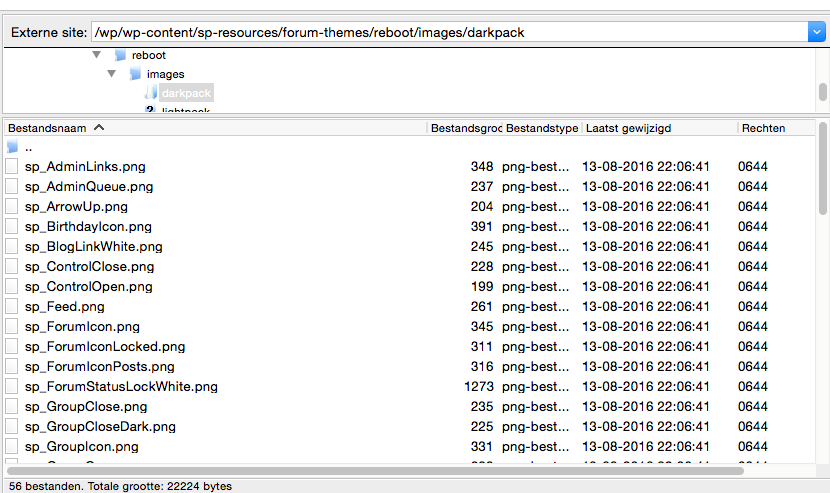
I’m a bit further with investigation, the call to the images are wrong. 

The forum calls for example:

http://ktmco.nl/wp/wp-content/sp-resources/forum-themes/reboot/images/darkpack/sp_controlclose.png

But the actual image on the server is:

http://ktmco.nl/wp/wp-content/sp-resources/forum-themes/reboot/images/darkpack/sp_ControlClose.png

See attachment

Schermafbeelding-2016-09-07-om-08.11.21.png

A simple solution would be to rename all the icons in the way the forum will call them, but with future updates we will most likely have the same issue again.

Regards,

Marcel

YS Yellow Swordfish
Yellow Swordfish
Member

Not us. There has to be a reason the names are being altered so something is changing them when SP issues the request. And actually – I would be kind of angry about that – especially if it turns out to be something to do with the WP theme

I would ask them if it is possible they have some sort of filter affecting the http request and setting the names into lower case.

MA Marcel
Marcel
Member

Actually, I’m not angry, but very disappointed…., it took me hours to find out were the issue could be and there is no real solution for now except to rollback the theme update.

YS Yellow Swordfish
Yellow Swordfish
Member

why not at least ask the theme authors?

MA Marcel
Marcel
Member

Done that and they told me nothing has changed into the coding…

I’m not a coder so for me it make no sense, I’m just a linux specialist and installing and updating is not  a problem at all, but as soon there is something wrong in the code itself I’m lost. 

I have managed a lot of vBulletin forums and the reason for S:P in combination with WP was a perfect solution for our foundation, one login for everything, very easy for our users.