Support Forum

Time stamp, subscribed threads and notifications on all posts…

RP Robert Provencher
Robert Provencher
Member

3 questions…..

1- Our time stamp is way off. Is there a way to adjust/fix?

2- Post subscriptions, also seems way off…..

3- Is there a way to get a notice when anyone creates a post or adds a reply (say, to my email?)


I created a quick video:

https://vimeo.com/144496461

16 Answers

New Answer

IK Ike
Ike
Member

Hey Robert,

1. What timezone is your forum running? Did you update it as we were discussing in this thread?

2. Not sure I completely understand your question on the relevance of the number displayed in the button to the popup so will just clarify – t’s actually showing how many are unread, not how many topics you are subscribed to. It also displays in forum order rather than chronologically.. I do remember discussion at one point somewhere about making it possible to change the sort order to date / time rather than forum but can’t seem to find out. @yellow-swordfish or @mr-papa should be able to help out with that one.

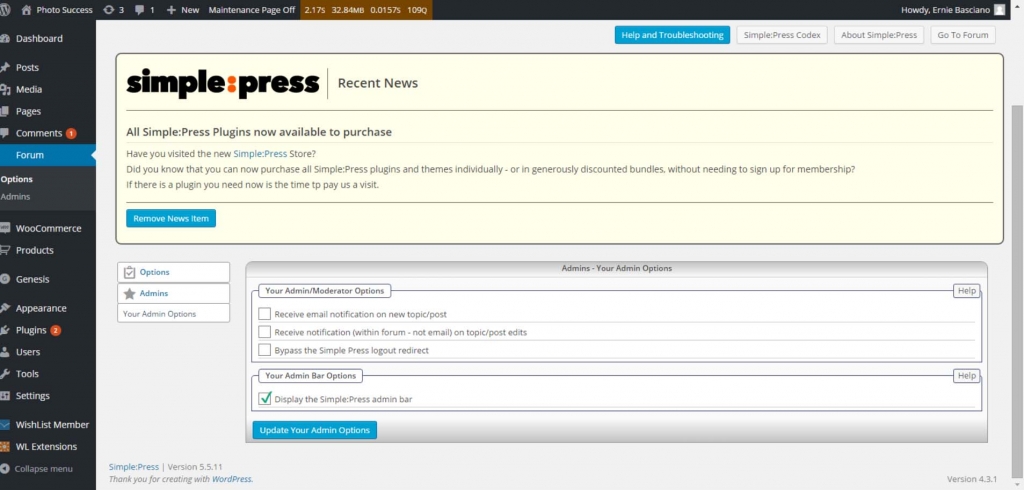
3. For email, see Forum > Admins > Your Admin Options. You can then set ‘Receive email notification on new topic/post’.

Also it might be worth checking out what is in my opinion the most useful plugin we offer – the Admin Bar. It adds a section above the header of your forum where you will be able to view every unread post within the admin bar itself and reply, mark read, deal with spam etc..

RP Robert Provencher
Robert Provencher
Member

thanks…

the thing about the subscriptions I find odd is the number indicating…??? new replies?

When I click on it, it shows all my subs, so, which ones have the new replies….isn’t obvious…confused.


I bought that admin bar plugin just now. thanks.


Yes, I did fix the time zone….but many members are getting all sorts of weird times still…unless I didn’t set it right?

 i checked just now, and I did set it as UTC-5 originally, but noticed I could set it by a city in my zone (missed that), so I changed to that setting. Maybe, maybe not?? worth a try…

I’ll keep you posted if the time thing keeps coming up.

MP Mr Papa
Mr Papa
Member

yes, in fact you must set to city for proper action… utc-x is not a valid timestamp though wp added it for some backwards compat – a mistake imho…

yes, showing the subscriptions will show you them… but the unread count is just that – number of subscribed topics with unread posts…

RP Robert Provencher
Robert Provencher
Member

the timezone thing is fixed….

BUT, on the:

“Forum > Admins > Your Admin Options. You can then set ‘Receive email notification on new topic/post’….’

solution.

All my mods are annoyed now, since they’re getting emails for every post. Is there a way that only I will receive notice? as admin and mod? thoughts????

YS Yellow Swordfish
Yellow Swordfish
Member

This is a sort of odd admin panel in that any admin or moderator can visit it to fill in their own, personal preferred options. So method one would be to inform them all to visit the admin and do this.

Alternatively – YOU could visit and turn OFF your email preference and then tick the option to apply the settings to all moderators. Update the oanel and then turn the email preference just for you and save.

RP Robert Provencher
Robert Provencher
Member

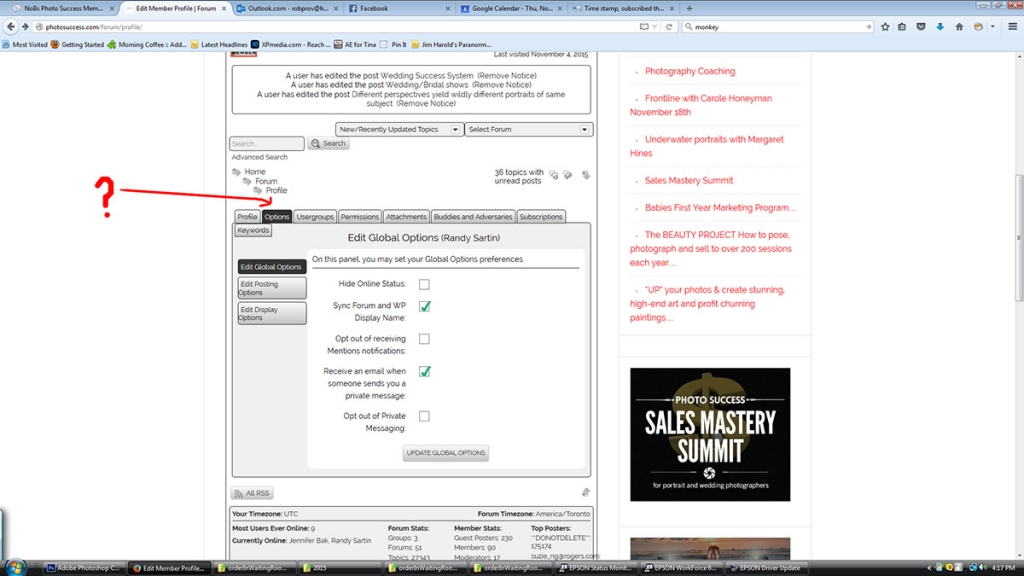
confused…by:

inform them all to visit the admin


i log in as a mod and see no where is there an ‘admin’..or am i missing something?

R

IK Ike
Ike
Member

If you log in to the admin panel as a moderator / SP mod, you should still have a ‘Forum’ option there but it will only contain personal admin options so others can set up their own desired preferences.

IK Ike
Ike
Member

Sorry no, the admin panel / WordPress dashboard.

RP Robert Provencher
Robert Provencher
Member

I still have no idea how to get there….or how to fix this….my mods are pleading with me…two of the main mods are posting:


“This is really annoying  and making me crazy.  I hate to be a pain in the ass, but you have to figure out what changed.  I wasn’t receiving anything before.”


“Agreed – please make this a priority over everything else. It’s driving me insane.”


i gotta fix this…..


help??? anything? im lost…

YS Yellow Swordfish
Yellow Swordfish
Member

The ‘admin’ side of any WP site is where you write blog posts, change your settings and, in the case of SP, set up forums etc. At the beginning if this thread you asked to receive email notifications on new posts and we directed you to – Forum > Admins > Your Admin Options – (Post #2 – point 3) which, I believe, you visited and changed.

METHOD 1: Ask each of your moderators to visit the SAME PLACE in the site admin. It will probably be the only forum menu item they can access and they can change their own notification settings as they want them. This is what that panel is for.

METHOD 2: As described in post #6 – YOU go to the panel. Turn OFF email notifications and turn ON ‘Grant all moderators the same option settings as above’. This will turn off email notifications for everyone. Update the panel. Then turn back ON email notifications only and update. This will turn them back on for only you.

There is popup-help available on each section of all admin panels that explain things in a little more detail.

RP Robert Provencher
Robert Provencher
Member

Mr Papa said

yes, showing the subscriptions will show you them… but the unread count is just that – number of subscribed topics with unread posts…

ok, maybe it’s me….

I see a red “3” in the Subscribed button. I click on the Subscribed button to see those three, and the entire list of subscribed threads shows up, with no indication as to where those 3 are or which ones??

Am I missing something?

thanks

R

IK Ike
Ike
Member

Bit confused myself here..

You should see a ‘New: X’ count on the button on the right hand side of a topic with new posts, where you have an ‘End x’ button on topics with no new posts.

You also get an ‘End x’ button if you view a subscribed topic with new posts directly instead of using the subscribed popup.. Maybe it’s possible that you’ve read the topic but somehow the count hasn’t reset.

It does seem like it could be related to your post timestamp issue in that respect, but if that’s resolved then could you double check next time you have a subscribed topic with new posts to see if you have this indicator now and if the count is working properly?

RP Robert Provencher
Robert Provencher
Member

speaking of the email notifications the mods are getting, I do not see the option to have my email settings applied to the mods?

here is what I see

simplepress.jpg