Support Forum

Toolset loads at bottom of page in mobile view.

JI jim
jim
Member

I’m not certain if this is specifically related to the Reboot theme, but for the record that is what we’re using so feel free to move this topic to Themes forum if applicable…

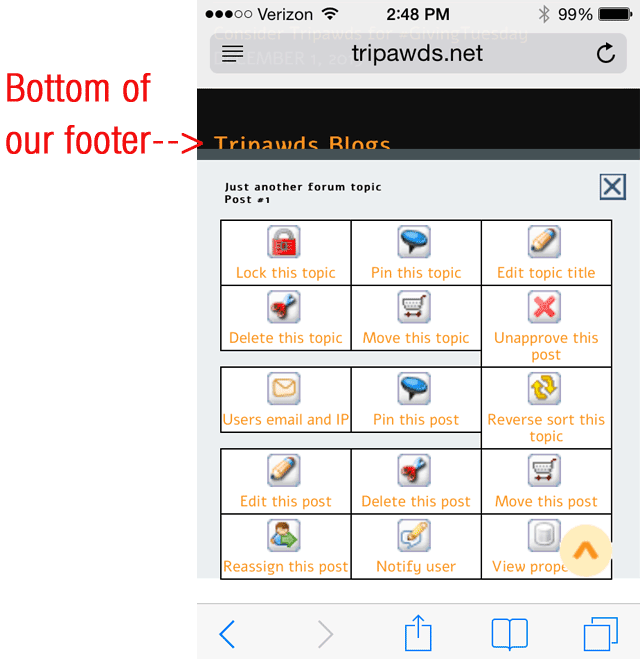
I briefly thought the toolset was not loading when viewing our forums on my mobile device (iPhone 4s). Then I scrolled all the way down to the bottom of the page, and noticed it popped up there, way down in the footer. This is not a major issue, but a bit of a pain to scroll all the way down. And it may require some explanation to our moderators.

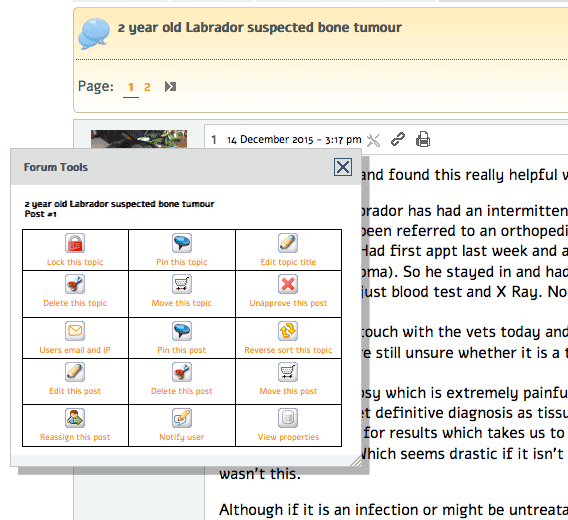
In Desktop view, the Toolset pops up right in the middle of the screen, near where the icon is clicked. This is much more convenient, and expected. See attached screenshots for clarification.

I noticed this in the recent change log, so thought it might be worth reporting.

5207 [ Simple:Press ] Increase tooltips z-index

Can anyone else replicate this?sptools-mobile.png
sptools-desktop.png

16 Answers

New Answer

YS Yellow Swordfish
Yellow Swordfish
Member

The display looks good but it should be fixed at the bottom of the phones viewport as opposed to the bottom of the page. In fact, while the layout has changed (it used to be in a long list) the actual panel display has remained the same.

First check – have you reset the JS cache in the toolbox > housekeeping? It should do this for you but it is worth a manual try.

To be honest I do not know how you actually empty the browser cache on a phone but that might also be responsible.

Finally – perhaps you could try with a different browser – especially if you are trying this with Safari! have a go with Chrome or Mercury perhaps.

And of still wrong after that we need to look for a script issue  bit let;s cover that separately.

JI jim
jim
Member

Yellow Swordfish said
The display looks good but it should be fixed at the bottom of the phones viewport as opposed to the bottom of the page.

That’s what I expected.

First check – have you reset the JS cache

Yes.

…empty the browser cache on a phone but that might also be responsible.

That did not make a difference.

FYI: It’s done from the iPhone Settings -> Sarari -> Clear History

Finally – perhaps you could try with a different browser – especially if you are trying this with Safari!

May try that later, yes I noticed this in Safari on iPhone 4s. This is an older phone so that may be an issue too.

And of still wrong after that we need to look for a script issue  bit let;s cover that separately.

This is clearly no major issue. I was basically posting to see if others can replicate the issue. I’ll help troubleshoot further if there are other reports, or it becomes an issue with our moderators.

Thanks again!

YS Yellow Swordfish
Yellow Swordfish
Member

The age of the phone shouldn’t be a factor unless the software on it is way our of date. But Safari can be real messy… I am not sure that clearing history will clear the cache of images, scripts etc., – at least that wouldn’t be my own expectation.

So – it works fine on my iPhone using this website. Mione is a 6 and I don’t touch Safari if i can help it but I will try it later just in case….

MP Mr Papa
Mr Papa
Member

looks good as well in firefox and chrome on android phones…  I did previously test with safari on my iphone 6 and it was working… but dont have it with me on this cruise…

JI jim
jim
Member

For the record, Chrome also loaded the toolset at the very bottom of the page.

Perhaps this is due to our iPhone 4s, or something specific to our site. Please don’t spend any more time worrying about this unless it is also an issue for others. And I’ll chime back in if it ever becomes a serious issue for us.

Just thought I would post to see if others could replicate the issue. Apparently not.

JI jim
jim
Member

Yellow Swordfish said
I don’t touch Safari if i can help it…

Nor I. But for the record, it is the only browser I’ve been able to use successfully in these forums recently. smile 

YS Yellow Swordfish
Yellow Swordfish
Member

for the record, it is the only browser I’ve been able to use successfully in these forums recently

You mean our forums here? Really? That’s a bit worrying…  We test here with all the main browsers and the only one I know of that does have the odd issue is Safari. I even test now and then with Maxthon, Seamonkey etc., on desktop and Mercury on mobile.

There are a few things I do not like about Google Chrome  but on both my Mac and iPhone I have to sauy it runs SO flawlessly on this site. Pretty damn fast as well.

EK Edward Koon
Edward Koon
Member

Mornin Y’all.. cool

I use Waterfox (W7 64bit Firefox variant) and Google Chrome most of the time. Chrome is faster but Waterfox is more developer friendly.

I also use Opera browser but mostly to tune into accuradio and stay minimized. Never any problems viewing SimplePress either here or on my sites. Another browser i sometimes use is the TOR Firefox package but mostly for checking spammy backlinks before making a decision whether to disavow in webmaster tools. 

Mobile wise i use a Samsung GS5 Android with mostly Google Chrome or sometimes Firefox mobile browser. Never any problems with either viewing or replying to messages here.

Merry Christmas Everyone.. wink

YS Yellow Swordfish
Yellow Swordfish
Member

I have to agree that Firefox remains my favourite browser for actual code development and testing, But recent updates have been very flaky under OSX and you have to reboot the machine every few days to clear out all the FF stuff it leaves lying around in memory. But for pure speed and performance, Chrome wins for me every time.

I would like to see Firefox available for IOS however.

EK Edward Koon
Edward Koon
Member

Is there a cleaner available for your OS? I use CCleaner on my W7 box religiously to wipe cache and tracking cookies. All the hitchhikers we pick up browsing the web is alarming. 

YS Yellow Swordfish
Yellow Swordfish
Member

I keep it as clean as i can! FF has always been a little flaky under OSX but it has become pretty bad of late and gets to the point where you can’t shut it down at all.

JI jim
jim
Member

Yellow Swordfish said
You mean our forums here? Really? That’s a bit worrying…  

 Sorry, just trying Chrome now. Looks like Firefox is the only browser giving me issues—editor not loading, quoting not working, stylesheets and images not all loading…

The issue could very well be network related since cell service is pretty weak at our current location and we haven’t been on our satellite in a few days.

IK Ike
Ike
Member

I take it it’s the latest version of FF for Android?

Got to say I haven’t had any trouble on my Android in both the stock internet app and Chrome. Just went to download Firefox for Android but embarrassingly I’m out of space!.. Just transferring some stuff off and then will try it out.

IK Ike
Ike
Member

Installed, all works fine here I’m afraid although it seemed quite slow in FF for Android!..