Support Forum

Unable to Submit Post!!! – ERROR: "Unable to Save, No post content entered"

BI BigFeat
BigFeat
Member

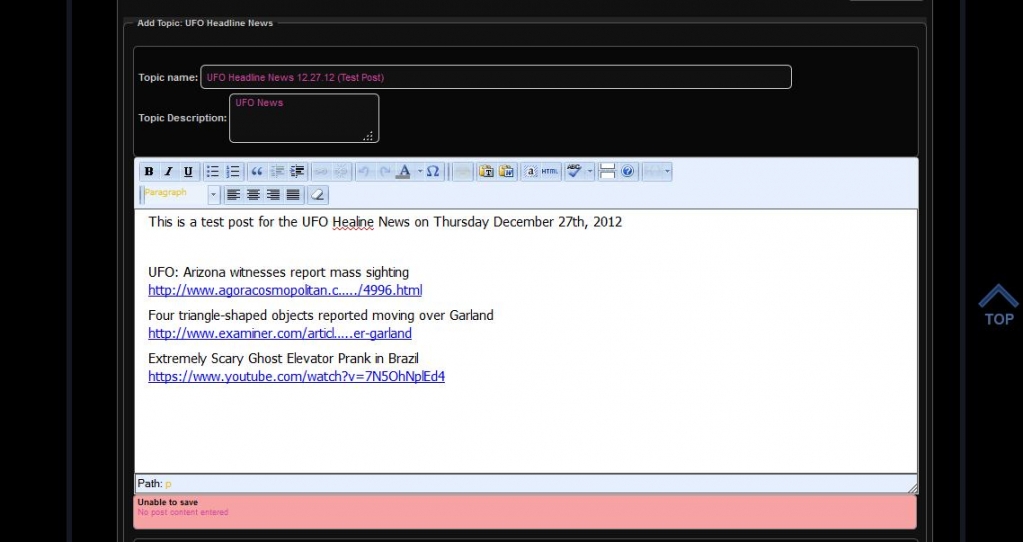
Major issue noticed today. We are unable to submit any post in any threads on the forum. The error states that it can not save post because there is no content in the area. However, as illustrated in the attached screenprint, there is clearly content in the content area. Please help ASAP!!!!


Website: http://inceptionradionetwork.com/forumForum-Error.jpg

38 Answers

New Answer

MP Mr Papa
Mr Papa
Member

so the obvious question is:  what has changed?  wp update, plugins/themes update? server config (ie mod_security) etc

BI BigFeat
BigFeat
Member

Mr Papa said
so the obvious question is:  what has changed?  wp update, plugins/themes update? server config (ie mod_security) etc

There was one simple press update a few weeks ago.


YS Yellow Swordfish
Yellow Swordfish
Member

And nothing else? No other Wp plugin updates? WP itself? Theme changes? New plugins?

BI BigFeat
BigFeat
Member

We’ve made WP theme change a few weeks ago and installed a few plugins since.  However, nothing so recent in the past 72hrs. 

Nonetheless, I still don’t understand what this error means. My site is functioning properly with the exception of not being able to post anything in this forum.  The error itself is a strange one and I can’t make any sense of it. 

MP Mr Papa
Mr Papa
Member

This is quite odd… we had one some time ago similar…and if I remember correctly it was mod_security getting in the way or a server config that was affecting POST/GET items…

have you checked the server error log? also, did you give us a link (sorry, replying via email) to site? and can guests post? would like to monitor the ajax responses to see what is going on…

BI BigFeat
BigFeat
Member

http://inceptionradionetwork.com/forum

I can give you access to the WP dashboard to look at it. I’ll send a PM

MP Mr Papa
Mr Papa
Member

wow. you have a lot of js errors on pages…  not sure how this ever worked frankly…

your theme is violating wp api and standards… its loading its own version of jquery instead of the version that comes with wp…  and its an old version of at that…

<script type=’text/javascript’ src=’http://inceptionradionetwork.com/wp-content/themes/wp007/js/jquery-1.6.4.min.js?ver=1.6.4′></script>

did you fix this at some point and maybe upgrade the theme and lose your changes???  Seem to have gone through this before…

MP Mr Papa
Mr Papa
Member

should add that I can’t even get to a topic to post with all the js errors.. :(

BI BigFeat
BigFeat
Member

This is a custom theme that is designed to load the website on a mobile phone with a specialized format.  We spent quite a bit of time getting the website to load fine and respond in mobile view.  This theme is only a few weeks old and not an off the shelf theme.   I’m not aware of this js error at all. Never got any indication from anything else in the site that would indicate that.

MP Mr Papa
Mr Papa
Member

you would have to have the browser console open to see the js errors…

since you have upgraded to WP 3.5, you might be seeing more issues now as WP changed its version of jquery and themes/plugins of course follow suit… but this theme is not using the wp version of jquery – its using its own, older version – a recipe for problems…

like the WP core developers and most plugin authors, the question is why???  themes and plugins really need to just use the version of jquery that comes with wp… there is no way for plugin authors to test and ensure compatibility with a theme’s own version of jquery…  the wordpress.org folks have even gone as far as to say they are rejecting any themes and plugins that do that from the repository…

if you can find in your wp theme where its loading its own version vice the standard wp version, we can help correct it…

MP Mr Papa
Mr Papa
Member

its in theme-scripts.php of the theme where its going wrong…  If you like, I can try to correct it – or at least keep it from doing that on the forum page…

BI BigFeat
BigFeat
Member

I’ve contacted the developer of the theme to get his reaction on this.  But I’m still curious to know whether this error message is something that you guys have run across before.  Could deactivating and reactivating the plugin him?  It would be an extreme stretch for us to have to change themes just to get this Forum plugin to work as it once did before. Especially that this is the only plugin out of the 15+ we have that appears to have an issue.

MP Mr Papa
Mr Papa
Member

how many of your other themes use jquery? if a plugin does not use jquery, it wont care… and even if it does, depends on what jquery it uses…

i need to get back to your site and see try to debug the js, but problem is with the number of js errors hitting the forum page right now, its stopping the js processing – hence the errors/conflicts…

BI BigFeat
BigFeat
Member

I’m not sure I have the knowledge to properly answer your question.  This current theme is a premium customized theme just for us, which we can’t afford to just drop unfortunately.

I do hope you can find some resolution to this.  This forum plugin has been really helpful and we’d really hate to lose it at this point.  We did test it through the customization process of this current theme and we didn’t notice any issues until recently. Just not sure what could have thrown a monkey wrench into the mix.

What I can try to do on my end is to clone the site, place it in a temporary domain, then to dissect the existing plugins and see if any of them are possibly causing a conflict with it, rather then the WP theme.

UPDATE: DEACTIVATING EVERY SINGLE PLUGIN EXCEPT SIMPLE-PRESS DID NOT RESOLVE THE ISSUE. I GOT THE EXACT SAME ERROR MESSAGE.